Configuring VLANs
Defining VLAN Properties
ESW 500 Series Switches Administration Guide 210
7
• Authentication — Indicates whether unauthorized users can access a Guest
VLAN. The possible field values are:
-
Enable
— Enables unauthorized users to use the Guest VLAN.
-
Disable
— Disables unauthorized users from using the Guest VLAN.
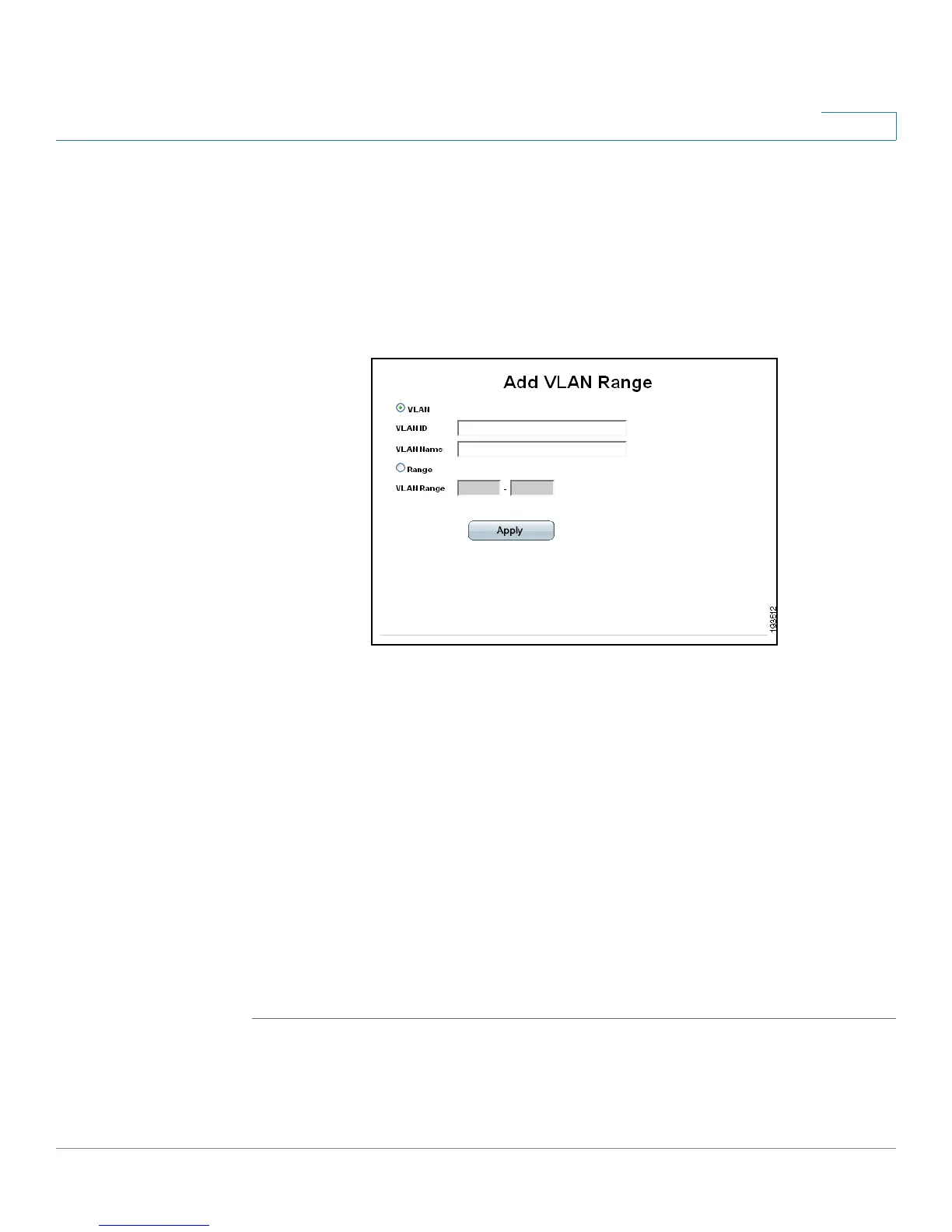
STEP 2 Click the Add button. The
Add VLAN Range Page
opens:
Add VLAN Range Page
The
Add VLAN Range Page
allows network administrators to define and configure
new VLANs, and contains the following fields:
• VLAN — Specifies that a specific VLAN is to be defined. The possible field
values are:
- VLAN ID — Defines the VLAN ID.
- VLAN Name — Defines a VLAN name.
• Range — Specifies that a range of VLAN IDs is to be defined. The possible
field values are:
- VLAN Range — Defines the lower and upper bounds of the VLAN range.
STEP 3 Define the relevant fields.
STEP 4 Click Apply. The VLAN Settings are defined, and the device is updated.





 To Next Page