Configuring Spanning Tree
Defining Multiple Spanning Tree
ESW 500 Series Switches Administration Guide 284
11
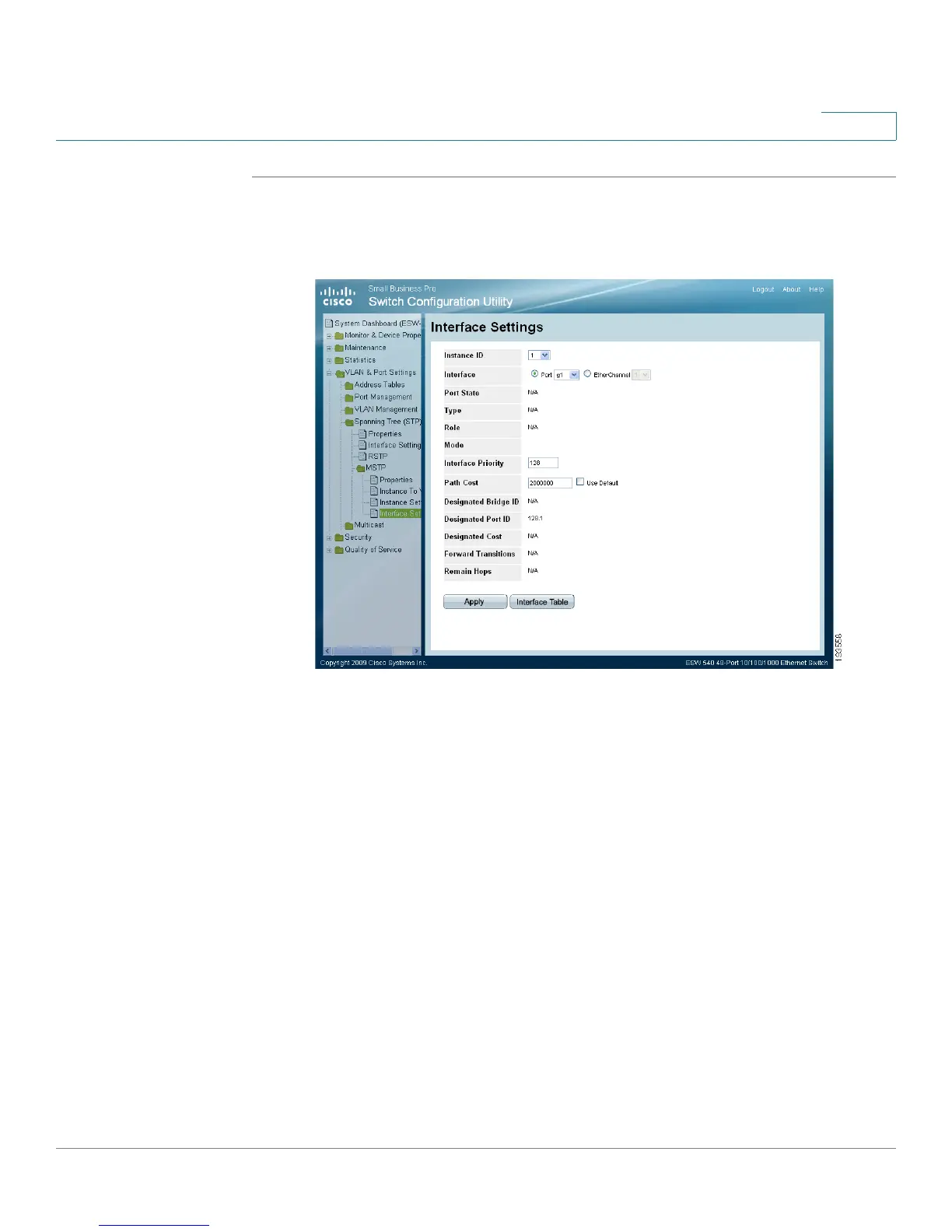
STEP 1 Click VLAN & Port Settings > Spanning Tree (STP) > MSTP > Interface Settings.
The
MSTP Interface Settings Page
opens:
MSTP Interface Settings Page
The
MSTP Interface Settings Page
contains the following fields:
• Instance ID — Lists the MSTP instances configured on the device. Possible
field range is 1-15.
• Interface — Displays the interface for which the MSTP settings are displayed.
The possible field values are:
-
Port
— Specifies the port for which the MSTP settings are displayed.
-
EtherChannel
— Specifies the EtherChannel for which the MSTP
settings are displayed.
• Port State — Indicates the MSTP status on the specific port. The possible field
values are:
-
Disabled
— Indicates that STP is currently disabled on the port.
-
Blocking
— Indicates that the port is currently blocked and cannot
forward traffic or learn MAC addresses.






 To Next Page