Configuring SNMP
Configuring SNMP Security
ESW 500 Series Switches Administration Guide 334
13
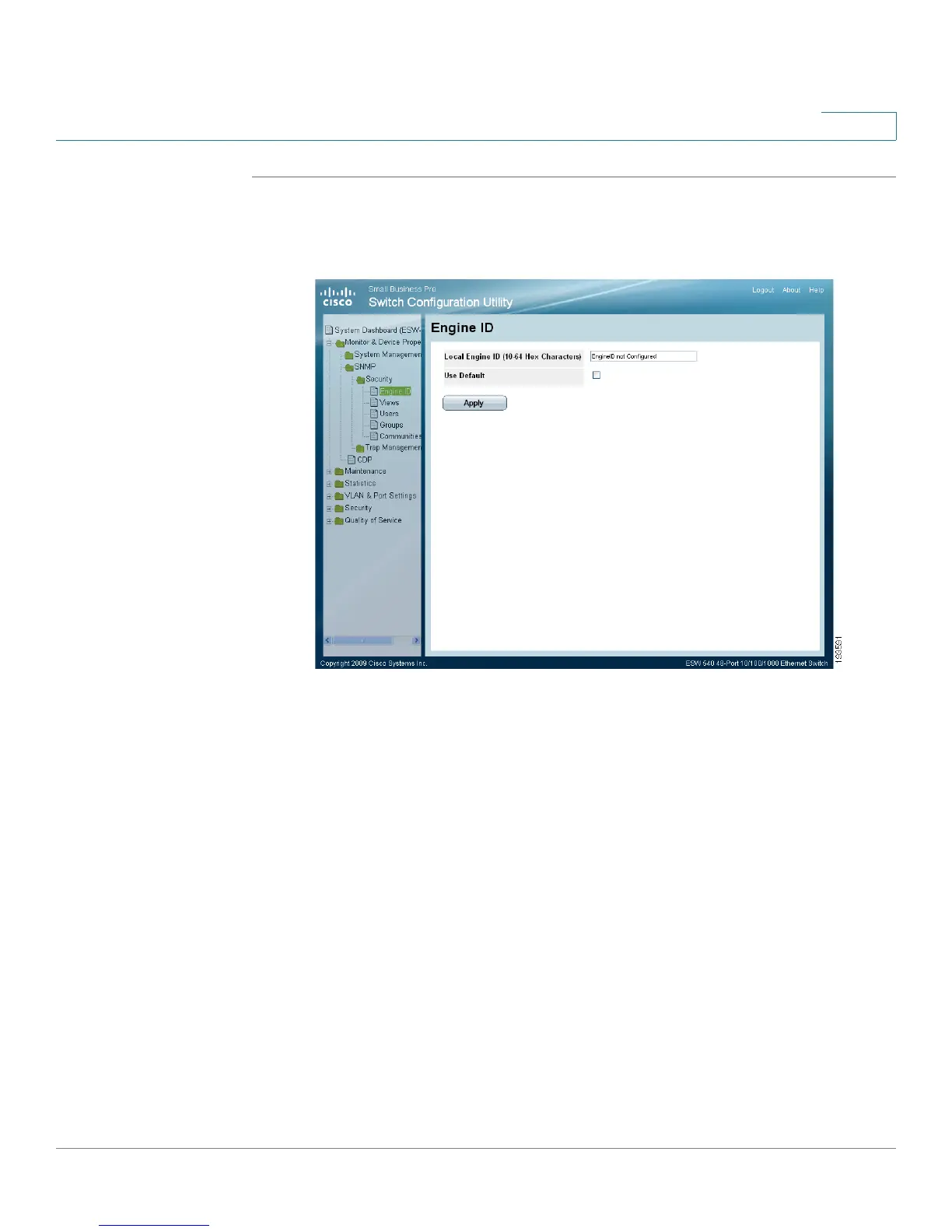
STEP 1 Click Monitor & Device Properties > SNMP > Security > Engine ID. The
Engine ID
Page
opens:
Engine ID Page
The
Engine ID Page
contains the following fields.
• Local Engine ID (10-64 Hex characters) — Indicates the local device engine ID.
The field value is a hexadecimal string. Each byte in hexadecimal character
strings consists of two hexadecimal digits.
• Use Default — Uses the device generated Engine ID. The default Engine ID is
based on the device MAC address and is defined per standard as:
•
First 4 octets
— first bit = 1, the rest is IANA Enterprise number.
•
Fifth octet
— Set to 3 to indicate the MAC address that follows.
•
Last 6 octets
— MAC address of the device.
The possible values are:
-
Checked
— Use the default Engine ID.
-
Unchecked
— Use a user-defined Engine ID.
STEP 2 Define the relevant fields.



 To Next Page