Viewing Statistics
Configuring RMON History
ESW 500 Series Switches Administration Guide 401
17
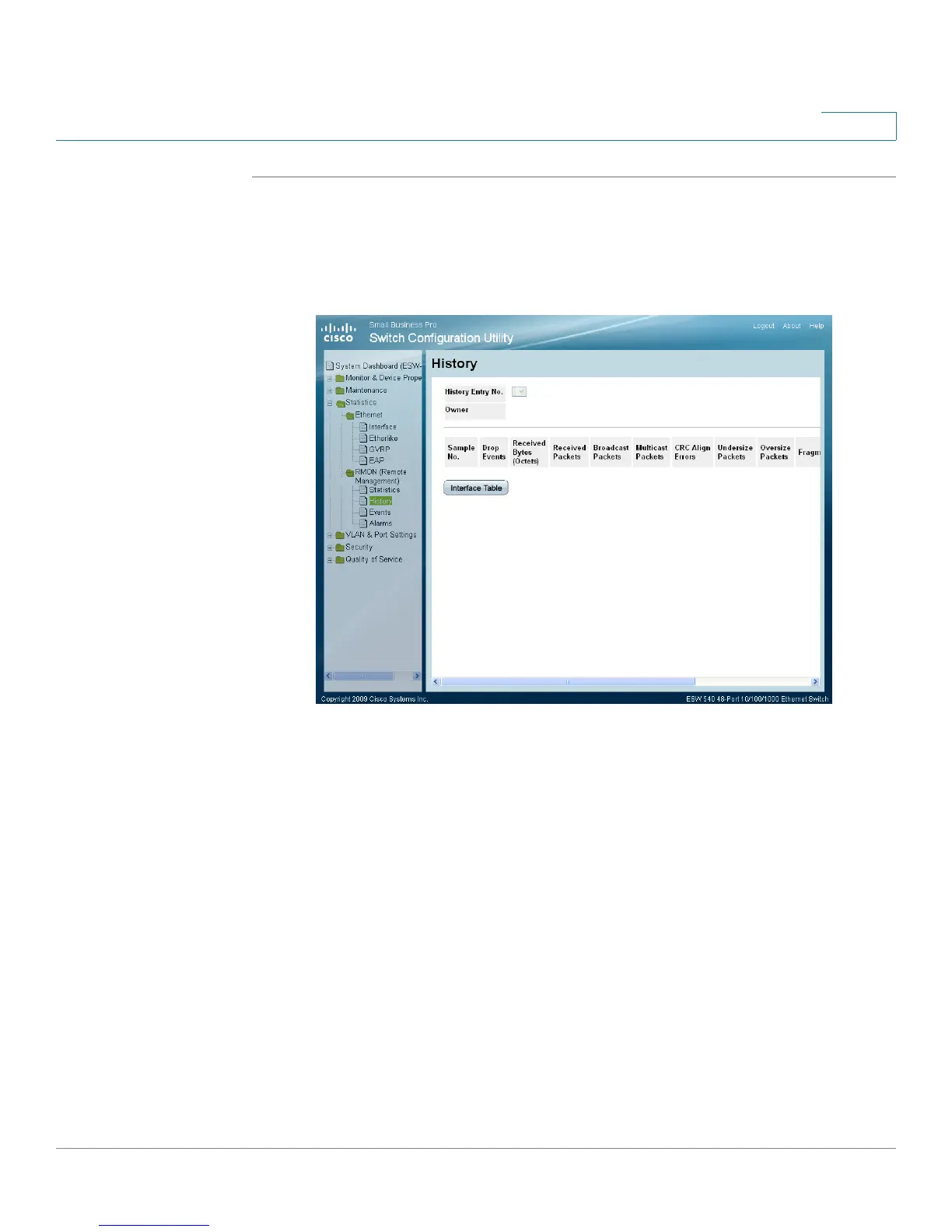
STEP 1 Click Statistics > RMON (Remote Management) > History. The
RMON History
Control Page
opens:
STEP 2 Click the History Table button. The
RMON History Table Page
opens:
RMON History Table Page
The
RMON History Table Page
contains the following fields:
• History Entry No. — Displays the entry number for the History Control Table
page.
• Owner — Displays the RMON station or user that requested the RMON
information. The field range is 0-20 characters.
• Sample No. — Indicates the sample number from which the statistics were
taken.
• Drop Events — Indicates the number of dropped packets due to lack of
network resources during the sampling interval. This may not represent the
exact number dropped packets, but rather the number of times dropped
packets were detected.
• Received Bytes (Octets) — Displays the number of octets received on the
interface since the page was last refreshed. This number includes bad packets
and FCS octets, but excludes framing bits.





 To Next Page