Managing Device Information
Managing Cisco Discovery Protocol
ESW 500 Series Switches Administration Guide 56
2
• Port ID — Indicates the neighboring device’s port from which the CDP packet
was sent.
STEP 2 Select Enable in the
CDP Status
field to enable the Cisco Discovery Protocol on
the device.
STEP 3 Define a VLAN ID to be advertised by the device in the
Voice VLAN
field.
STEP 4 Click Apply. CDP is enabled, and the device is updated.
To view additional neighboring device CDP information:
STEP 1 Click Monitor & Device Properties > CDP. The
CDP Page
opens.
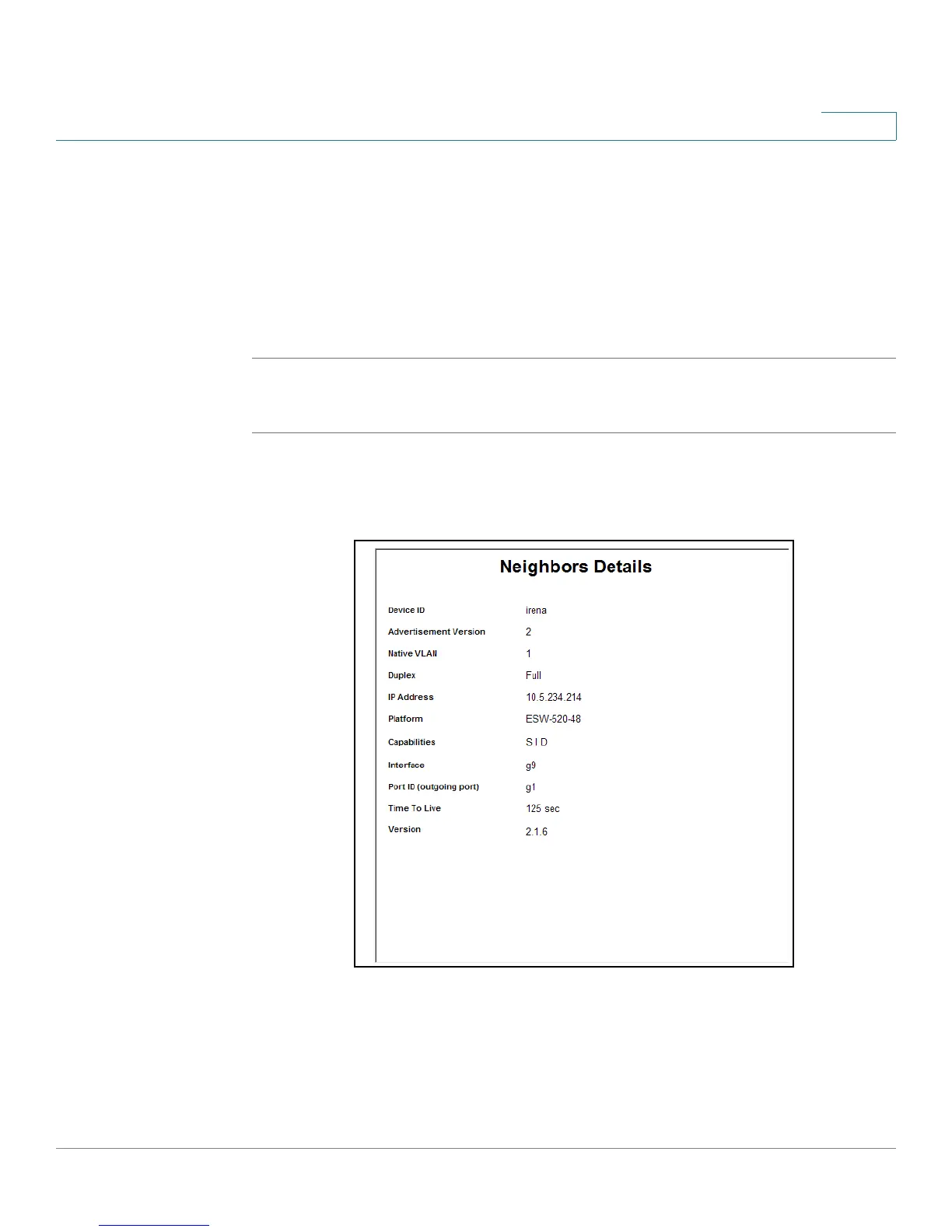
STEP 2 Click Details. The
CDP Neighbors Details Page
opens:
CDP Neighbors Details Page
In addition to the fields in the
CDP Page
, the
CDP Neighbors Details Page
contains
the following additional fields:
• Device ID — Indicates the name of the neighbor device and either the MAC
address or the serial number of the device.





 To Next Page