Control Station Duetto Program interface
2.0/0518 103
Function menu: Ethernet
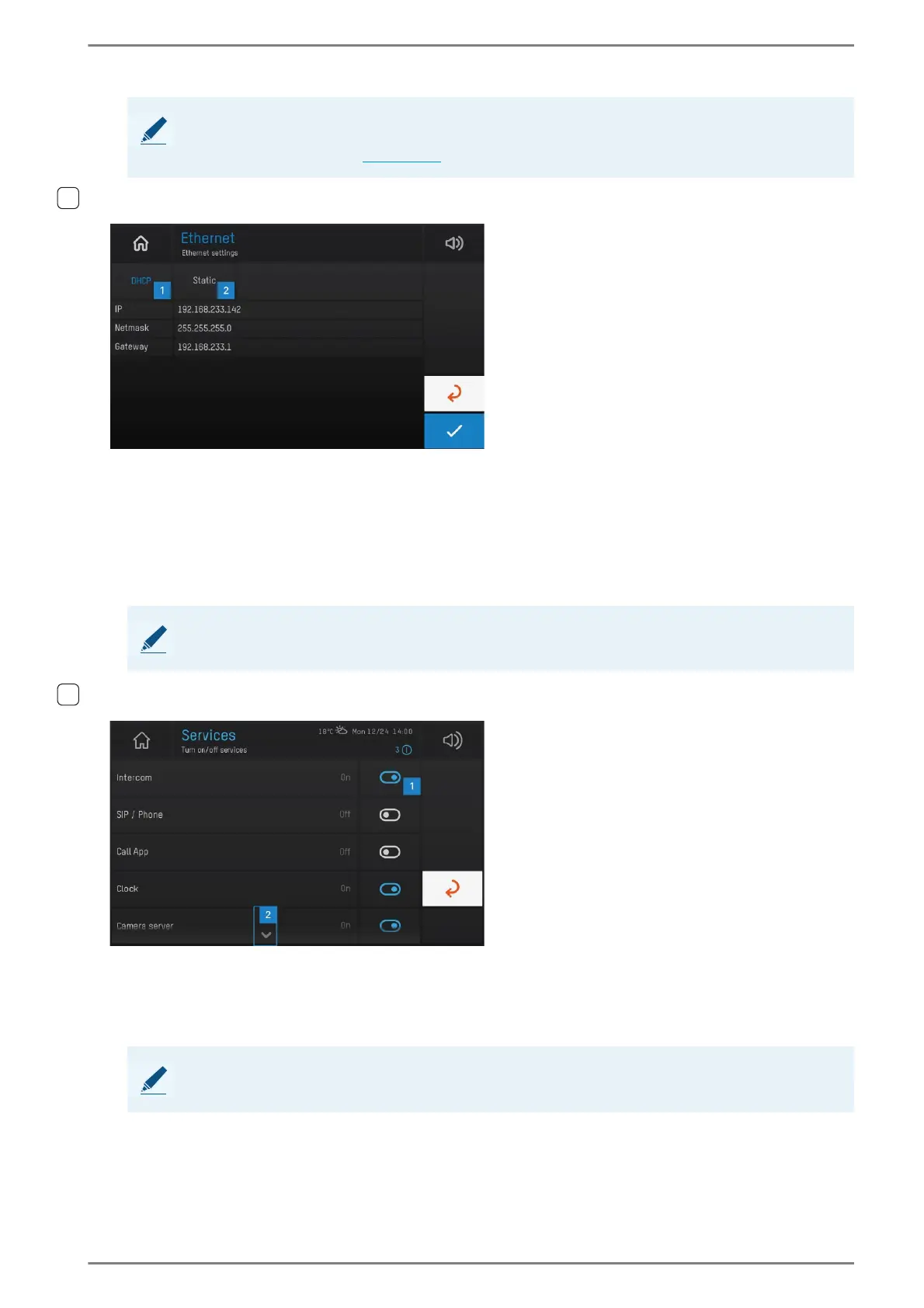
User interface “Ethernet”
In this menu, the IP settings of the Ethernet network connection of the DUETTO device can be config-
ured. The following settings are available:
DHCP 1: Tap on this button in order to request the IP address and network parameters by a DHCP
server. The fields IP, Netmask and Gateway are deactivated.
Static 2: Tap on this button in order to configure the IP address and network parameters manually.
The fields IP, Netmask and Gateway are activated.
Function menu: Services
User interface “Services”
In this menu, services of the DUETTO device can be switched on/off. Carry out the following configu-
ration steps:
Tap on the button 1 in order to switch the respective service on/off.
Tap on the arrow button 2 to scroll down or up in the list.
NOTE: Changes will not be applied in the web interface
Changes made in this menu are applied automatically in the Wi-Fi configuration on the DUETTO device,
but not in the web interface (see page 29).
NOTE: Selected button is highlighted in blue
The button of the activated mode is highlighted in blue.
NOTE: Buttons of activated services are highlighted in blue
The buttons of activated services are highlighted in blue.



 To Next Page