Control Station Duetto Web interface – Customization
2.0/0518 65
Elements individualisation
The position and size of any element in full screen mode (see page 59) and keypad sidebar (see
page 61) can be configured in the virtual screen preview. The grey configuration field in the virtual
screen preview serves as a 1:1 view of the displayed screen of the DUETTO device. All elements added
to the virtual screen preview will be displayed in the same way (position and size) on the display (ex
-
cept colour design and resolution). You can define elements via the input of absolute values of size and
position, or directly with the cursor.
DUETTO > CUSTOMIZATION > SCREENS
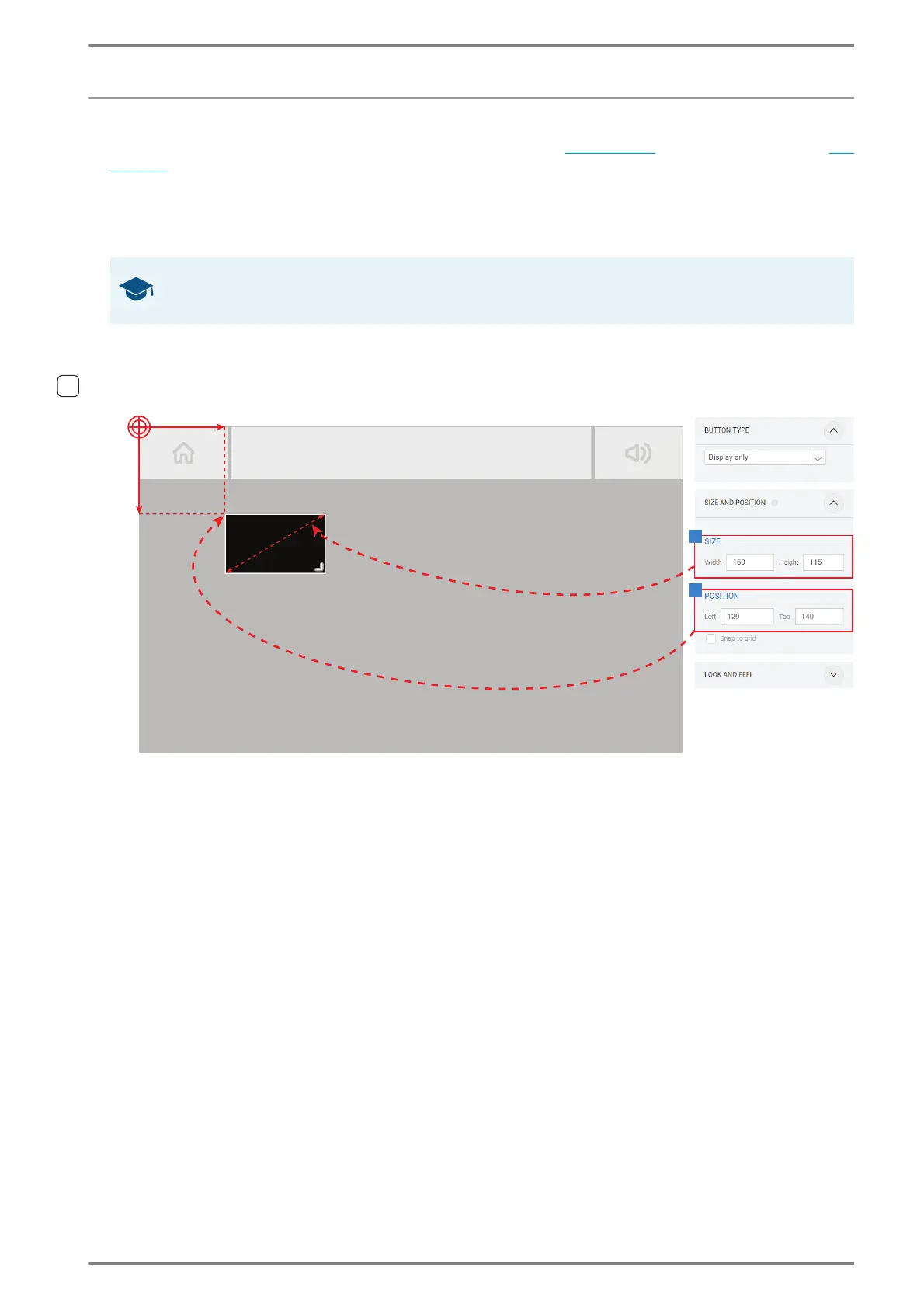
Adjust size and position via absolute values in the coordinate system
Size 1:
Select the desired element in the virtual screen preview.
In the field Size and Position, enter the desired width and height of the element in pixels.
➥ Click on the button Save to save the settings.
Position 2:
Select the desired element in the virtual screen preview
In the field Size and Position, enter the desired coordinates of the element in pixels.
Snap to grid: Activate this checkbox to align elements automatically along the virtual grid.
➥ Click on the button Save to save the settings.
GOOD TO KNOW: Aspect ratio of screens
The screens of the DUETTO device have a aspect ratio of 800 px to 401 px.
140 px
115 px
129 px
196 px
1
2



 To Next Page