Control Station Duetto Appendix – Examples
2.0/0518 139
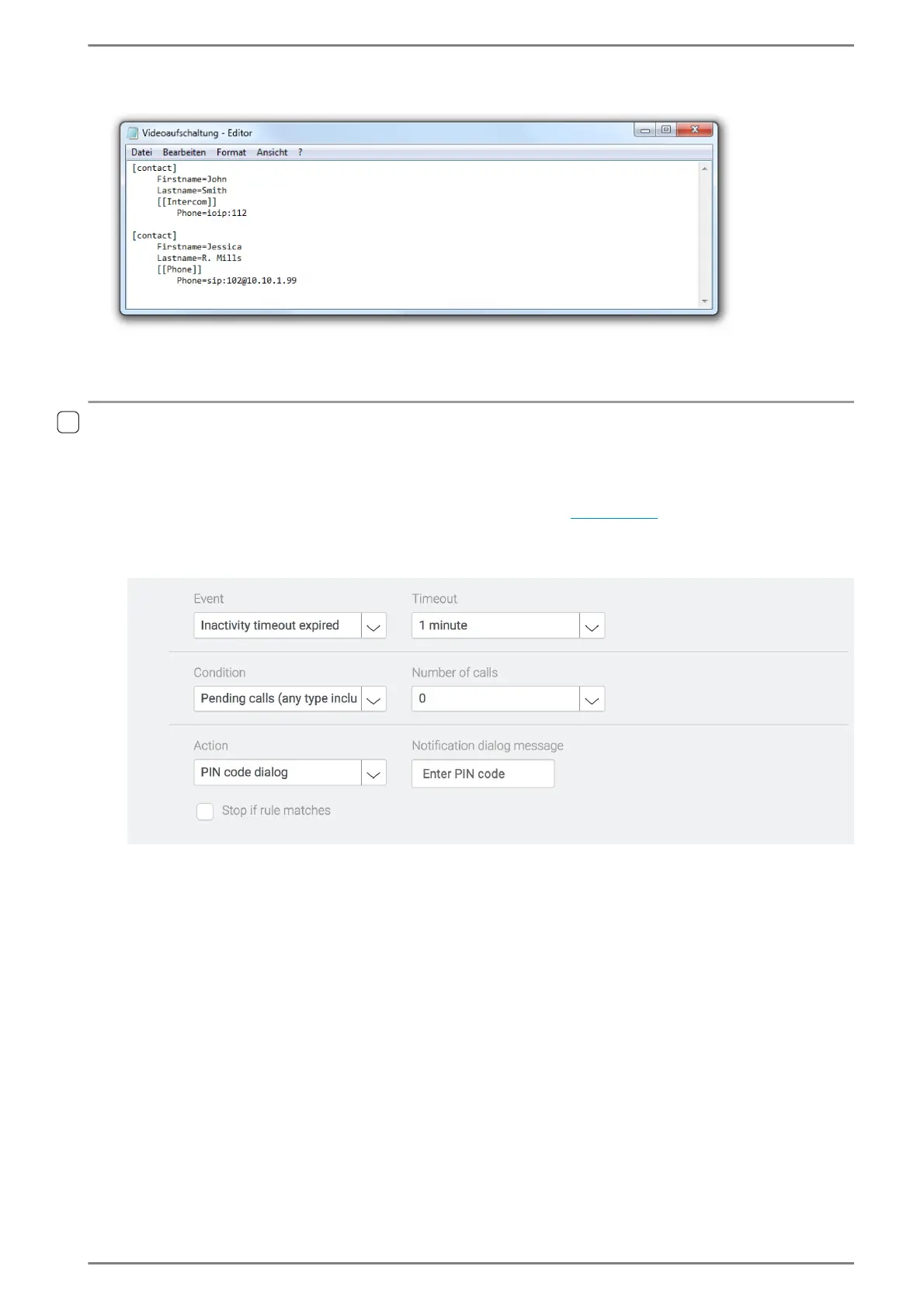
Example: Import of an Intercom and SIP subscriber
Import of several contacts in address book
Configuration of a PIN code dialogue
After the inactivity timeout has expired, the display of the DUETTO device is locked by a PIN code
dialogue. This dialogue can either be suppressed by entering a PIN code or by incoming SIP or
Intercom calls. After a SIP or Intercom call has been cancelled, the display is locked automatically.
Go to: Customization > Logic Rules in the web interface (see page 66).
Add a new logic rule. With this logic rule, the display is locked when the inactivity timeout has
expired and no pending calls are active. See the following screenshot:
Display is locked when the inactivity timeout has expired
Select the event “Inactivity timeout”.
In the drop-down list Timeout, select the desired timeout after which the display of the DUETTO
device will be locked at inactivity.
Select the condition “Pending calls”.
In the drop-down list Number of calls, select the entry “0”. Thus, the selected event is only fulfilled
if no pending calls are active.
Select the action “PIN code dialog”.
(Optional) In the field Notification dialogue message, enter the text that is shown in the PIN code
dialogue on the display.



 To Next Page