Program interface Control Station Duetto
108 2.0/0518
Enter the call number of the desired subscriber via the keypad and tap on the blue button 2 in order
to initiate a call to the entered number. It is also possible to select a desired contact in the address
book in the left keypad sidebar
3, which has a quickdial function.
Tap on the white button 4 to cancel the transfer process and return to the previous view. The call
will be neither transferred nor rejected.
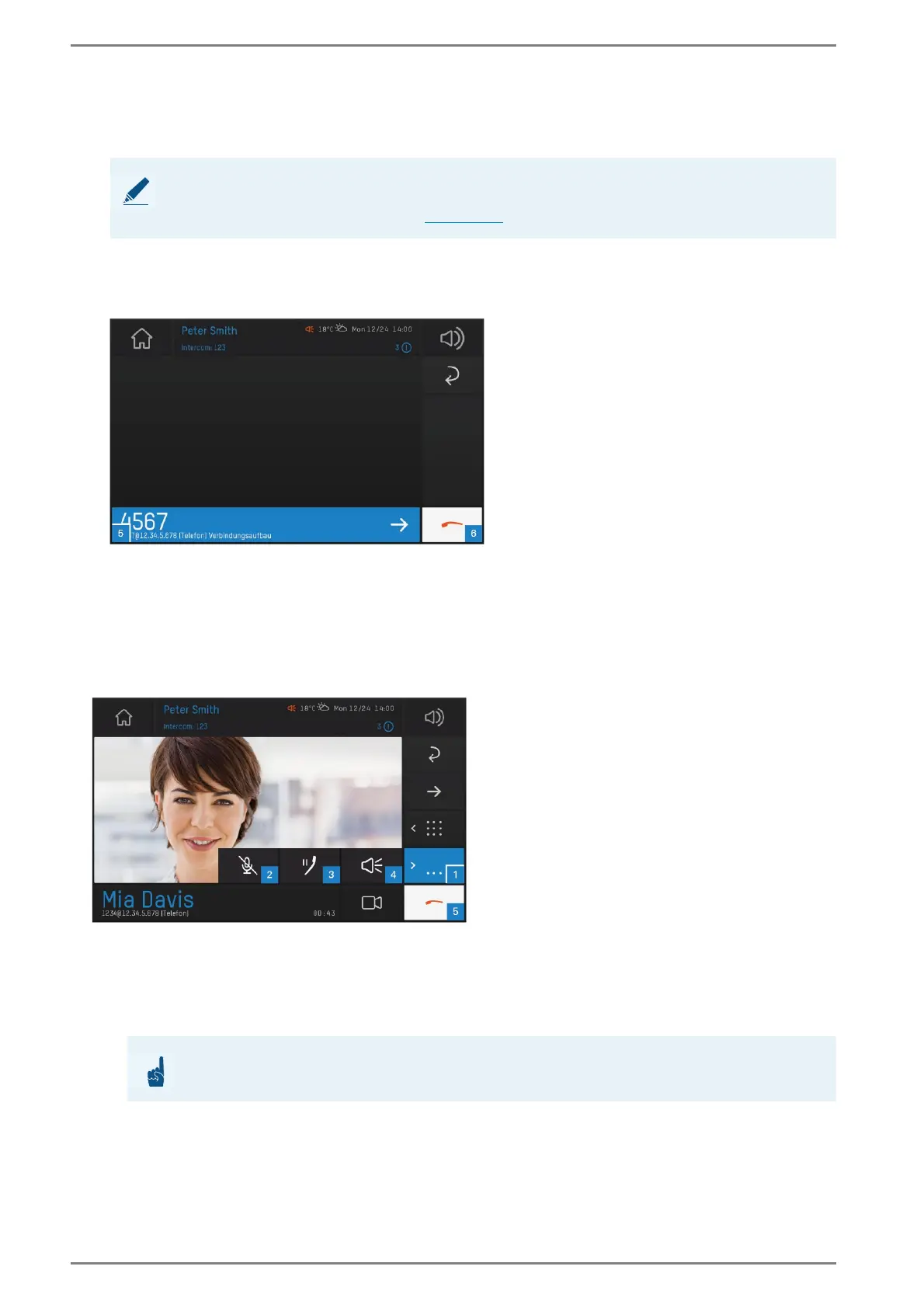
The following screen appears:
User interface “initiate call”
Tap on the blue bar 5 to transfer the call. If the transferred call will be rejected by the subscriber or
the subscriber is not available, the call will automatically be retransferred to the DUETTO device.
Tap on the white button 6 to cancel the transfer process.
Active calls
User interface “active calls”
Tap on the list button 1 to indicate the settings for an active call. The following settings are available:
Microphone mute 2: Tap on the crossed-out microphone button to mute the own micro-
phone during a call. The symbol turns red. By tapping the microphone button a second time,
the microphone will be activated.
NOTE: Activate quickdial
In order to use quickdial in the keypad, activate the toggle button Quickdial-Status in the web interface
at Customization, tab: Call Interface (see page 53).
ATTENTION: Mute function only for single calls
The mute function is only valid for the currently active call!



 To Next Page