Program interface Control Station Duetto
132 2.0/0518
Filtering calls
Active call requests and input messages at the DUETTO control desks can be filtered by call types (see
page 129) and states. Hidden call requests and input messages will not be accepted or cancelled and
can be displayed at any time.
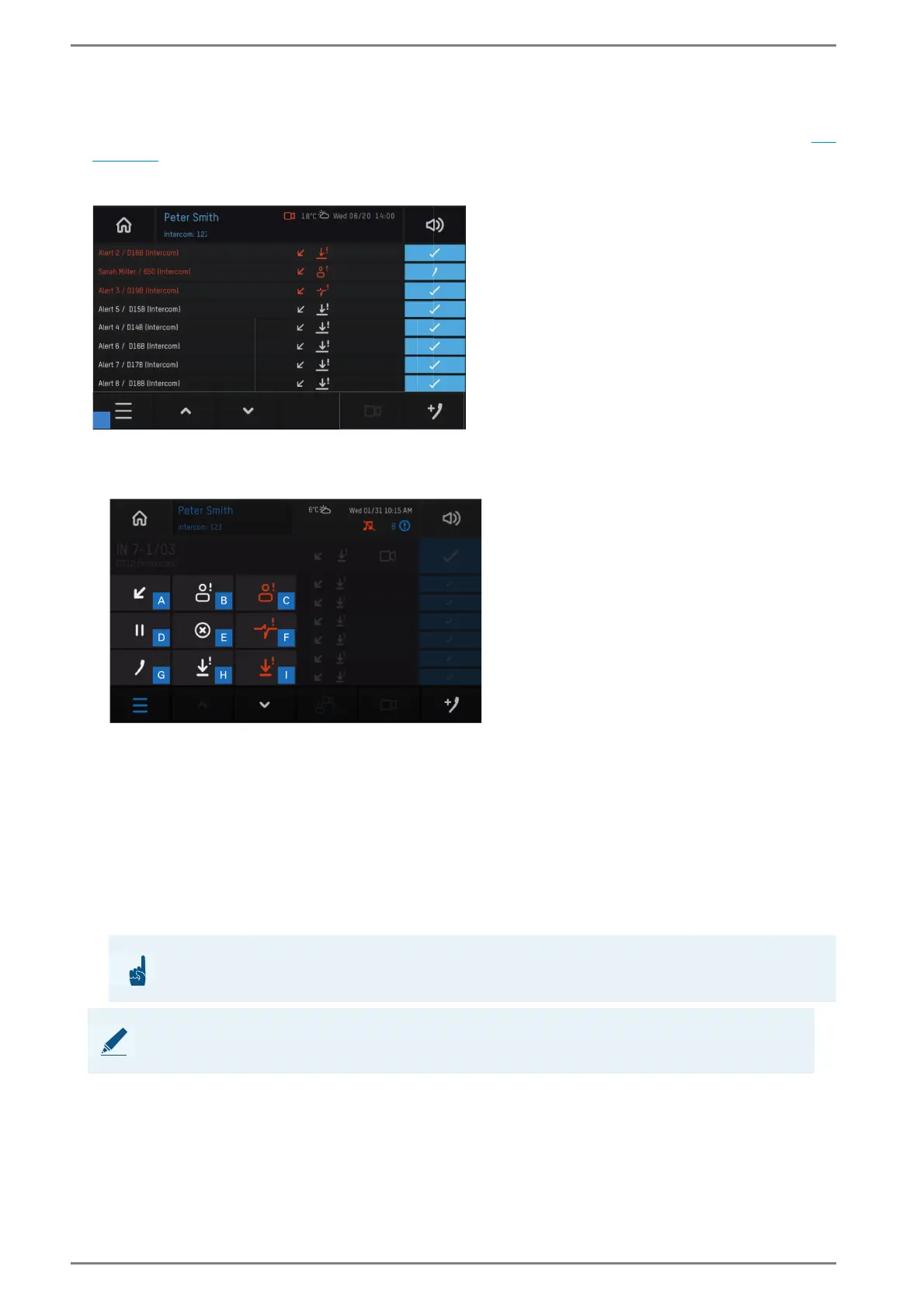
Control desk “incoming calls”
Tap on the list button 1 to open the filter settings. The following screen appears:
Control desk “filtering calls”
Tap on the desired filter to hide the respective entries (it is possible to select several filters). The
following filters are available:
Tap on an active filter and the button e in order to delete this filter and to display the hidden entries.
Tap on the list button 1 to close the filter settings.
a Incoming events f Line faults
b Normal calls g Outgoing calls
c Emergency calls h Input message/Active 1
d Paused calls i Input message/Active 2
e Delete selected filter
ATTENTION: Active filter will be deleted
Active filters will be deleted at an incoming call request or input message!
NOTE: Selected button is highlighted in blue
The button of the selected mode is highlighted in blue.



 To Next Page