Control Station Duetto Appendix – Examples
2.0/0518 143
In the field POST Parameter, enter the HTTP POST parameter to start the video broadcast.
Click on Save.
HTTP Post: Hide video
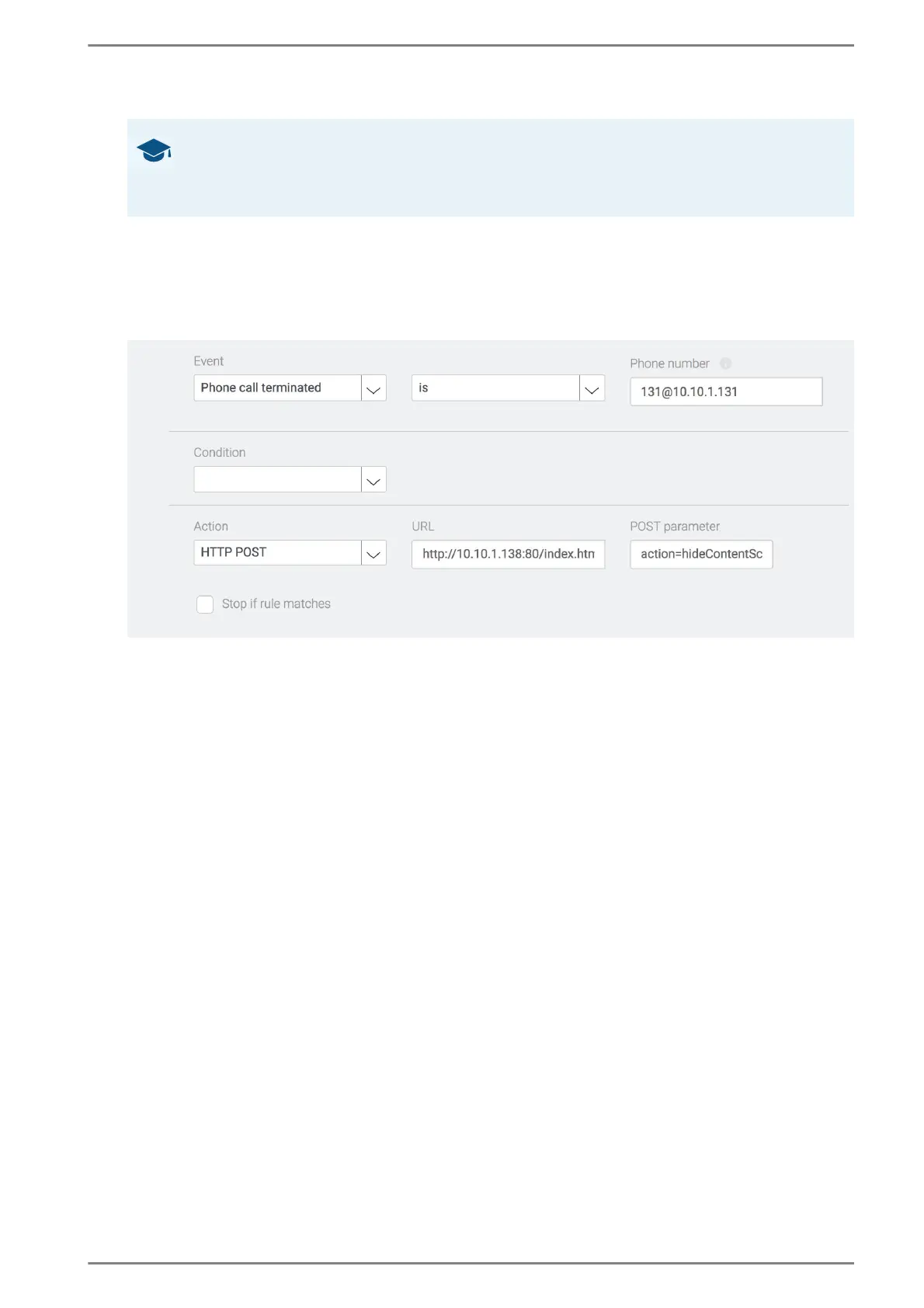
Add a new logic rule: When the connection with a certain phone number ends, the HTTP POST “Hide
video” is sent to the address defined in the field URL. See the following screenshot:
HTTP POST “Hide Video”
Select the Event “Phone call terminated”.
In the field Phone number enter the URI of the SIP-device.
Select the action “HTTP Post”.
In the field URL, enter the destination address of the video broadcast.
In the field POST Parameter, enter the HTTP POST parameter to end the video broadcast.
➥ Click on Save.
Good to know: Structure of HTTP POST requests
A HTTP POST is composed of the specifications in the fields URL and POST Parameter.
E.g. HTTP-POST “Show Video”:
http//10.10.1.138:80/index.html?action=showContentSRC=http://10.10.1.102:7712/1



 To Next Page