Control Station Duetto Web interface – SIP
2.0/0518 33
SIP SERVERS
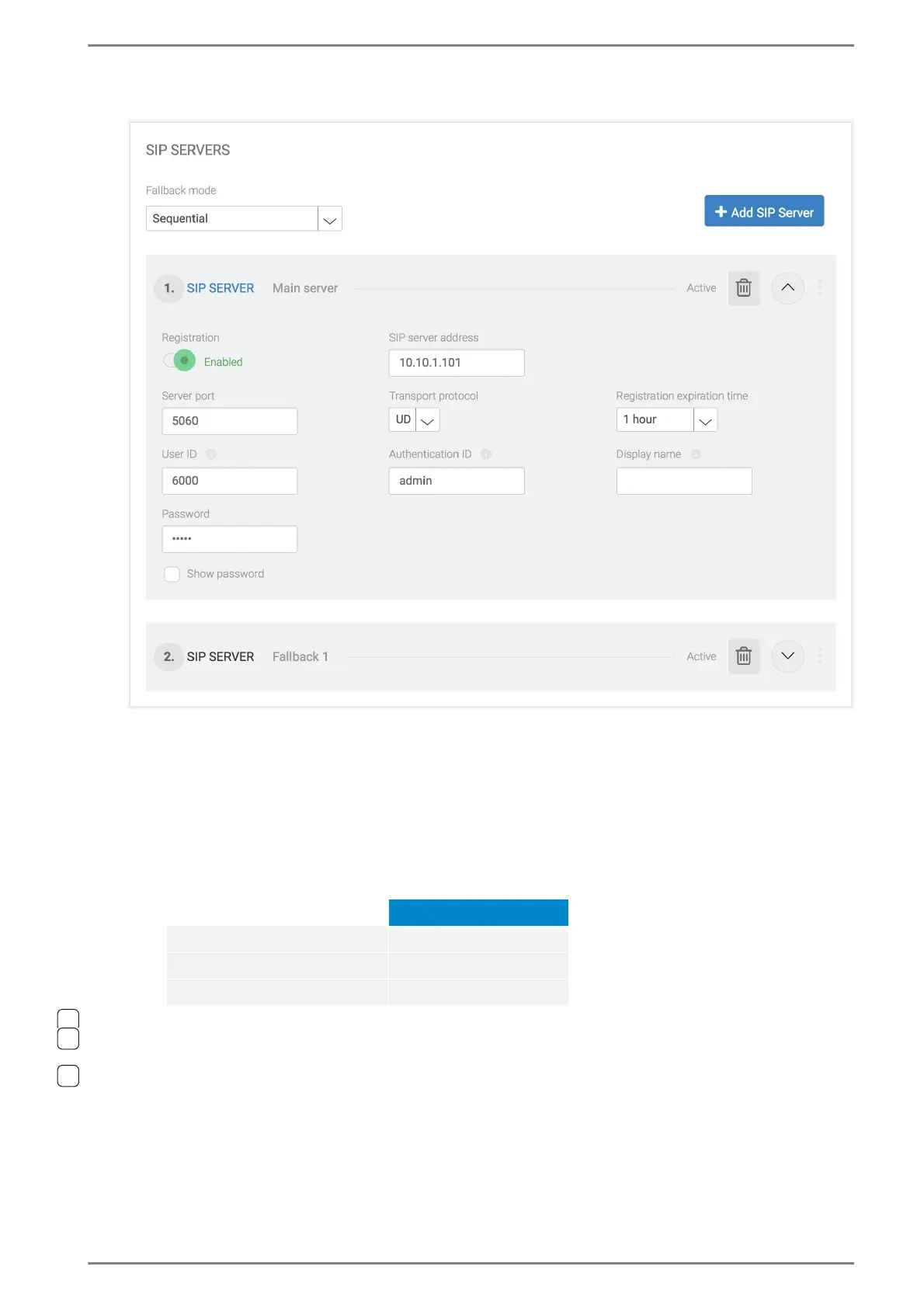
Click on the Button Add SIP Server to configure a SIP server for the DUETTO device. The following
settings become available:
Registration: With this toggle button the registration to the server can be deactivated. The
configuration settings remain unchanged. By default, this toggle button is activated.
SIP server address: Enter the IP address or domain of the SIP server.
Server port: Changes the port at which the SIP server awaits the connection.
→ By default: 5060
Info: Default RTP ports
Transport protocol: Select UDP or TCP for sending SIP packets to a SIP server.
Registration expiration time: Select the time of renewal for the registration.
User ID: Enter the user name for registration.
Authentication ID (optional): Enter a user identifier for authentication of the SIP User Agent.
Display name (optional): Enter a text to be shown in the status bar of DUETTO and at the sta-
tion of the conversation partner during a call. By default, “EE980” is shown.
Default RTP port
SIP messages 5060
SIP audio communication 7078
SIP video communication 7079



 To Next Page