Engineer Menu 2-7 Engineering Manual
104
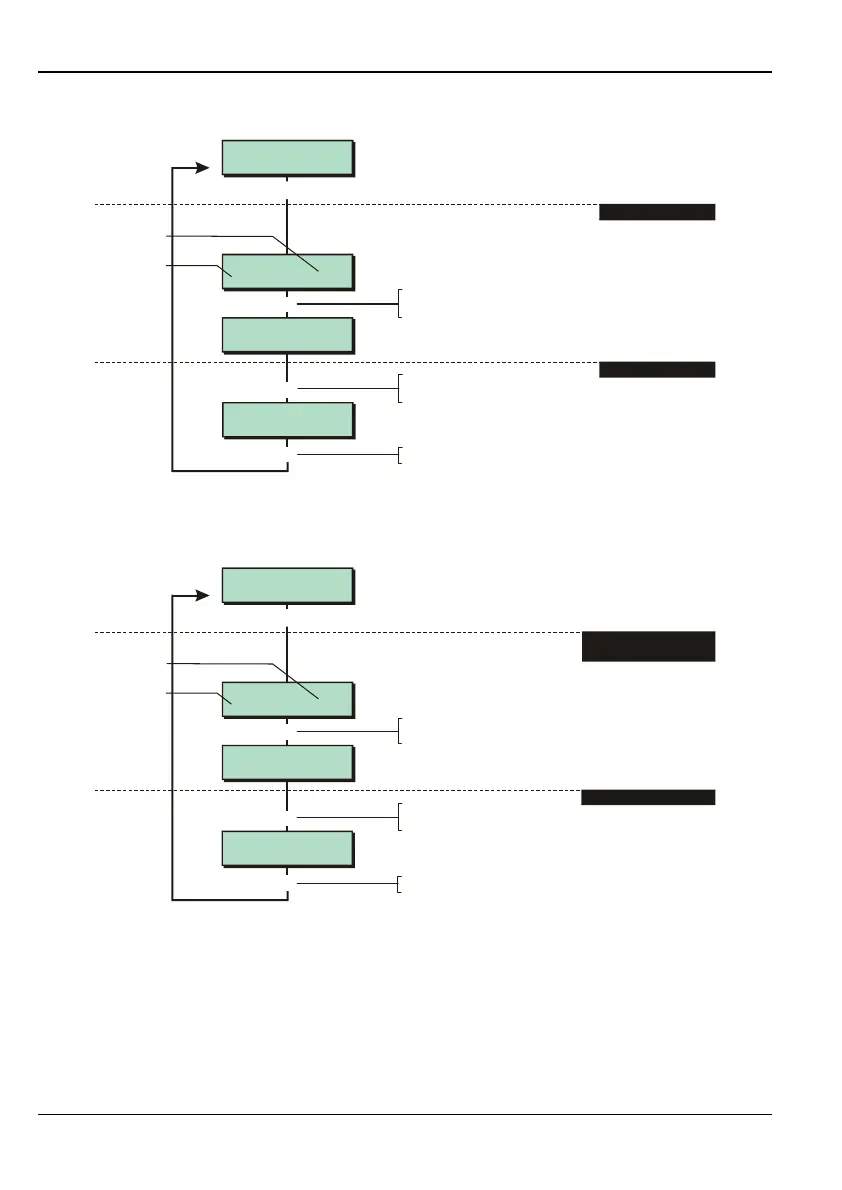
Option 2-7-2-2 – Testing the Digital Communicator Outputs
Digi outputs on
9-16: ********
Digi outputs on
9-16: 1*******
[
1234567890123456
1234567890123456
Test Outputs 2
Digi H/Wired
Digi outputs on
1-8: *****6*8
1
r
Press
r
to toggle between
viewing outputs 1-8 or 9-16
1. SELECT GROUP
2. TOGGLE OUTPUTS
Press when you have finished
]
]
e.g.
Outputs 1-8
Outputs
(* = off)
Enter number (1-8) to toggle
output on/off
This option allows you to switch the digital communicator outputs on and off.
Option 2-7-2-3 – Testing the Digi On Board Channels
Channels
9-16: ********
Channels
9-16: 1*******
[
1234567890123456
1234567890123456
Test Outputs 3
Digi On Board
Channels
1-8: ********
1
r
If required, press
r
to display
next set of channels
1. SELECT DIGI
ONBOARD CHANNELS
2. TOGGLE OUTPUTS
Press when you have finished
]]
e.g.
Enter output number (1-8) to
toggle output on/off
Outputs 1-8
Outputs
(* = off)
This option allows you to switch on or off the 16 digi on-board channels (the 16 "software"
outputs, the status of which are transmitted via the on-board modem port). You will need to
contact the Alarm Receiving Centre (ARC) for verification that the channels are functioning
correctly.



 To Next Page