Engineer Menu 2-8 Engineering Manual
116
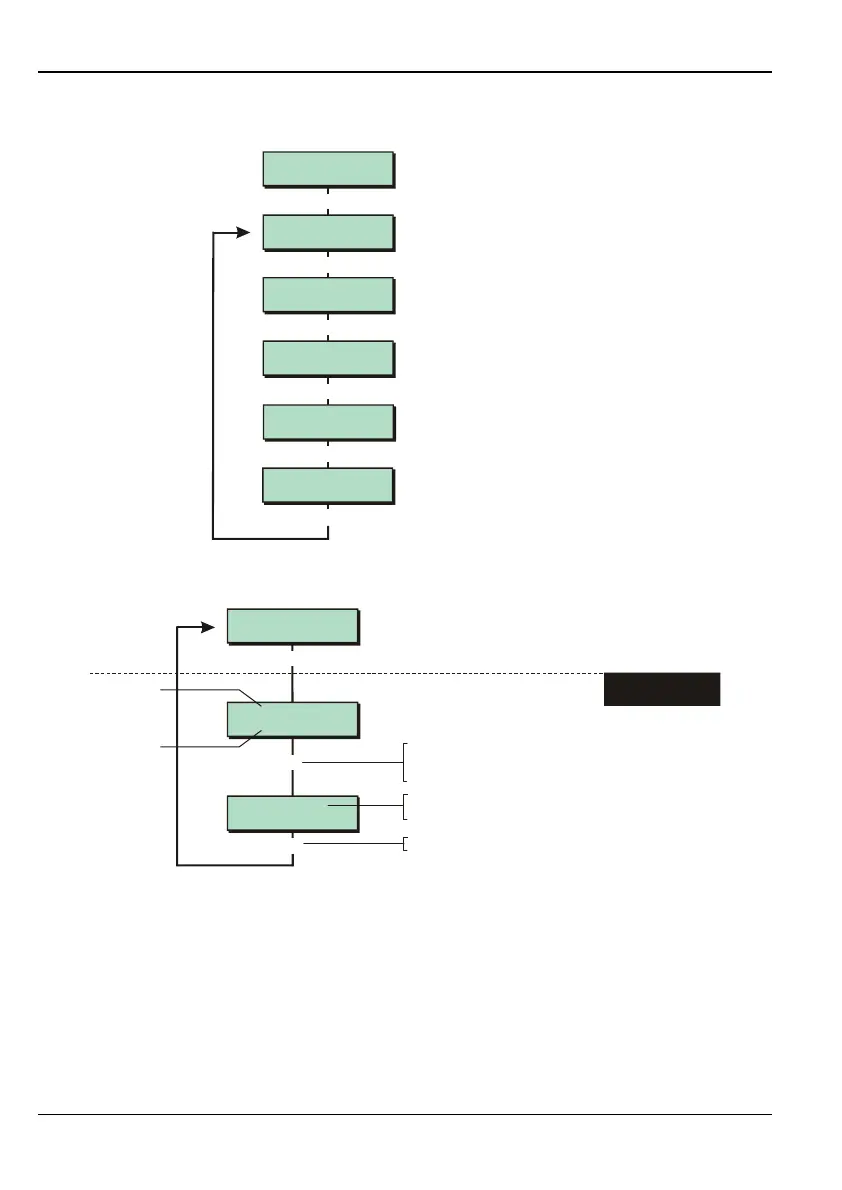
Option 2-8: Viewing or Printing the Log
Log Functions 1
View Log
Log Functions 2
Print Log
Log Functions 3
View Access Log
Log Functions 4
Print Access Log
Log Functions 5
System Print
Eng 2 Menu 8
Log Functions
|
[
|
|
|
|
Use or
|¬
to scroll through options,
or press hot key (1-5)
Option 2-8-1: Viewing the Event Log
e.g.
Log Functions 1
View Log
UNSET WARDS:-
10:37:10 25/01
SET WARDS:-
10:35:57 25/01
]
|
[
Press when you have finished
]
1. SELECT EVENT TO
VIEW
To select the event to view:
Press or
"
"
|¬
to scroll through the log sequentially, or
Enter event type key
Event type
Event time
and date
For some event types, pressing
r
toggles on/off the
display of additional information about the event
You can use this option to view the system log. The log contains the date and time of system
events, such as wards being unset, zones omitted, duress code activations and
communications problems. For details of each event code displayed, see page 118.
The number of events recorded in the log is model specific.
Press | or ¬ to scroll through the log (| displays earlier events).



 To Next Page