Engineering Manual Engineer Menu 1-4
39
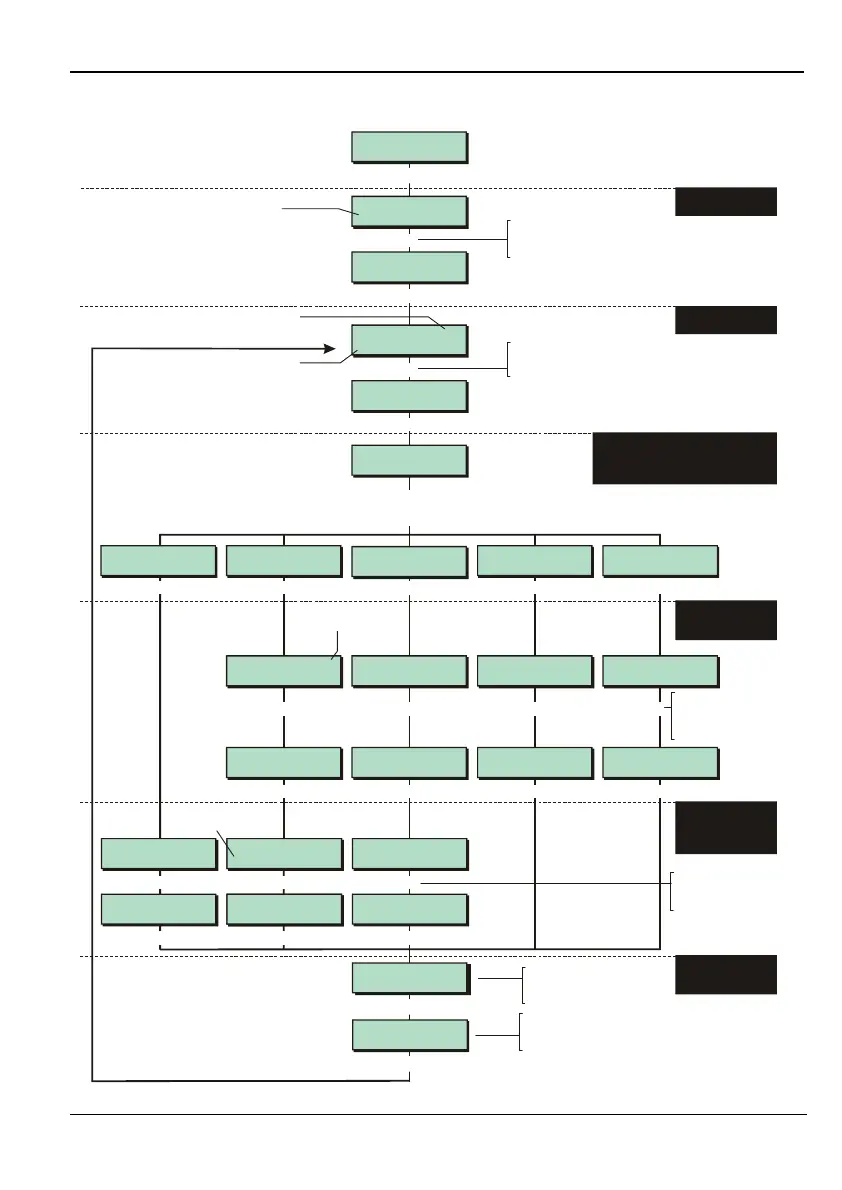
Option 1-4: Setting Up Outputs
Outputs 2
Digi H/Wired
Digi H/Wired 01
Fire Alarm
Eng 1 Menu 4
Outputs
Digi H/Wired 02
Panic Alarm (PA)
Output Type 1
System
Outputs 1
Panel
[
[
|
|
e.g.
e.g.
e.g.
To select output number:
Press or
"
"
|¬
to scroll, or
Press the output number (e.g. 03)
To select output type:
Press or
"
"
|¬
to scroll, or
Press hot key (1 to 6)
Shows the ward that
the output will follow
Ward number selected
in the previous screen
Shows what output is
currently set to follow
Output type
Top line shows output number. For equipment
outputs, an address of, for example, 3:02:1
indicates network 3, device 02, output 1
Note:
See next section for
programming of custom outputs
1. SELECT OUTPUT
TYPE
2. SELECT OUTPUT
NUMBER
3. SELECT WHETHER OUTPUT (OR GATE
FOR A CUSTOM OUTPUT) FOLLOWS
SYSTEM, WARD, ZONE, USER CODE
OR OUTPUT GROUP
To select the item that the
output is required to follow:
Press or
"
"
|¬
to scroll, or
Press the item number
To select the event:
Press or
"
"
|¬
to scroll, or
Press hot key
If required, press to
toggle sense of output
(Normal or Invert).
r
If required, press to
toggle output mode
(Latched or Pulsed).
r
To select the item the output or gate must follow:
Press or
"
"
|¬
to scroll, or
Press the hot key (1to 5)
Output Type 1
System
Output Type 5
Group
[
Enter Zone:
0001 Normal Alm
Output Type 4
User
Enter User No.
01 Code Entered
Enter User No.
00 Code Entered
Select Ward >2
AlwaysOff
[
|
Select Ward >1
AlwaysOff
Enter Group No.
Group 02
Enter Group No.
Group 01
Zone OP Type >2
0002 Alarm
[
|
Zone OP Type >1
0002 Mimic
Outputs 6
Custom Outputs
y
6
Outputs 1
Panel
Ward Type >32
Ward 2 SetStrobe
[
|
Ward Type >31
Ward 2 AlwaysOff
System Type >007
Fire Alarm
[
|
System Type >006
Panic Alarm (PA)
|
[
.
5. SELECT THE EVENT
THAT SHOULD
ACTIVATE THE
OUTPUT/GATE
6. SELECT THE
INVERSION AND
OUTPUT MODE
[
[
Output Type 3
Zone
Output Type 2
Ward
e.g.
e.g.
e.g. e.g.
e.g.
Enter Zone:
0002 Entry
e.g.
4. SELECT ITEM THE
OUTPUT/GATE
MUST FOLLOW
[
[
Output Inversion
Output = Normal
Output Mode
Output = Latched



 To Next Page