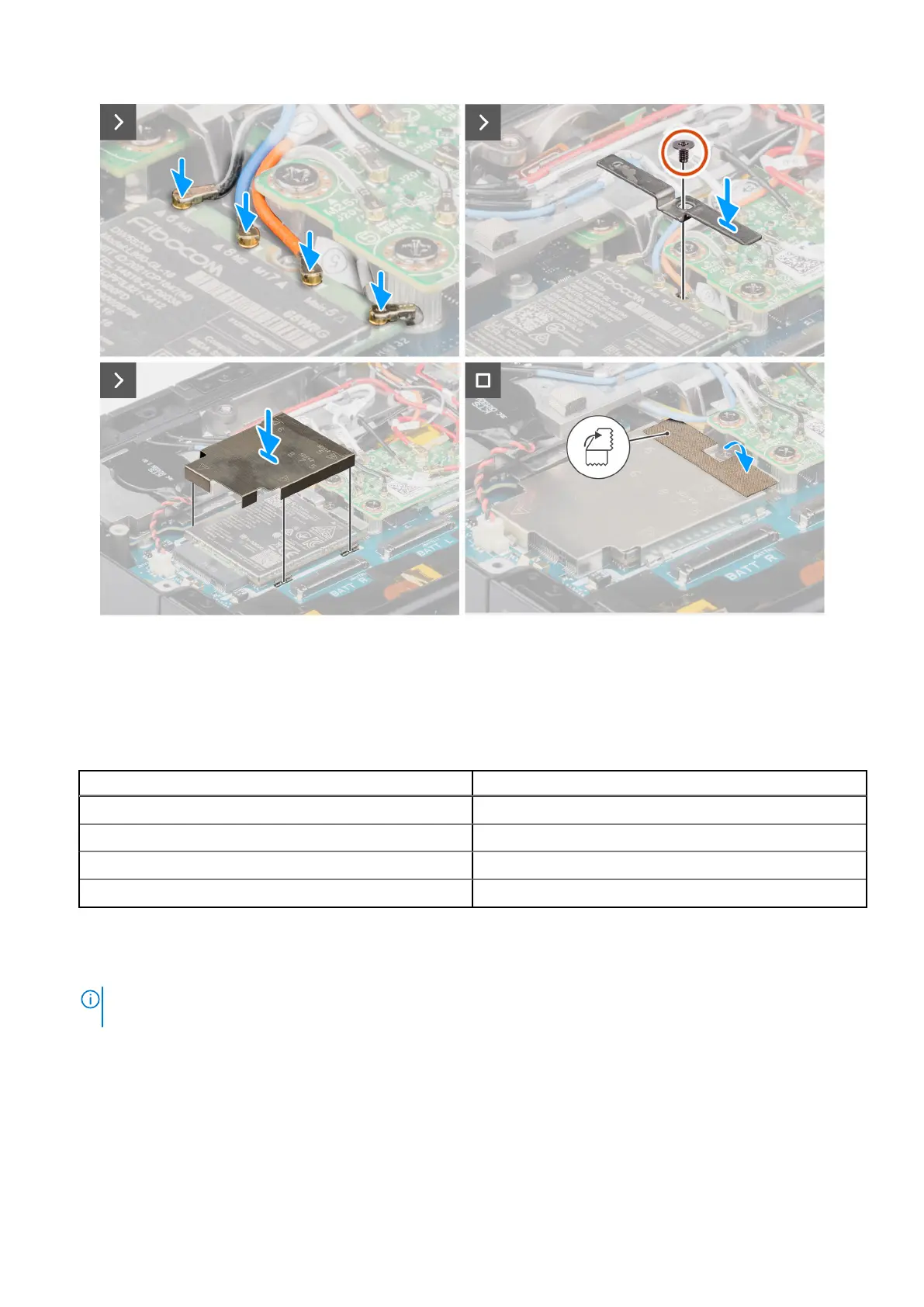
Figure 75. Installing the WWAN card (5G configuration)
Steps
1. Slide the WWAN card at an angle into the WWAN card slot.
2. Connect the antenna cables to the WWAN card.
Table 47.
Connectors on the WWAN card
Antenna Cable Color
Main (white triangle) - ANT1 Orange (cable number 7)
Main (white triangle) - ANT3 White and Black (cable number 6)
Auxiliary (black triangle) - ANT0 White and Grey (cable number 5)
Auxiliary (black triangle) - ANT2 Blue (cable number 8)
3. Place the WWAN card holder on the WWAN card and replace the (M2x3) screw that secures the WWAN card holder to the
system board.
4. Place the WWAN shield and press the anti-static fabric tape back into place.
NOTE:
For instructions on how to find your computer's IMEI (International Mobile Station Equipment Identity) number,
see the knowledge base article 000143678 at Dell Support Site.
Next steps
1. Install the RF switch board.
2. Install the base cover.
3. Install the solid state drive carrier.
4. Install the batteries.
5. Follow the procedure in after working inside your computer.
112
Removing and installing Field Replaceable Units (FRUs)











 To Next Page