7. Battery
Supplies power to the laptop. It enables the laptop to work without connecting to an electrical outlet for a certain time.
8. Battery-release latch
Lock or unlock the battery in the battery bay. Slide the latch to the unlocked position to release the battery.
9. Solid state drive door
Covers and protects the solid state drive, ensuring secure installation and access.
10. Docking port
Enables docking to the laptop.
11. Radio frequency pass-through connectors
Provides an option to switch the main WWAN, WLAN, and GPS antenna signals from internal to external antennas when the
device is docked.
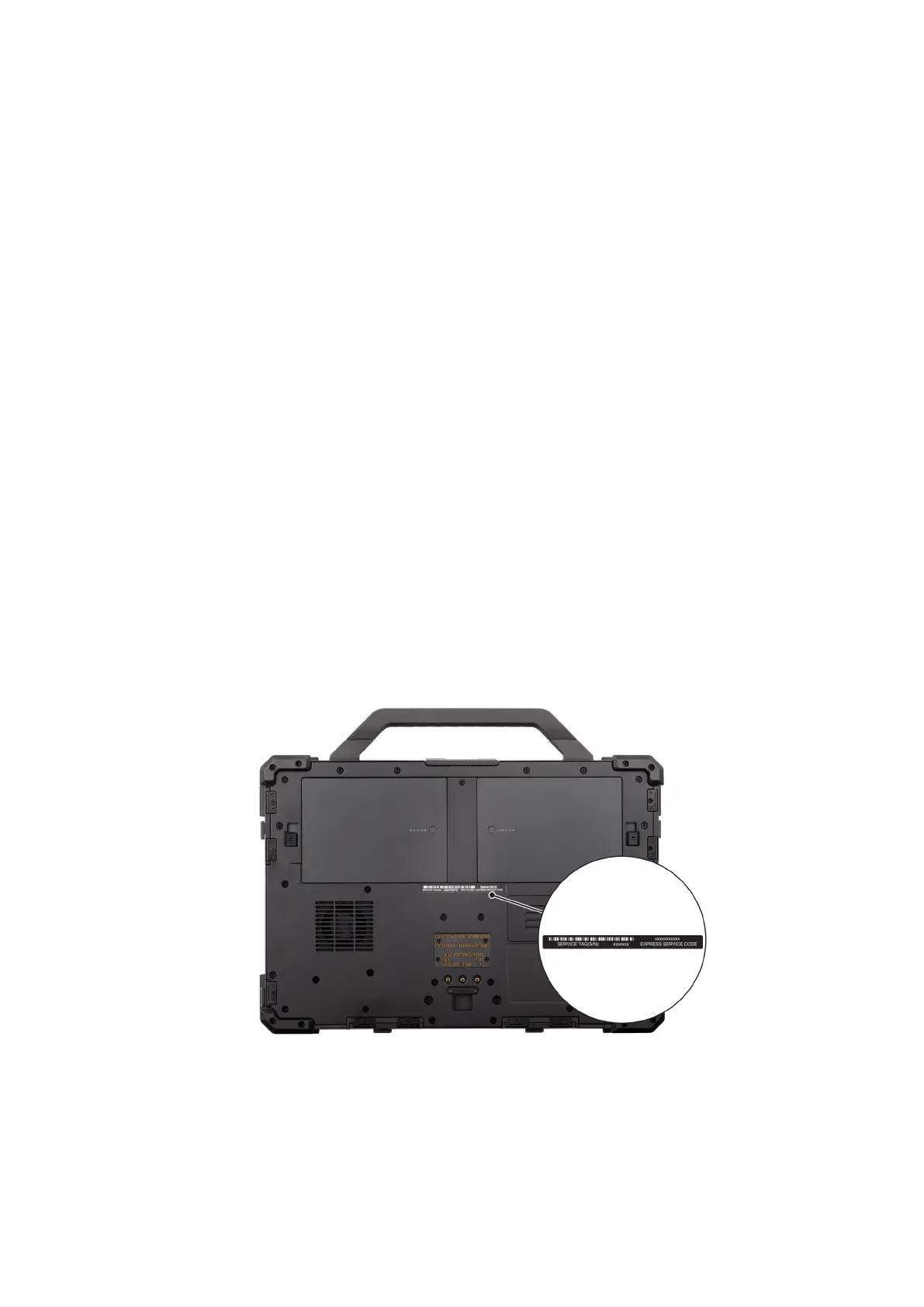
12. Service tag label
The Service Tag is a unique alphanumeric identifier that enables Dell service technicians to identify the hardware
components in your computer and access warranty information.
Locate the Service Tag or Express Service Code label
of your computer
The service tag is a unique alphanumeric identifier that allows Dell service technicians to identify the hardware components in
your computer and access warranty information. The Express Service Code is a numeric version of the Service Tag.
For more information about how to find the Service Tag of your computer, search in the Knowledge Base Resource at the Dell
Support Site.
Figure 7. Service Tag/Express Service Code location
14
Views of Dell Pro Rugged 13 RA13250











 To Next Page