Registering Multiple Machines in VPanel
116
4. Useful Functions
J
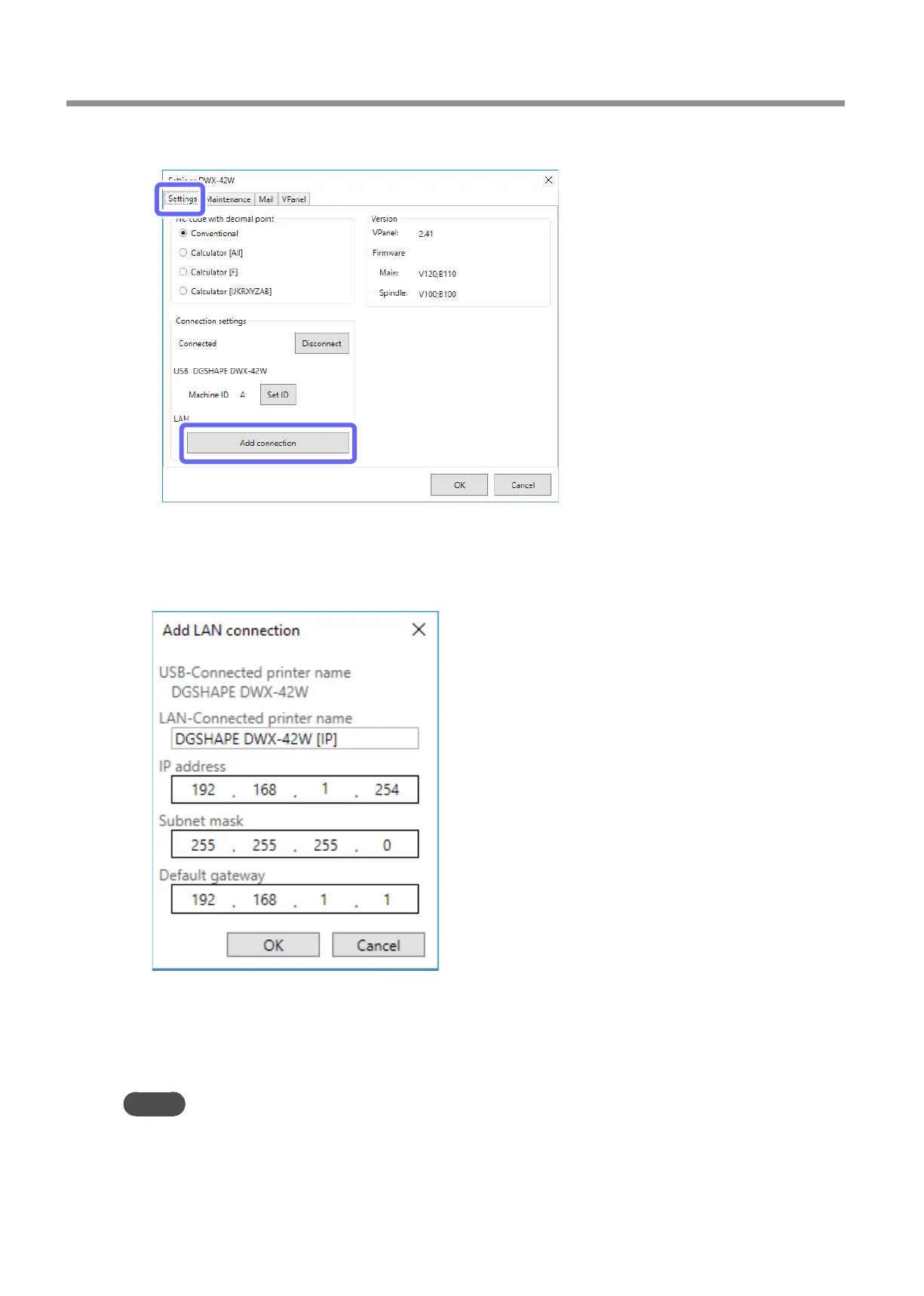
Click the [Settings] tab, and then click [Add connection].
K
Enter the items.
• Enter a unique name for [LAN-connected printer name]. The name you enter here will be displayed
in VPanel and as the name of the computer's printer.
• Enter the values determined in step
A
for the [IP address], [Subnet mask], and [Default gateway].
L
Click [OK].
The machine restarts automatically.
The driver is installed. This may take a few minutes. Wait for the machine to restart, and then proceed to the next
operation.
MEMO
• The machine is added to [Devices and Printers] in Control Panel with the name entered for [LAN-connected printer name]�
• The name entered for [LAN-connected printer name] is displayed on the [Settings] tab in the [Settings] window in VPanel�
• If you want to change the network settings of the milling machine, click [IP Settings] on the [Settings] tab in the [Settings]
window in VPanel�



 To Next Page