Registering Multiple Machines in VPanel
117
4. Useful Functions
M
Disconnect the USB cable that connects the machine and the computer.
N
Use a LAN cable to connect the computer and the machine that is being newly connected.
O
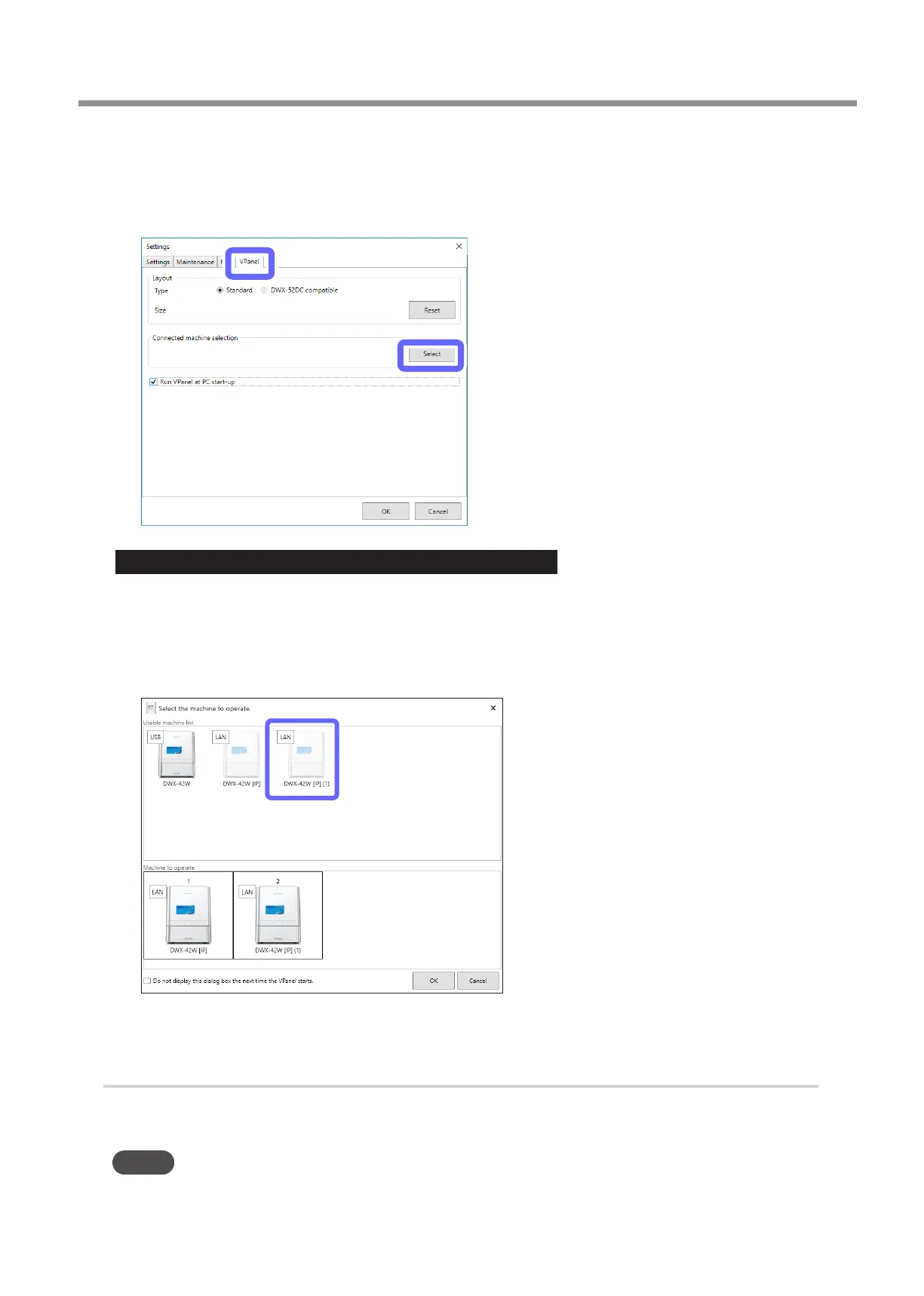
On the [VPanel] tab, click [Select].
Important: When the machine is connected to multiple computers
If the same machine is selected as the [Machine to operate] on multiple computers, communication may become unstable�
Before selecting the machine that was connected this time, check that it is not displayed as the [Machine to operate] in the
VPanel window on other computers�
P
Select [DWX-42W[IP](1)] as the machine to connect to from the [Usable machine list].
The clicked machine is added to the [Machine to operate] list.
Q
Click [OK].
3.
Add the third and fourth machines.
Repeat the steps in “
2
. Add the second machine.” to congure the LAN connection settings in
VPanel.
MEMO
USB connections can also be used for the third and fourth machines�
"



 To Next Page