Home
DGSHAPE
Medical Equipment
DWX-42W
Page 82
DGSHAPE DWX-42W - Page 82
169 pages
Manual
Save Page as PDF
To Next Page
To Next Page
To Previous Page
To Previous Page
Loading...
5.
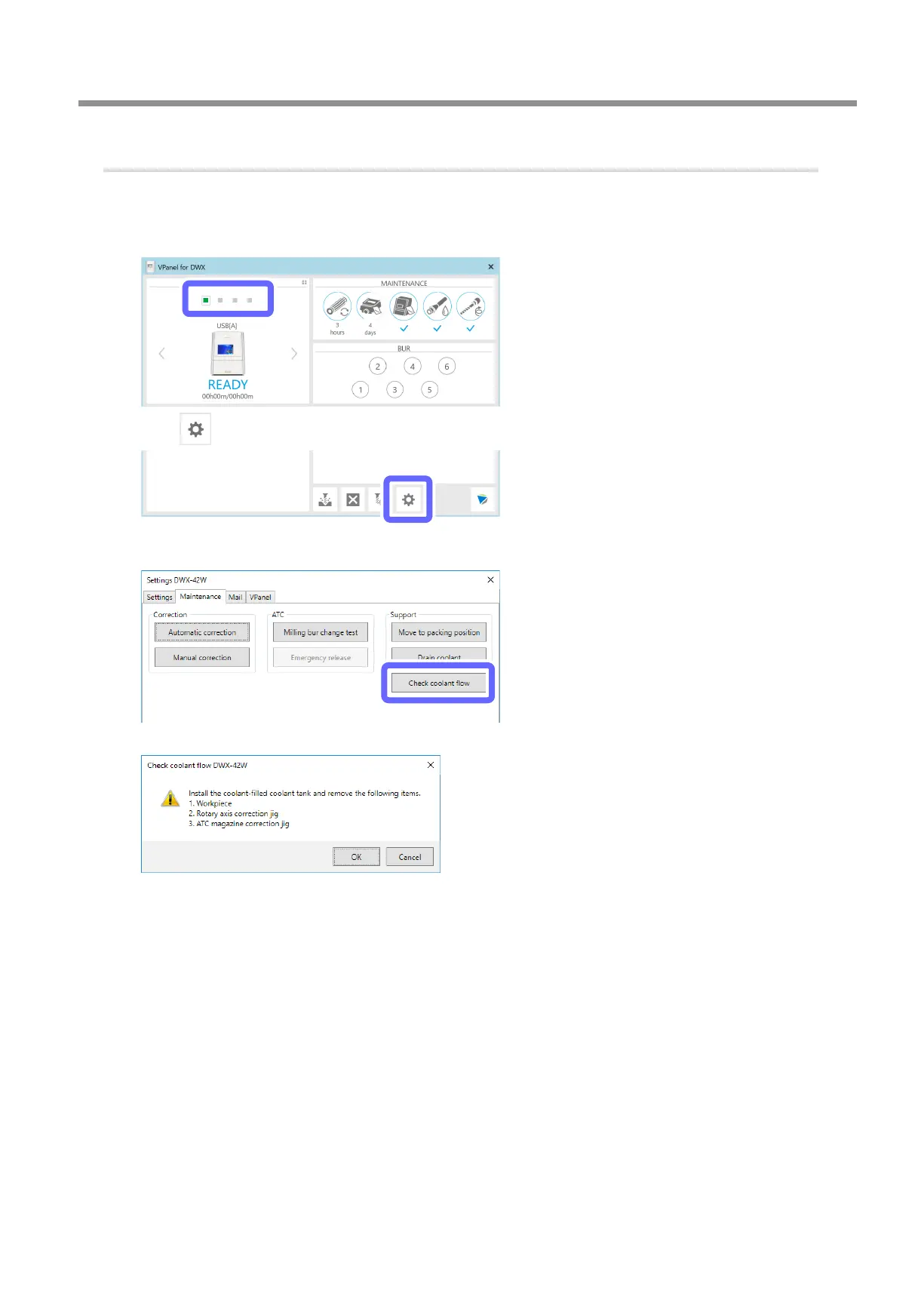
Check the coolant ow rate again.
A
Show VPanel.
"
B
Select the machine to operate.
C
Click
.
D
Click [Check coolant ow].
The following window is displayed automatically
.
Replacing Consumable Parts
81
3. Maintenance
81
83
Table of Contents
Main Page
Default Chapter
2
Table of Contents
2
Contents
2
1 Basic Operation
5
Switching the Power on or off
6
Switching the Power
6
Switching the Power off
6
Switching the Power on
6
Vpanel Basic Operation
7
What Is Vpanel
7
Displaying Vpanel
7
Vpanel Display in the Task Tray
8
Using the [Emergency Release] Button
9
Exiting Vpanel
10
Milling Machine Display
11
Built-In Panel Display
11
Statuses Indicated by the Status Light
12
2 Milling
13
Checks before Milling
14
Usable Workpieces
14
Usable Milling Burs
14
Preparing Compressed Air (Setting the Regulator)
14
Registering Milling Burs
15
Registering Milling Burs in Vpanel
15
Enabling Automatic Switching of Milling Burs at the End of Their Service Lives
18
Starting Milling
23
Step 1: Filling the Machine with Coolant
23
Step 2: Setting Milling Burs
29
Step 3: Spindle Run-In (Short)
30
Step 4: Mounting the Workpiece
31
Step 5: Outputting Milling Data
33
Checking the Operation Status
37
Checking the Milling Data Status
37
Checking the Estimated Milling Time
38
Checking the Basic Status of the Milling Machine
39
Checking the Operation Status of the Milling Machine
41
Checking the Milling Bur Usage Status (Replacement Time)
42
Pausing or Aborting Milling
43
Deleting Standby Milling Data
44
Following Daily Operations
45
Collet Maintenance, Cleaning of Dummy Pin, and Checking of Coolant Flow Rate
45
Cleaning after Milling Finishes
52
3 Maintenance
55
Maintenance Precautions
56
Periodic Care and Maintenance
57
Correcting the Milling Machine
57
Replacing the Coolant
62
Care and Storage of the Automatic Correction Jig
68
Care of the Regulator Bowl
69
Cleaning the Coolant Nozzle
71
Replacing Consumable Parts
73
Replacing the Spindle Unit
73
Replacing Milling Burs
73
Replacing Coolant Filters
73
Replacing the Collet
84
Extended Periods of Non-Use / Moving the Machine
89
Draining the Coolant Lines
89
Attaching the Retainer
94
Spindle Run-In (Long)
96
4 Useful Functions
99
Setting the Connection with the Computer
100
Connecting over a LAN Instead of by USB
100
Registering Multiple Machines in Vpanel
109
Registration of Multiple Machines
109
Adding USB-Connected Machines
109
Adding LAN-Connected Machines
114
Operation When Multiple Machines Are Registered in Vpanel
119
Switching the Machine to Operate
119
Listing the Machines to Connect to and Selecting the Machine to Operate
119
Switching the Machine to Register in Vpanel
120
Changing the Display Order of the Machines
122
Email Notification Settings
123
Receiving Milling Machine Status Notification Email
123
Using NC Codes
125
Selecting the NC Code Numeric Value Interpretation Method
125
Advanced Correction Function
126
Milling Machine Manual Correction
126
Other Functions
128
Milling Bur Change Test
128
Changing the Name of the Machine Displayed in Vpanel
129
Changing the Image of the Machine Displayed in Vpanel
130
Checking the Vpanel/Firmware Version
131
Displaying System Reports/Error Logs
132
Preventing Vpanel from Starting on Computer Startup
133
5 Troubleshooting
134
Machine Problems
135
The Machine Does Not Run/Cannot Generate Output
135
The Operation Button Does Not Respond
135
Vpanel Does Not Recognize the Machine
135
The Machine Recognized by Vpanel Is Displayed as OFFLINE
135
The Computer Shuts down When Connecting Multiple Machines
136
Compressed Air Does Not Come out
136
Automatic Correction Fails
137
Collet Maintenance Cannot Continue Due to an Error Occurring
137
Milling Quality Problems
138
The Milling Results Are Not Attractive
138
There Is a Line of Level Difference in the Milling Results
138
The Dimensions of the Milling Results Do Not Match
138
Chipping Occurs (Edges of Milling Products Become Chipped)
139
A Hole Opens in the Milling Results
139
Installation Problems
140
Installing the Driver Separately (USB Connection)
140
Installing the Driver Separately (LAN Connection)
142
Installing the Software and the Electronic-Format Manual Separately
142
Driver Installation Is Impossible
143
Uninstalling the Driver
147
Uninstalling Vpanel
150
Cannot Connect Via LAN (Resetting the Machine IP Address)
151
Responding to Error Messages
152
Error Message List
152
1000-****" the % Limit Switch was Not Found
153
1006-02**" the % Axis Position Has Been Shifted
153
0000" the Milling Bur Sensor was Not Found
154
000*" the % Milling Bur Cannot be Released
154
010*" the % Milling Bur Cannot be Released. It Might be Broken from the Root
155
000*" the % Milling Bur Might be Broken
156
000*" the % Milling Bur Chucking Has Slipped out
157
1020/1021-000*" the % Milling Bur Is too Long/Too Short
158
1022-000*" the % Milling Bur was Not Found
159
1023-0000 to 1028-0000" Milling Data Error
160
1029-0000" the Spindle Experienced an Overload
161
000*" the Spindle Experienced Overcurrent
162
0000" the Spindle Motor Temperature Is too High
163
0000" the Mechanical Part Has Collided
163
1033-000*" the Coolant Has Run out
164
1034-0000" the Coolant Tank Is Not Installed
164
1038-0000" Milling Data Error. no Milling Bur Is Selected
166
000*" DANGER!! the Coolant Is Leaking
166
0000" the Automatic Correction Is Not yet Finished
167
0000" Milling Data Error. the Milling Bur Cannot Reach the Milling Position
167
0000" the Pressure of the Compressed Air Is too High or Low
168
An Unknown Error Occurred
168
Other manuals for DGSHAPE DWX-42W
Setup Guide
84 pages



 To Next Page