Manuale operativo
CHORUS
74 Rev. 0 del 06/2012
4.6.3 N
O
C-
LIST IS STORED
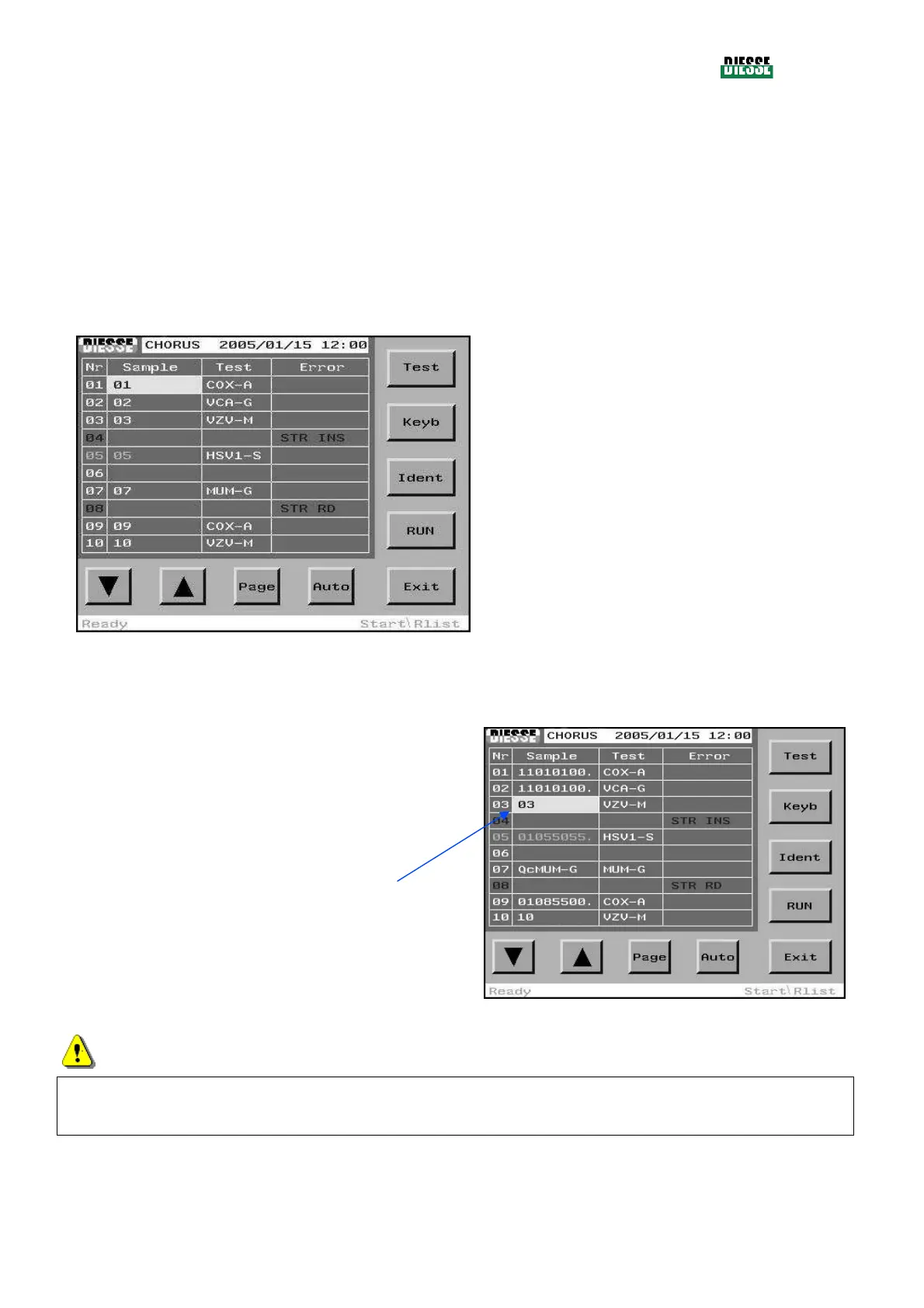
If there is no C-list, the instrument simply indicates the strip codes detected in each of the 30 positions
on the carousel and assigns a sample code corresponding to the position of the strip on the plate to
each one. If the operator wishes, he can change the sample codes, either by scanning with the
barcode reader or by manual editing.
The Err column displays eventual error strings regarding the identified strips.
For complete information on the errors, see the specific chapter (5.4.2.4).
Test: moves the selection bar from the samples
column to the test column
Keyb: to access the editing window
Ident: identifies the strips present in the carousel
again
Run: starts the cycle
(any strips presenting errors will not be processed)
Exit: returns to the main window
fig. 83
4.6.4 I
NSERTION OF A SAMPLE CODE
To insert a sample code, place the selection bar on the
empty field in the Sample Column, corresponding to the
test which has not yet been associated to a sample,
and read the sample code with the bar code reader, or
press the Keyb key to insert it manually.
fig. 84
ATTENTION
It is possible to insert or modify a sample code only if the strip is present in the tray and there is no
corresponding association in the C-list.



 To Next Page