76
Conguring Advanced Settings
AllowsyoutodenetheAdvancedSettingsavailableontherouter.
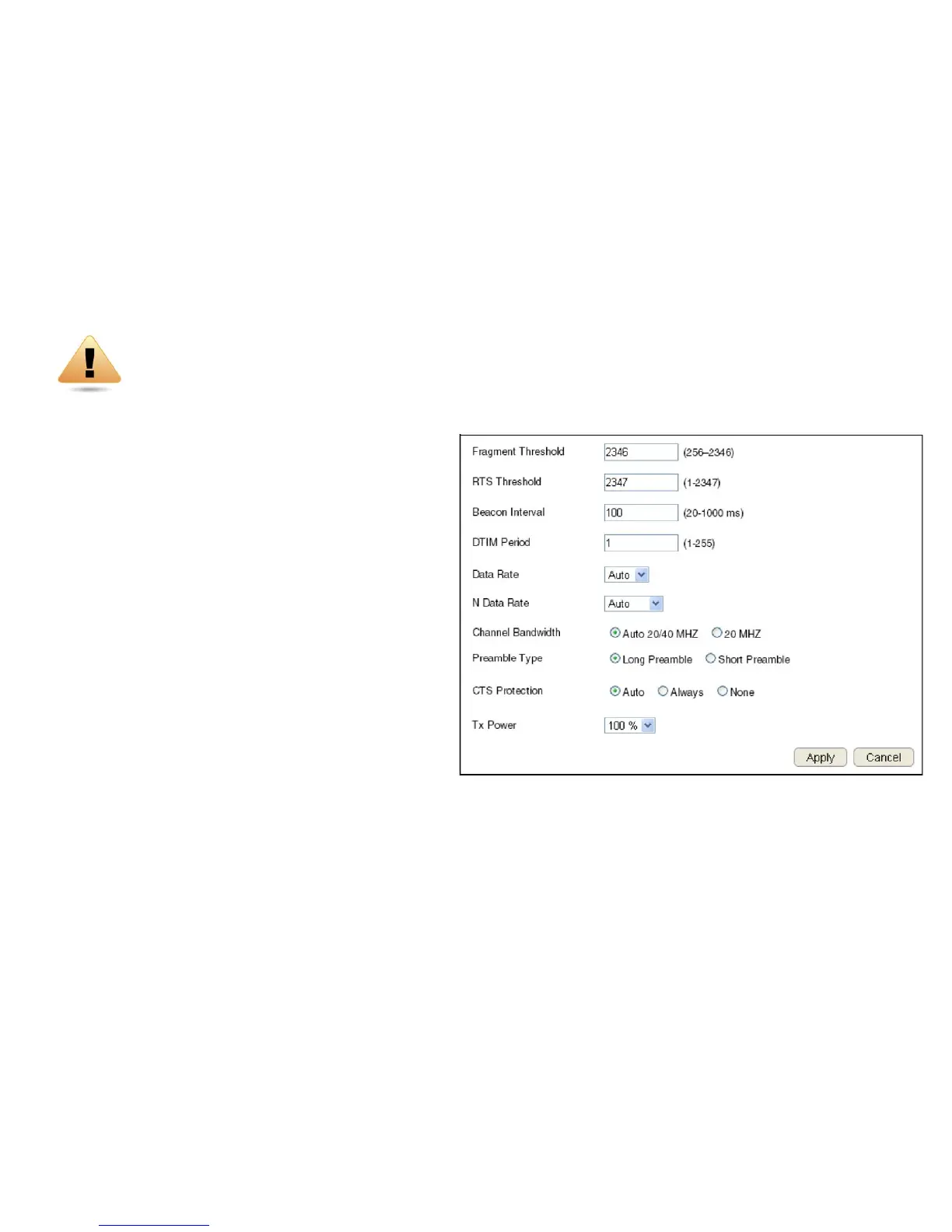
ToviewtheAdvancedsettings,clickWireless then select Advanced.
Fragment Threshold
Enterthemaximumsizeofapacketduringdatatransmission.
Avaluetoolowcouldleadtolowperformance.
RTS Threshold
EntertheRTSthreshold.Ifthepacketsizeissmallerthanthe
RTSthreshold,therouterdoesnotuseRTS/CTStosendthe
data packet.
Beacon Interval
Enterthebeaconinterval.Thisistheamountoftimethatthe
routersetstosynchronizethenetwork.
Delivery Trafc Indication Message (DTIM) Period
EntertheDTIMperiod.TheDTIMisacountdownperiodinformingclientsofthenextpoint
ofbroadcastandmulticastofmessagesoverthenetwork.Validvaluesarebetween1and255.
N Data Rate
SelecttheNdatarate.ThisistherateinwhichtheESRSeriesRouterwilltransmitdatapacketstowirelessNcompatibledevices.
WARNING!Incorrectlychangingthesesettingsmaycausethedevicetostopfunctioning.Donotmodify
thesettingsinthissectionwithoutathoroughunderstandingoftheparameters.



 To Next Page