90
Conguring PPPoE
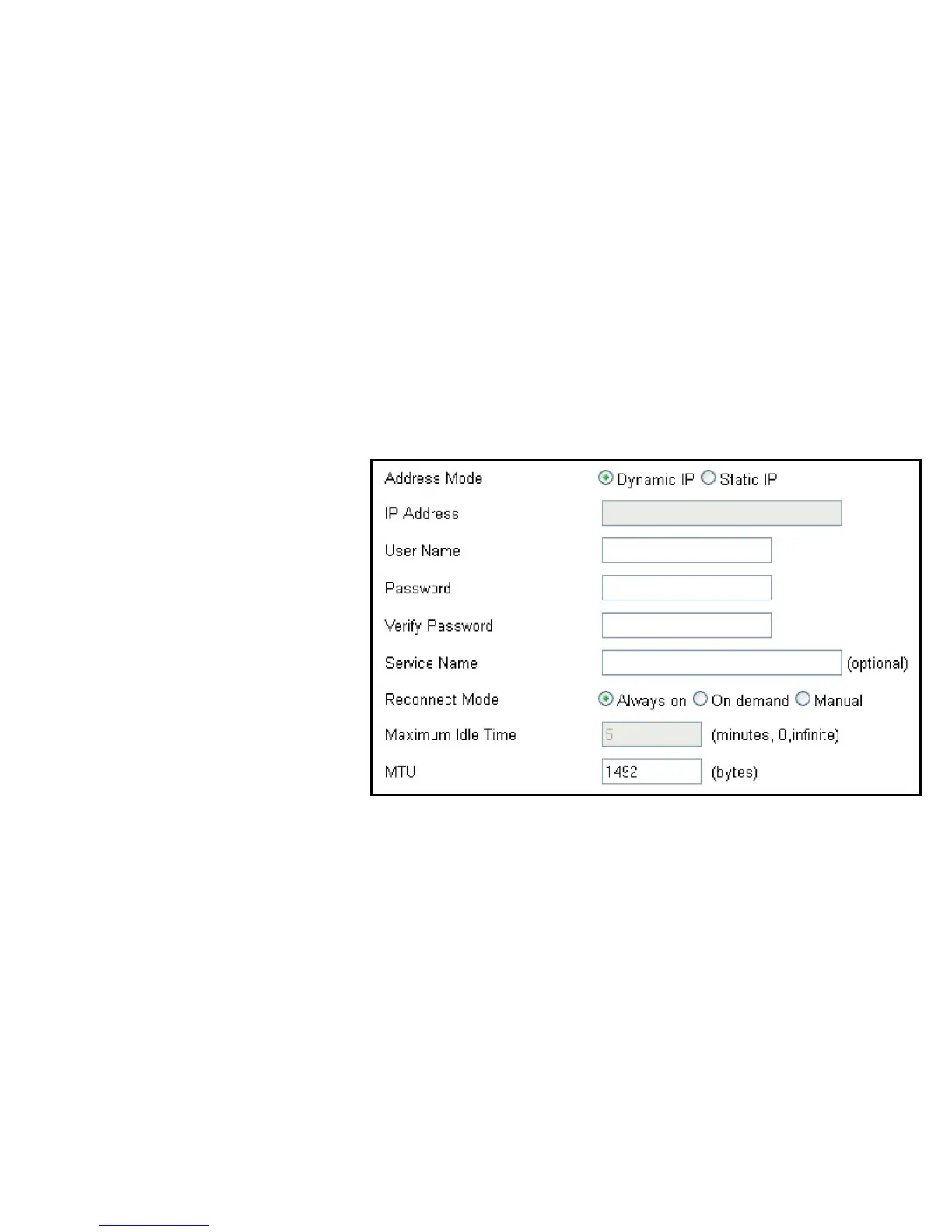
ToviewthePPPoEsettings,clickIPv6 then select PPPoE.
Address Mode
SelectStaticifyourISPassignedyoutheIPaddress,subnet
mask,gateway,andDNSserveraddresses.Inmostcases,select
Dynamic.
IP Address
EntertheIPaddress(StaticPPPoEonly).
User Name
Enter your PPPoE user name.
Password
EnteryourPPPoEpassword.
Verify Password
RetypetheyourPPPoEpassword.
Service Name
EntertheISPServiceName(optional).
Reconnect Mode
SelecteitherAlways-on,On-Demand,orManual.
Maximum Idle Time
Enteramaximumidletimeduringwhichthe
Internet connection is maintained during inactivity.
Todisablethisfeature,enableAuto-reconnect.
MTU
MaximumTransmissionUnit-youmayneedtochangetheMTU
foroptimalperformancewithyourspecicISP.1492isthe
defaultMTU.



 To Next Page