Setup & Operation 15. RAID
RC620 Rev.8 119
15.3 Restoring the Data Protection Status
Follow the instruction below and restore the data protection status.
15.4.1 Shutdown the system
15.4.2 Replace the HDD
15.4.3 Restore the data protection status
15.3.1 Shutdown the system
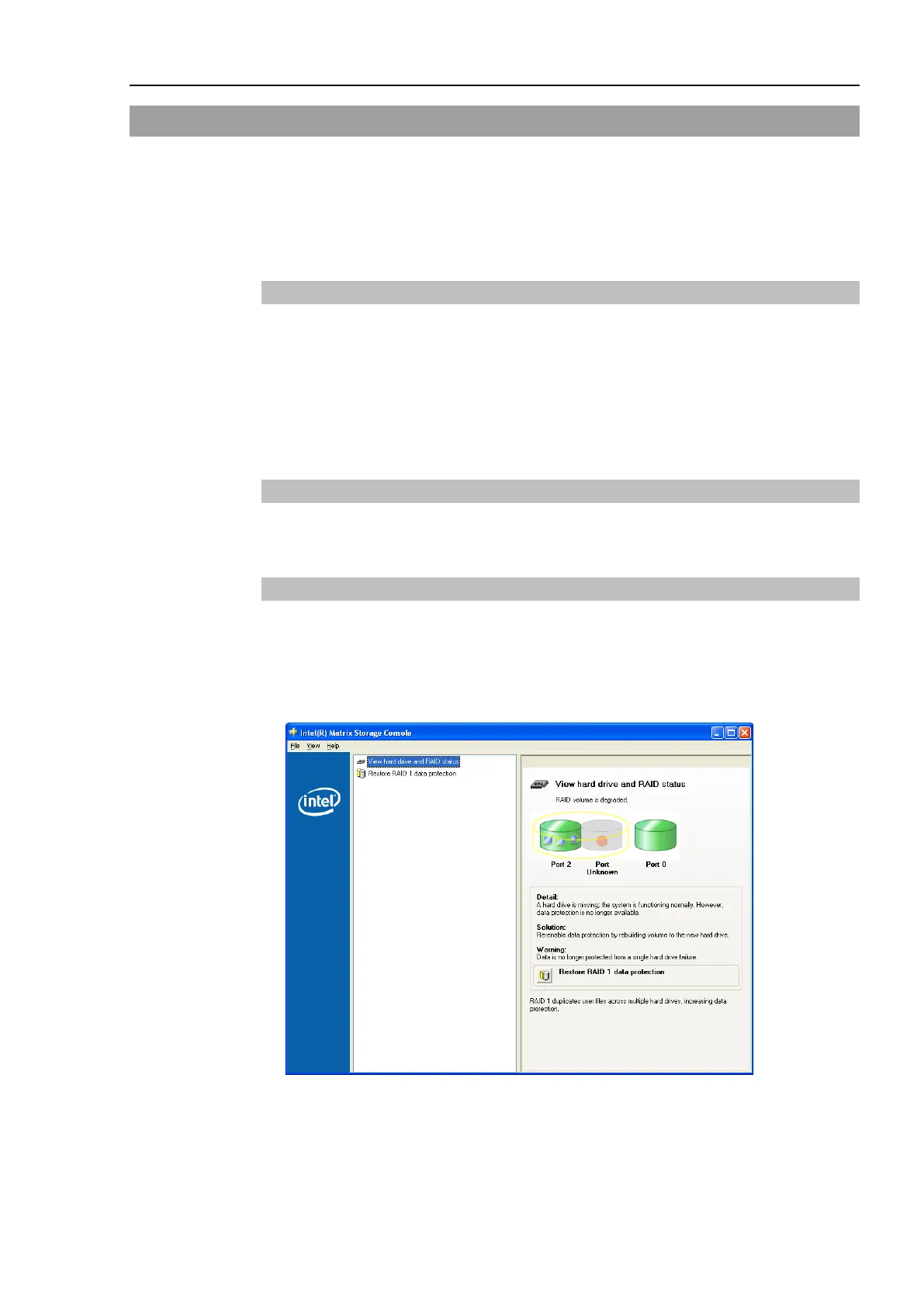
(1) Check the port which is normally running.
To check the port which is normally running, execute the Intel Matrix Storage Console
from Start | All programs | Intel(R) Matrix Storage Manager.
(2) Shutdown the system.
15.3.2 Replace the HDD
Refer to Maintenance 6.9 HDD and replace the HDD.
15.3.3 Restore the data protection status
(1) Start up the Controller.
(2) Execute the Intel Matrix Storage Console from Start | All programs | Intel(R) Matrix
Storage Manager.
(3) Click the <Restore RAID 1 data protection>.


 To Next Page