Maintenance 6. Maintenance Parts Replacement Procedures
154 RC620 Rev.8
6.2.2 Replacing the UPS Battery
CAUTION
When handling the UPS battery (nickel hydride battery), observe the
following precautions for safe use.
- Be sure to use the battery supplied as the maintenance parts from
EPSON. (Refer to Maintenance 9. Maintenance Parts List.)
- Do not allow the positive (+) and negative (-) electrodes to short circuit.
- Do not discard batteries into fire or heat them to high temperature.
- Do not disassemble or alter batteries.
- Do not apply a strong shock to the battery.
- Stop using the battery if you see any signs of change of color or
damage to the battery.
Recycling of Battery
Dispose of the used battery appropriately in accordance with the laws and acts of your
national or local government. If you cannot dispose of a used battery properly, please
inquire of your EPSON robot supplier how to dispose of it.
Battery
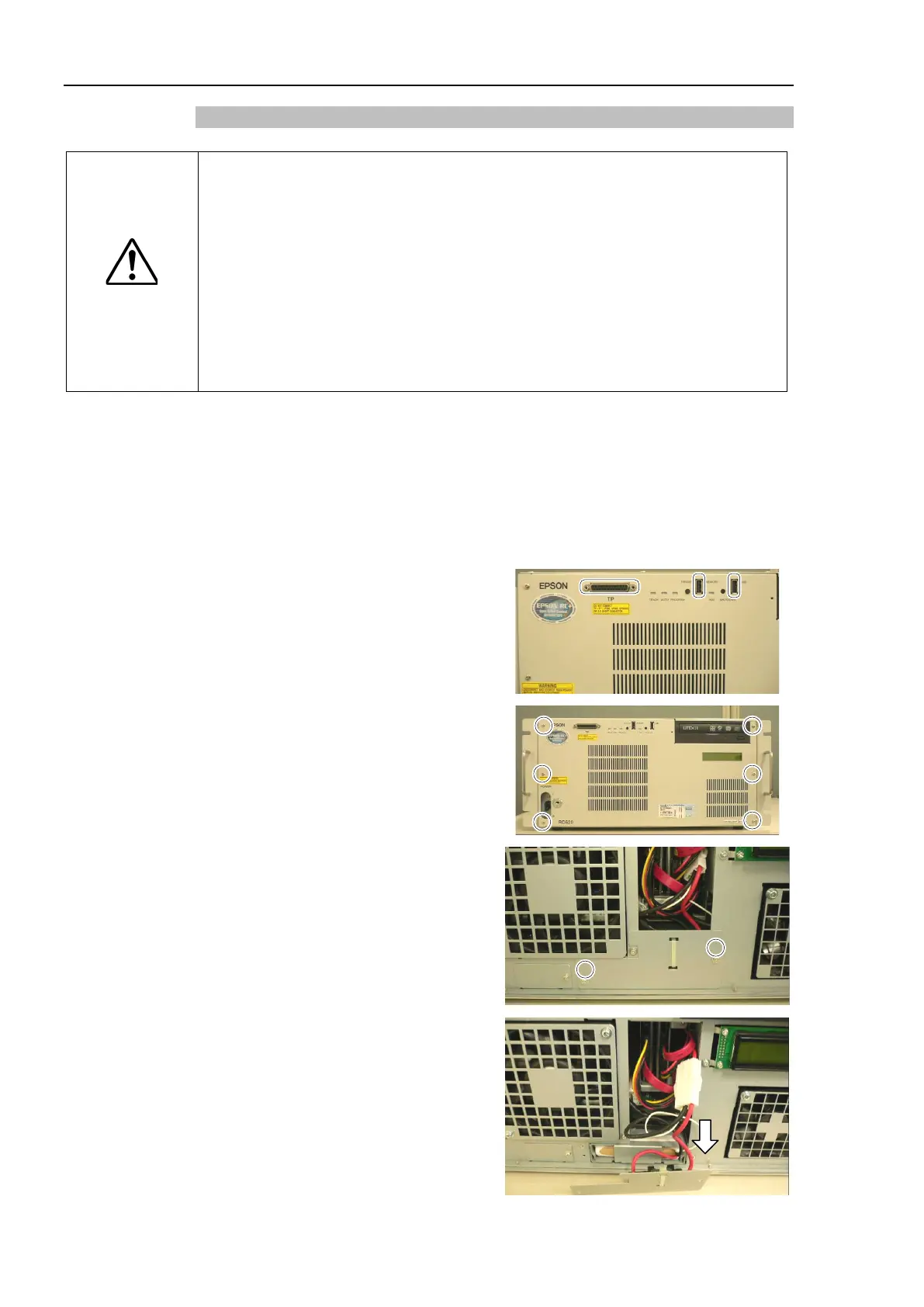
Remove cables from TP port and USB
port on the front panel if they are
connected.
Remove 6 screws and the front panel.
Remove 2 screws of the UPS battery
fittings.
UPS battery fixing plate
until you can see the relay connector.
UPS battery cable is connected to
the main chassis. Be sure to pull it
out slowly.



 To Next Page