EasyManua.ls Logo

Epson RC620 CU - Switching Power Supply (75 W)

Epson RC620 CU
226 pages
Print Icon
To Next Page IconTo Next Page
To Previous Page IconTo Previous Page
Loading...
Maintenance 6. Maintenance Parts Replacement Procedures
190 RC620 Rev.8
6.6.2 Switching Power Supply (75W)
Switching
Power Supply
(
75W)
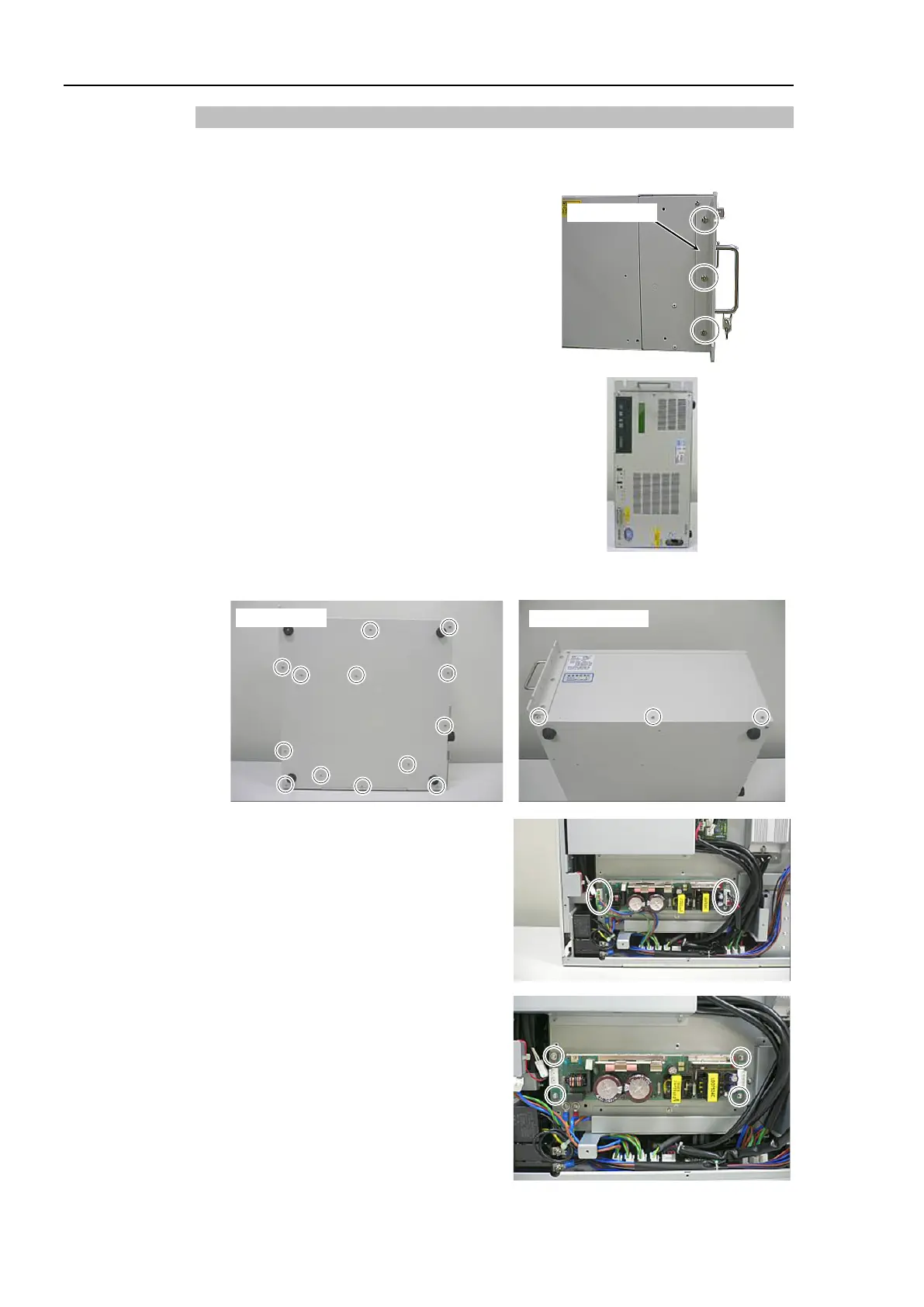
Removal
(1)
Turn OFF the Controller and unplug the power connector.
(2)
Remove 3 screws (
M4
pan head) and
fixing plate.
Fixing plate
(3)
Change the Controller
s direction and put
the
DPB down.
(4)
Remove 16 screws and
the bottom panel.
Bottom panel
Right-side panel
(5)
Remove Cable No. (5), (11) connecting
with the
Switching Power Supply
(
75W).
Refer to Maintenance:
3.2 Diagram of Cable Connections.
(6)
Remove 4 screws and remove the
Switching Power
Supply (75W) from
the Controller.

Table of Contents