Setup & Operation 12. Option Slots
RC620 Rev.8 61
12.2 Expansion I/O Board
12.2.1 About Expansion I/O Board
Each additional expansion I/O board provides 32 inputs and 32 outputs.
CN1: 16 inputs / 16 outputs
CN2: 16 inputs / 16 outputs
The number of I/Os that can be expanded is maximum 4 boards and 128 inputs and
outputs.
The input and output bit numbers are assigned as follows. (Bit number is assigned from
CN1.)
The 1
st
Expansion I/O board
The 2
nd
Expansion I/O board
The 3
rd
Expansion I/O board
The 4
th
Expansion I/O board
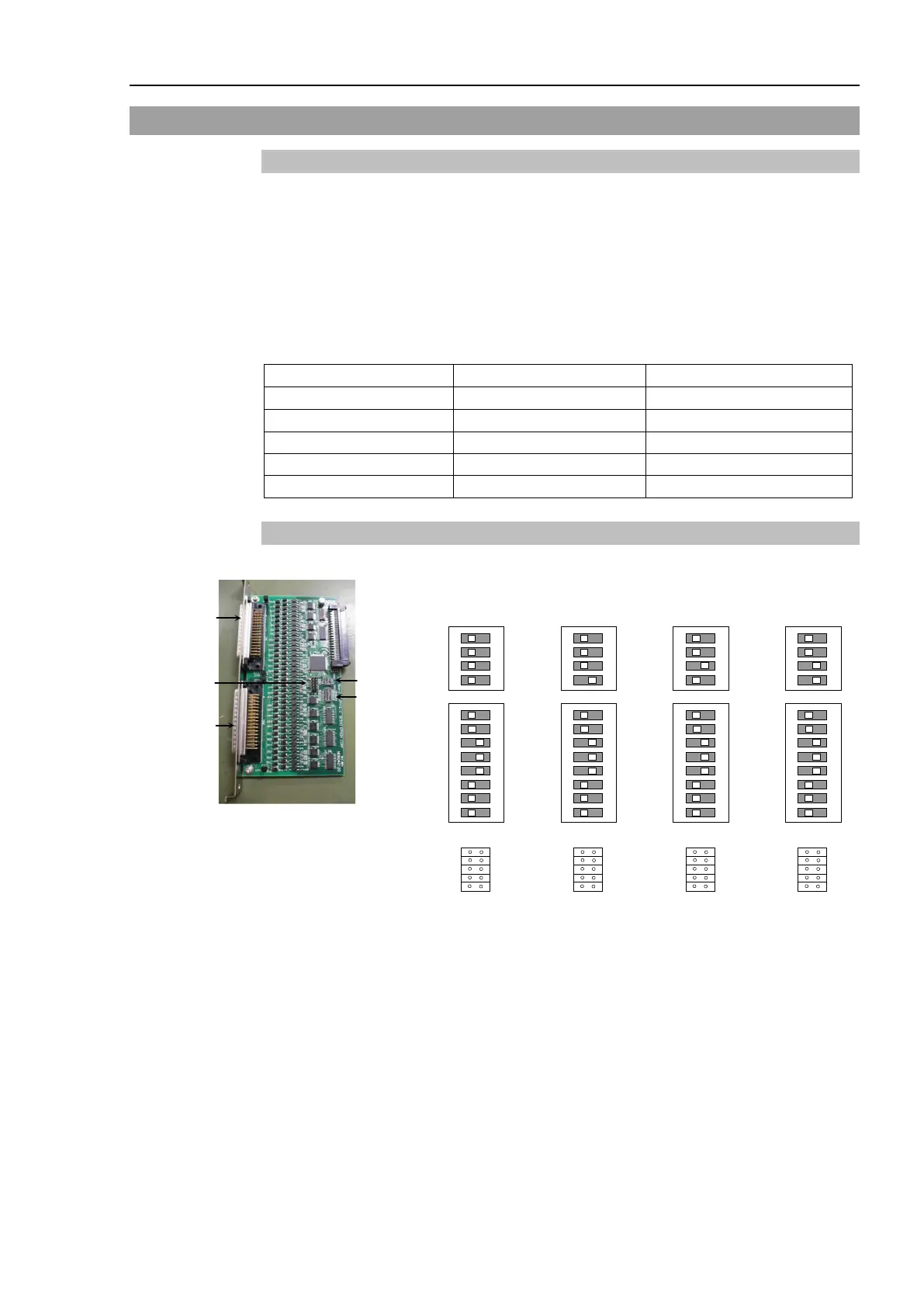
12.2.2 Board Configuration (Expansion I/O)
Board Appearance Switch and Jumper Configuration
Setup the DSW1 and DSW2. CN4 is all open.
st
nd
rd
th
SW8
SW7
SW6
SW5
SW4
SW3
SW2
SW1
SW8
SW7
SW6
SW5
SW4
SW3
SW2
SW1
SW8
SW7
SW6
SW5
SW4
SW3
SW2
SW1
SW8
SW7
SW6
SW5
SW4
SW3
SW2
SW1



 To Next Page