Setup & Operation 4. Operation Mode (TEACH/AUTO)
RC620 Rev.8 33
4.4 Auto Mode (AUTO)
4.4.1 What is Auto mode (AUTO)?
Auto mode (AUTO) is for automatic operation of the Robot system.
Procedures for switching to the Auto mode (AUTO) are the followings.
A : Set the start mode of the EPSON RC+ 6.0 to “Auto” and start the Controller.
B : Set the Controller to the Independent mode.
Execute and stop the program from the control device specified by the EPSON RC+ 6.0.
(Refer to 4.4.3 Setup Control Device.)
4.4.2 Setup EPSON RC+ 6.0
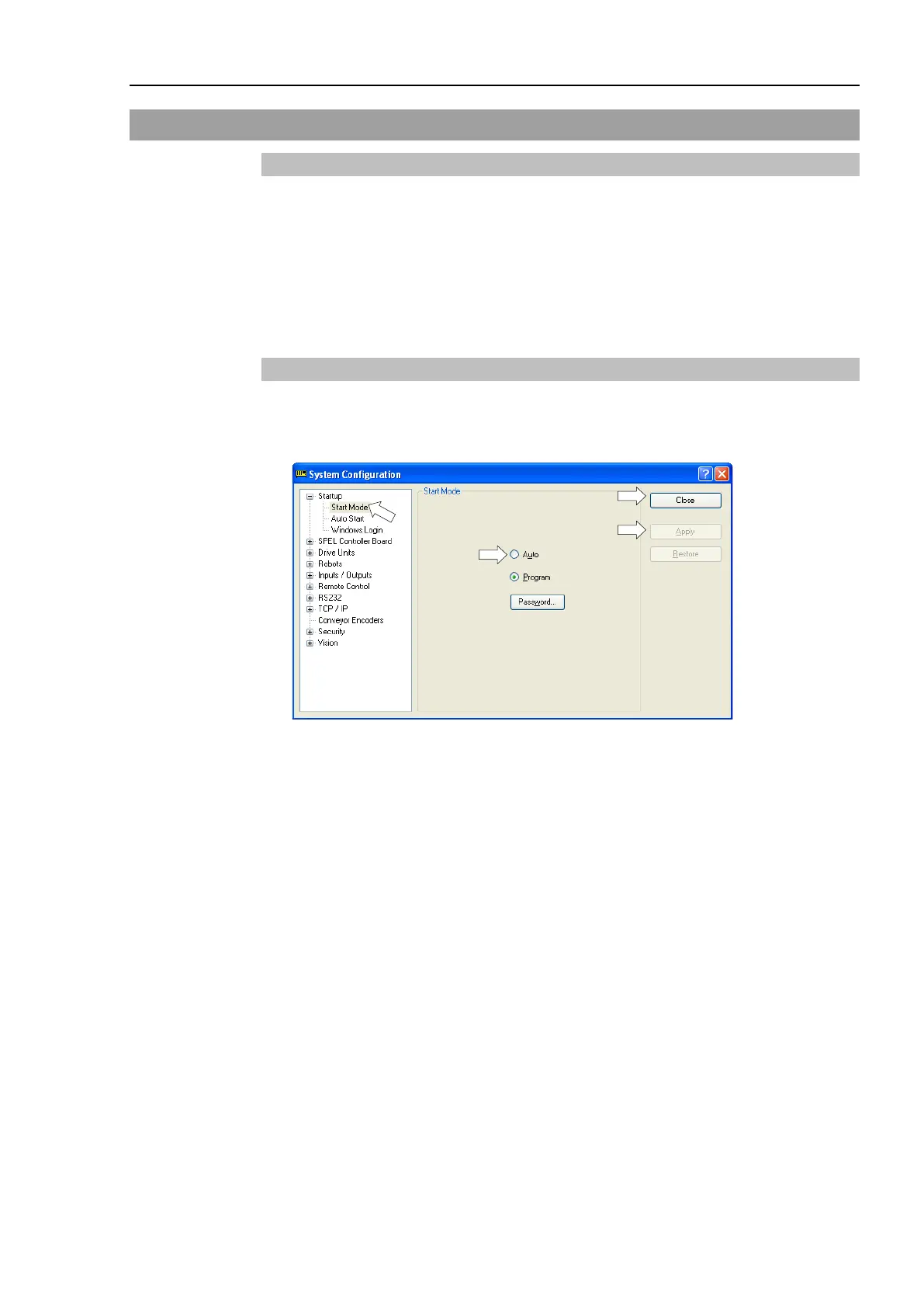
Switch the Start mode to Auto mode (AUTO).
(1) Select EPSON RC+ 6.0 menu | Setup | System Configuration to display the [System
Configuration] dialog.
(2) Select [Startup].
(3) Select [Start Mode]-<Auto> button.
(4) Click the <Apply> button.
(5) Click the <Close> button.



 To Next Page