CHECKING the system
After the project has been validated, uploaded to the module MSC-CB and all safety
components have been connected, the system must be checked for correct operation.
This check is made by forcing a status change for each safety component connected to
MSC to check whether the status of the outputs also actually changes.
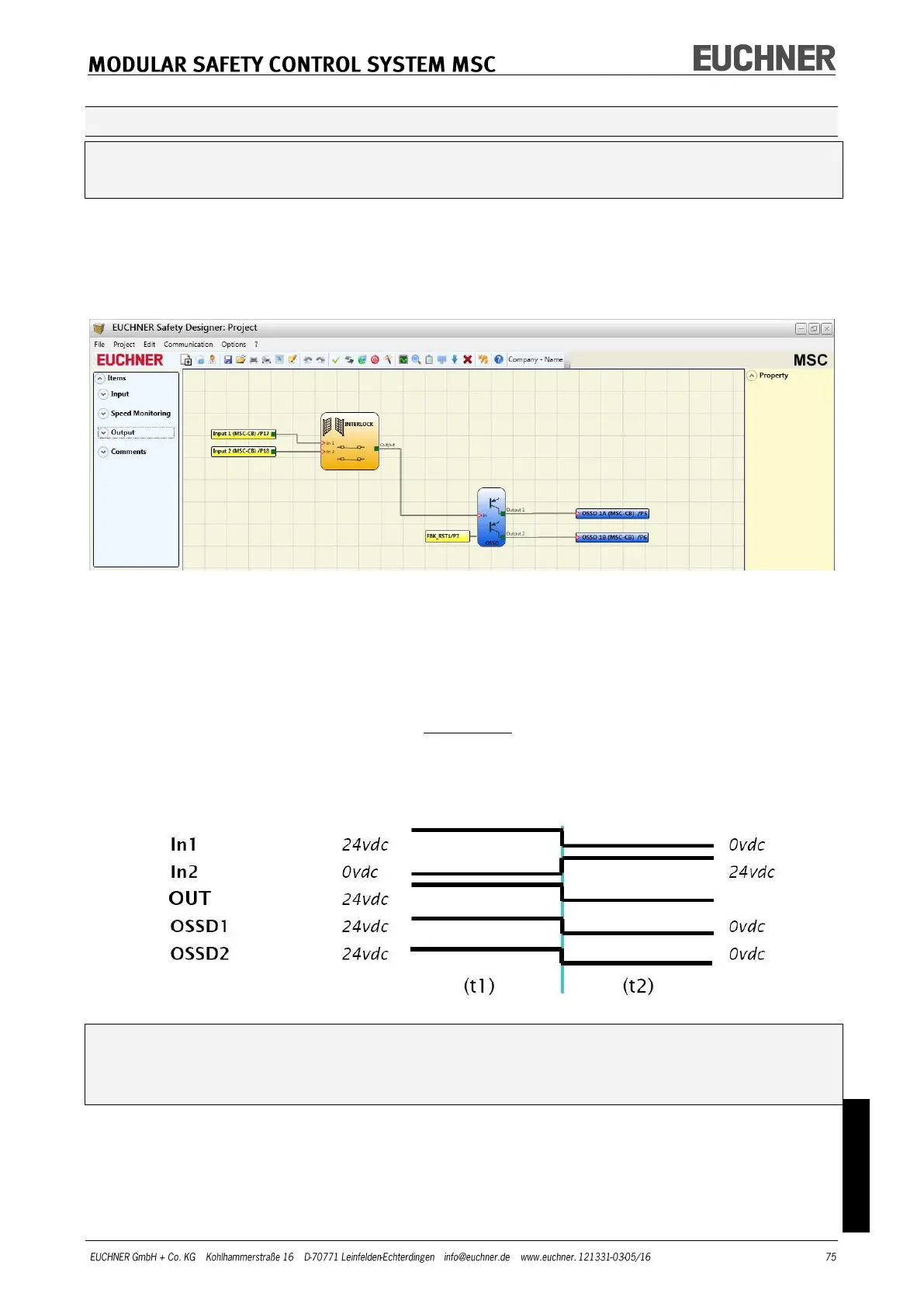
The following example is intended to explain the CHECK process.
Figure 46
(t1) In the normal operating status (INTERLOCK closed) Input1 is closed, Input2 is
open and the INTERLOCK output set to the "HIGH" logic level. In this mode the
safety outputs (OSSD1/2) are active and a supply voltage of 24 VDC is present
at the related terminals.
(t2) If the INTERLOCK is opened physically, the state of the inputs changes and
therefore also the outputs of the INTERLOCK block: (OUT = 0 VDC--->24 VDC).
The state of the safety outputs OSSD1/2 changes from 24 VDC to 0 VDC. If
this change is detected, the moving INTERLOCK is connected correctly.
You will find more detailed information on the correct installation of external sen-
sors/components in the installation manual.
This check must be undertaken for each safety component in the project.



 To Next Page