INPUT OBJECTS
E–STOP
The input status of an emergency stop device can be
checked using the E-STOP function block. If the
emergency stop button is pressed, the OUTPUT out-
put is "0" (FALSE), otherwise the OUTPUT output is "1"
(TRUE).
Parameters
Input Type:
- Single NC – makes it possible to connect emergen-
cy stop devices with one normally closed contact
- Dual NC – makes it possible to connect emergency
stop devices with two normally closed contacts.
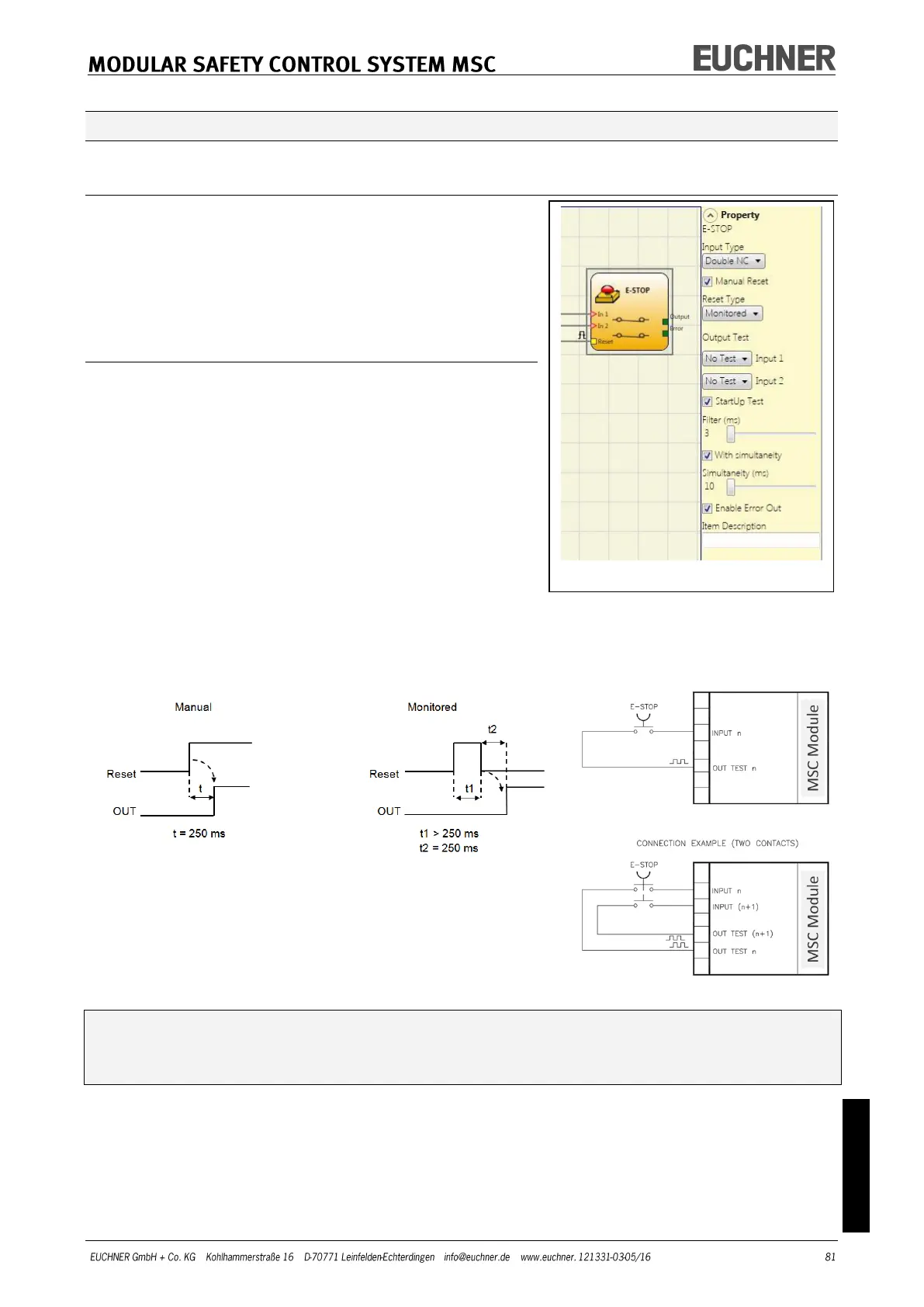
Manual Reset: If selected, a reset can be requested on
every activation of the emergency stop. Otherwise the
activation of the output will correspond directly to
the input conditions.
There are two types of reset: "Manual" and "Monitored". On the selection of the manual
reset, the system only checks the signal transition from 0 to 1. With the monitored reset
the double transition from 0 to 1 and then back to 0 is checked.
WARNING: If Manual Reset is selected, the next Input must be used. Example: If In-
put1 and Input2 are used for the function block, Input3 must be used for the reset
input.
Output Test: Using this option you can select which test output signals are to be sent to
the emergency stop device. Short circuits between the wires can be detected by means of
this additional test. For this purpose it is necessary to configure the test output signals
(from the test output signals available).



 To Next Page