Q.series
Gantner Instruments GmbH
111
5 Configuration → Configuring analog inputs
Procedure
(control using a variable)
1. Click in the column Type of the first free row (V3 = Variable 3
in Fig. 5-2) or mark the row (click on V3) and use Variable
definition > Type.
2. Select Default.
3. Click in the column Variable name and al
locate a name spec-
ifying the purpose of the signal, e.g. Zero_tare (Fig. 5-2).
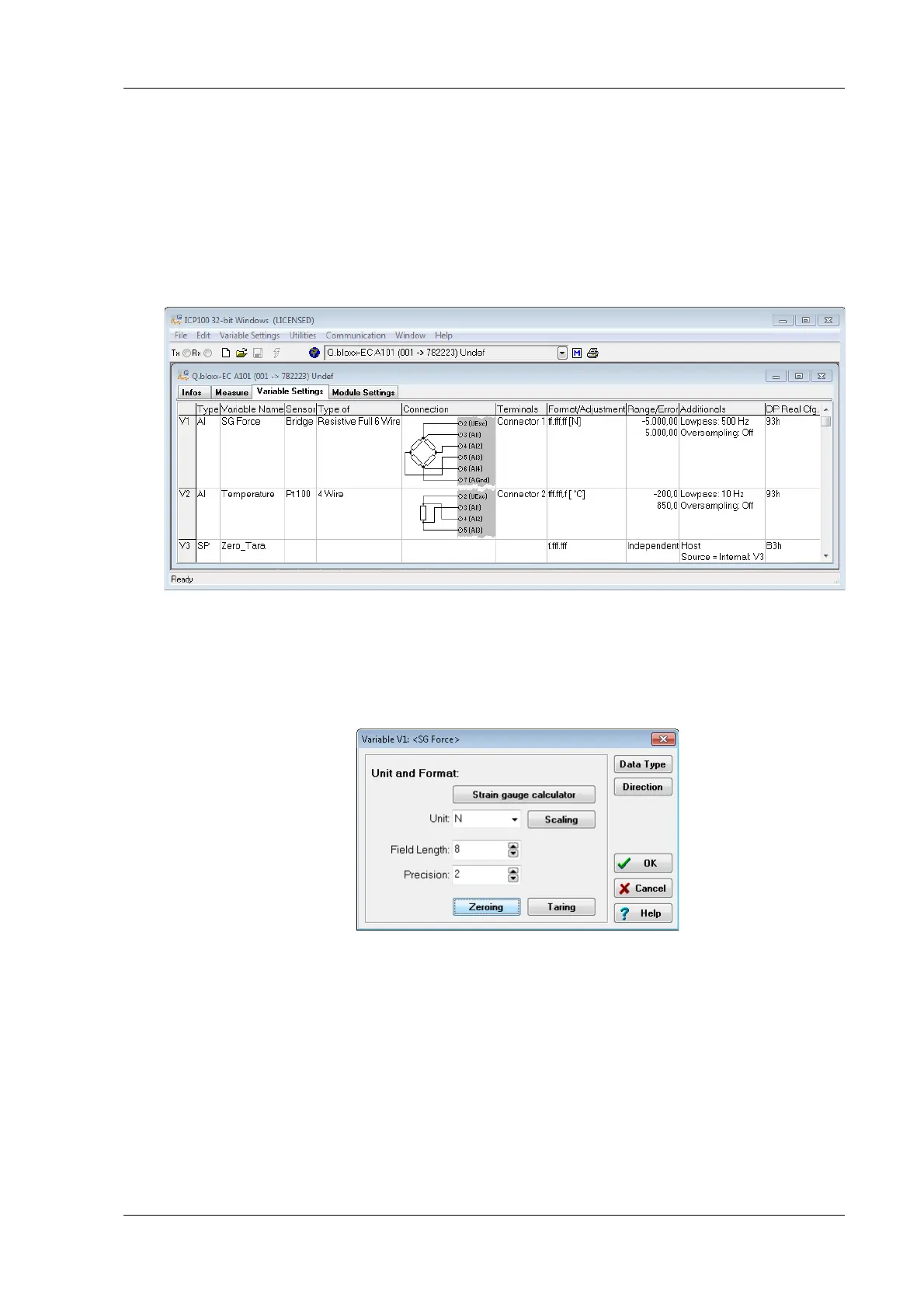
Fig. 5-2 Defining the variable for zero balancing and/or taring.
4. Click in the column Format/balance of the channel for which
zero balancing and/or taring is to be executed, e.g. for the
strain-gauge force sensor in Fig. 5-2.
Fig. 5-3 Dialog for sensor scaling.
5. Click on Direction and specify Input/Output for the channel
so that control is possible (Fig. 5-3).
6. Click on Zero
balance or Tare to configure the relevant pro-
cess (Fig. 5-3).
7. Select the variable created above as the contr
ol variable
(Fig. 5-4).


 To Next Page
 Loading...