122 THE HASSELBLAD MANUAL
● Save Adjustments which sets whether adjustments are saved “manually” where you need to save
each time you fi nd it necessary, “Ask before saving” where you can check before a save is attempted
or “Always save” that saves the current adjustments automatically
● Flash Delay to allow time for older fl ash system to regenerate
● Image Editor allows choosing the software that you want to work with for further editing
● Background Brightness to control the brightness of the graphical interface
Layout switches the layout of the Viewer and and Thumbnail Browser windows.
Adjustments
The original raw image goes through a range of transformations before it becomes the visible
image on the screen. The image that fi rst appears on the screen refl ects the default Imbedded
Adjustment Preset. From this point on, a new set of transformations can be imposed to cre-
ate the fi nal image. In Phocus, these transformations are called adjustments and can include,
for example, color temperature settings, exposure and curve modifi cations, and sharpness
enhancement. A set of adjustments for an image at a given time is referred to as an Adjustment
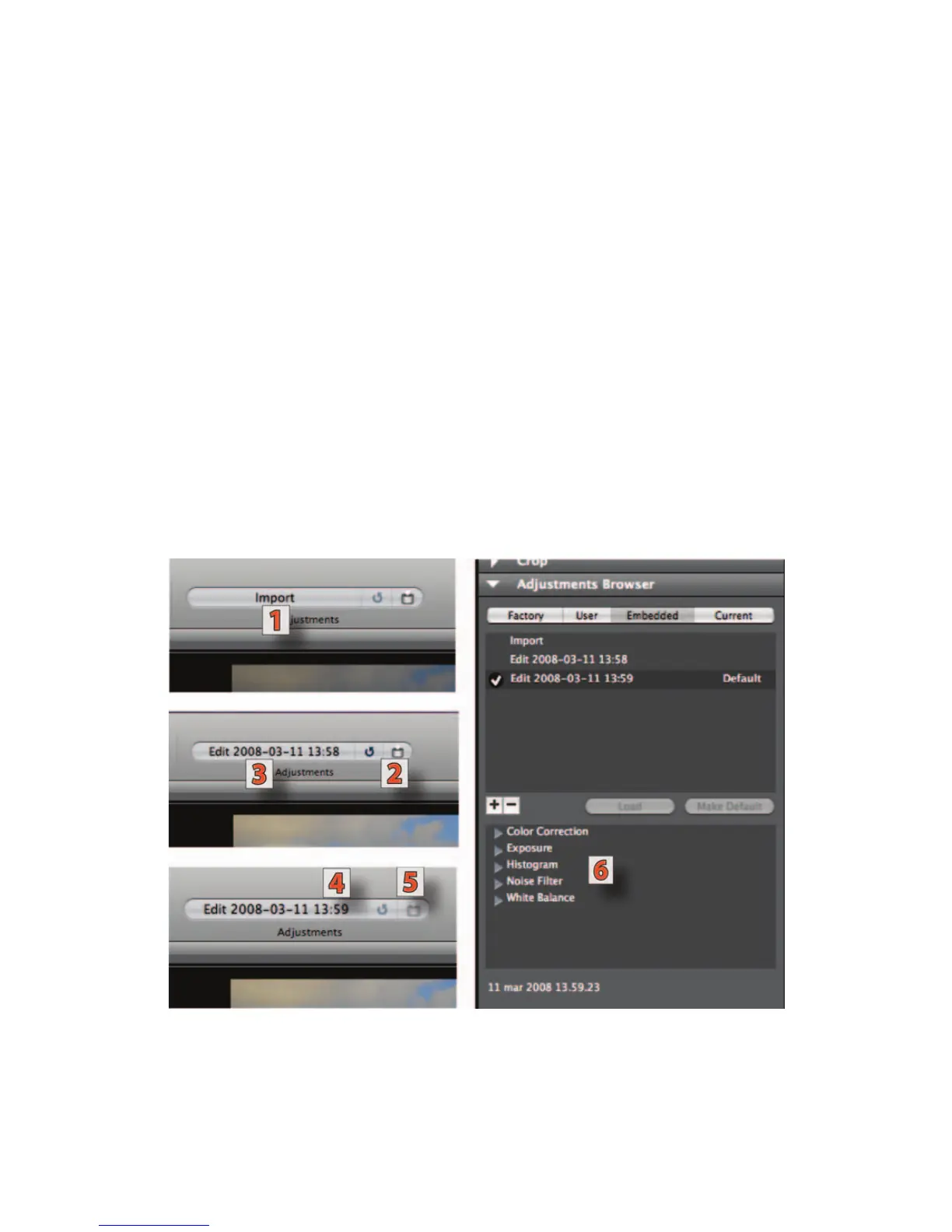
Figure 5-37 Adjustment example. Import sign (1) on the adjustment section, Save Changes
button (2) with the preset name (3).The new preset name after two additional corrections
is shown as (4) with the dimed Save button (5) and the fi ve tools used for the corrections
shown as (6) after clicking on the latest save.



 To Next Page