9 CHANNEL 2.4GHz AIRCRAFT COMPUTER RADIO SYSTEM
101
Spoiler (GLID)
t5IJTGVODUJPOJTUPCFQSPHSBNNFEPOBTXJUDI*UJTPOPSPò'PSQSPHSFTTJWFQSPQPSUJPOBMEFQMPZNFOUPGBOBJSCSBLFXJUI
a slider control, use the spoiler to Elevator function on page 92.
t*GZPVQSPHSBNUIFBJSCSBLFGVODUJPOPOBTXJUDIJOUIJTNFOVUIF"JSCSBLFUP&MFWBUPSGVODUJPONJYQSPHSFTTJWFBJSCSBLF
deployment feature will not work.
t*GZPVSNPEFMEPFTOPUIBWFBOBJSCSBLFUIJTGVODUJPODBOCFBQQMJFETFQBSBUFMZUPUIFBJMFSPOTFMFWBUPSBOEøBQTUPNPWF
them to a “spoileron”, “crow”/“buttery” and other creative ight control positions with the selection of a switch.
Note
Spoiler Function and Landing Mode.
The Spoiler function will be used for a switch to deploy a spoiler ight surface.
Switch Option
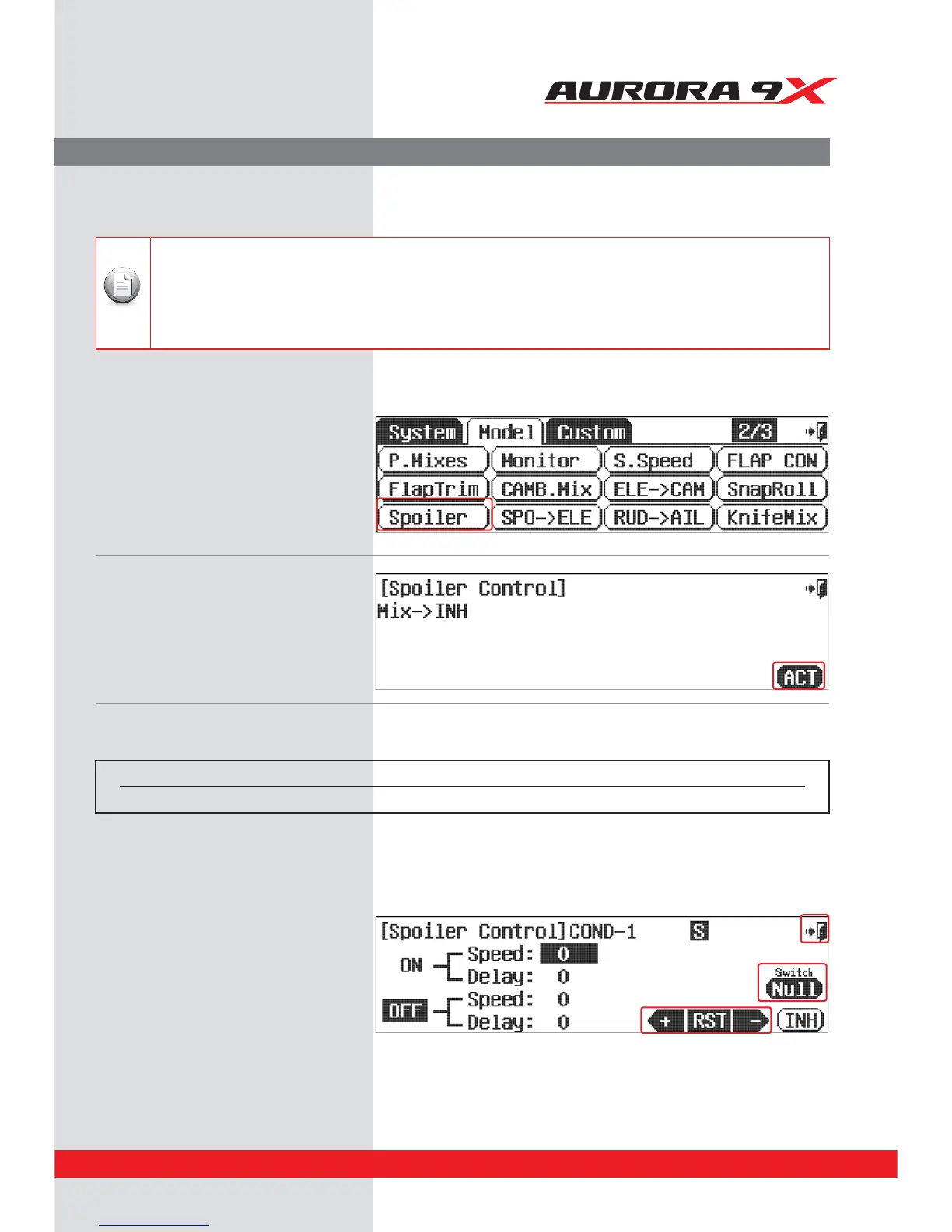
d. Press NULL to apply the Spoiler activation to a two position switch.
Switch type Function
2 positions On or O
- During the model type set-up in the system menu, select Spoiler if your model is to use an airbrake.
This will apply the airbrake to a channel within the model’s program.
a. Select Spoiler from the model menu.
b. Press the ACT icon to enter the Spoiler menu.
e. The Spoiler can mix with other Functions. Put the value of Speed and Delay by using +RST - icon and then proceed to set on the O position.
f. Select a Speed value to have the Spoiler deploy over a selected period of time.
g. Press the Exit icon to go back to the model
menu.



 To Next Page