9 CHANNEL 2.4GHz AIRCRAFT COMPUTER RADIO SYSTEM
118
B-y (GLID)
We suggest you choose the throttle, THR. as the “switch” activating the mix. This gives a linear,
progressive deployment and retraction of the ight control surfaces.
{{
Tip
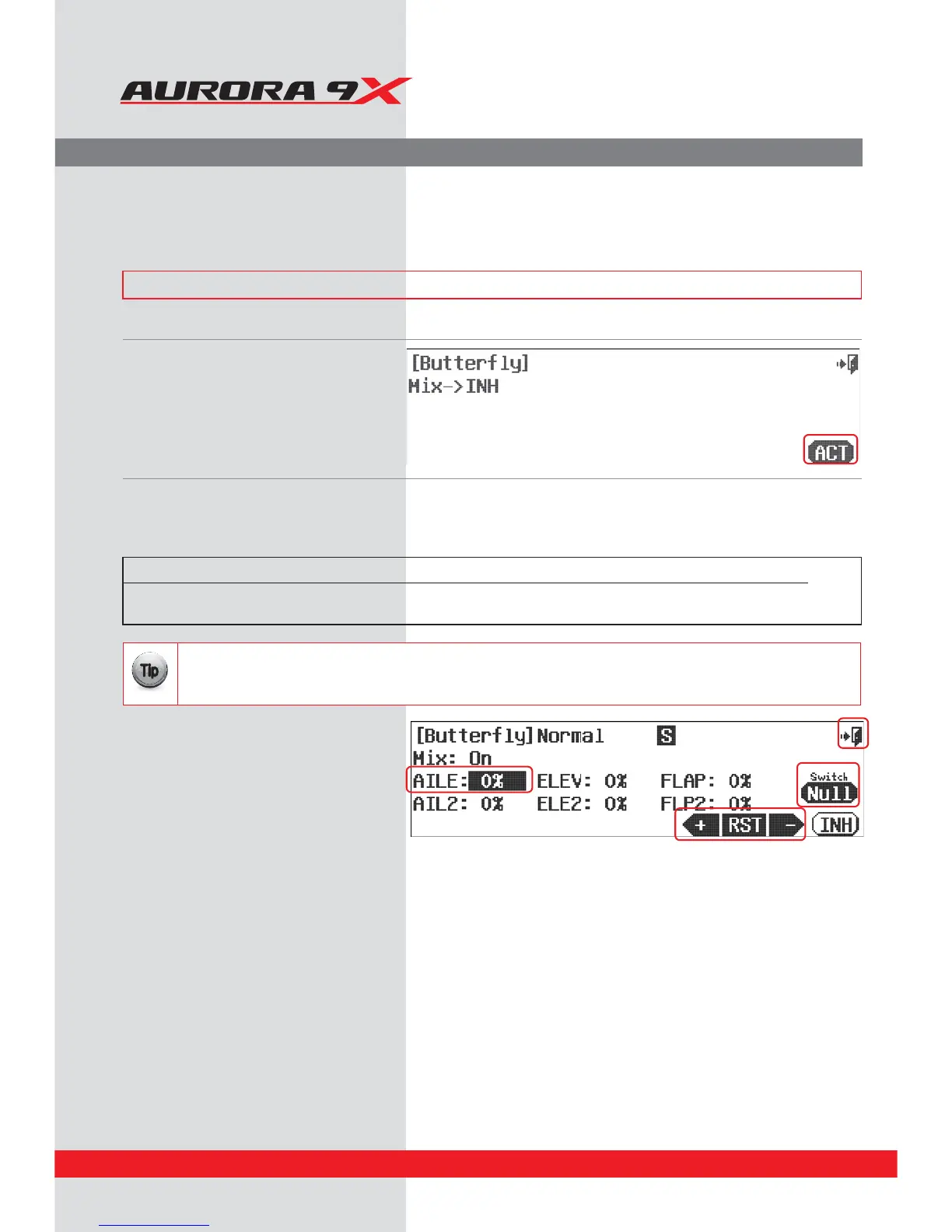
a. Select B-Fly from the model menu.
b. Press ACT to activate the
Buttery control feature menu.
Buttery or Crow Mix.
Buttery, also known as “Crow” mixing is used to land slippery gliders easier and with greater accuracy.
The mix is usually activated with the linear action of the throttle stick which drops the aps, raises the ailerons and
employs a bit of up elevator to compensate for the pitch down created by all the additional control surface drag.
### This function can be inuenced by the ight condition feature ###
Switch Option
c. Select a 2 position switch and/or the throttle stick to activate the buttery mix. Choose a “cut” point if you wish,
and apply an in ight adjustment switch by pressing NULL and following the switch activation process.
d. Use the +RST- icon to set a movement value for
the aileron, elevator and aps. Move the throttle
stick to see the eect of the movement values
you selected for the ight control surfaces.
e. Select the Exit icon to return to the model menu.
Switch type Function Cut Function VR adjustment
2 position Variable function Cut control choice Fine tuning control choice
and/or throttle



 To Next Page