9 CHANNEL 2.4GHz AIRCRAFT COMPUTER RADIO SYSTEM
Pitch and Throttle Curves (HELI)
Those wishing a “pitch hovering trim” and “throttle hovering trim” capability will nd it within their respective (adjust switch
menu). More on this at the end of this section.
Note
P. Curve and T. Curve
In the Aurora 9X, both the pitch AND throttle curve functions are on the same menu, IF both pitch and throttle curve
functions are “active”. Additionally both menus are dened the same way, so to avoid repetition we will explain both
throttle and pitch curve menus here.
If you have a collective pitch heli, pitch and throttle curve manipulation is mandatory to achieve the maximum
performance capability from the machine.
The Aurora 9X can set up 7 points whenever you want for pitch curve, throttle curve and support the acceleration and
exponential curve.
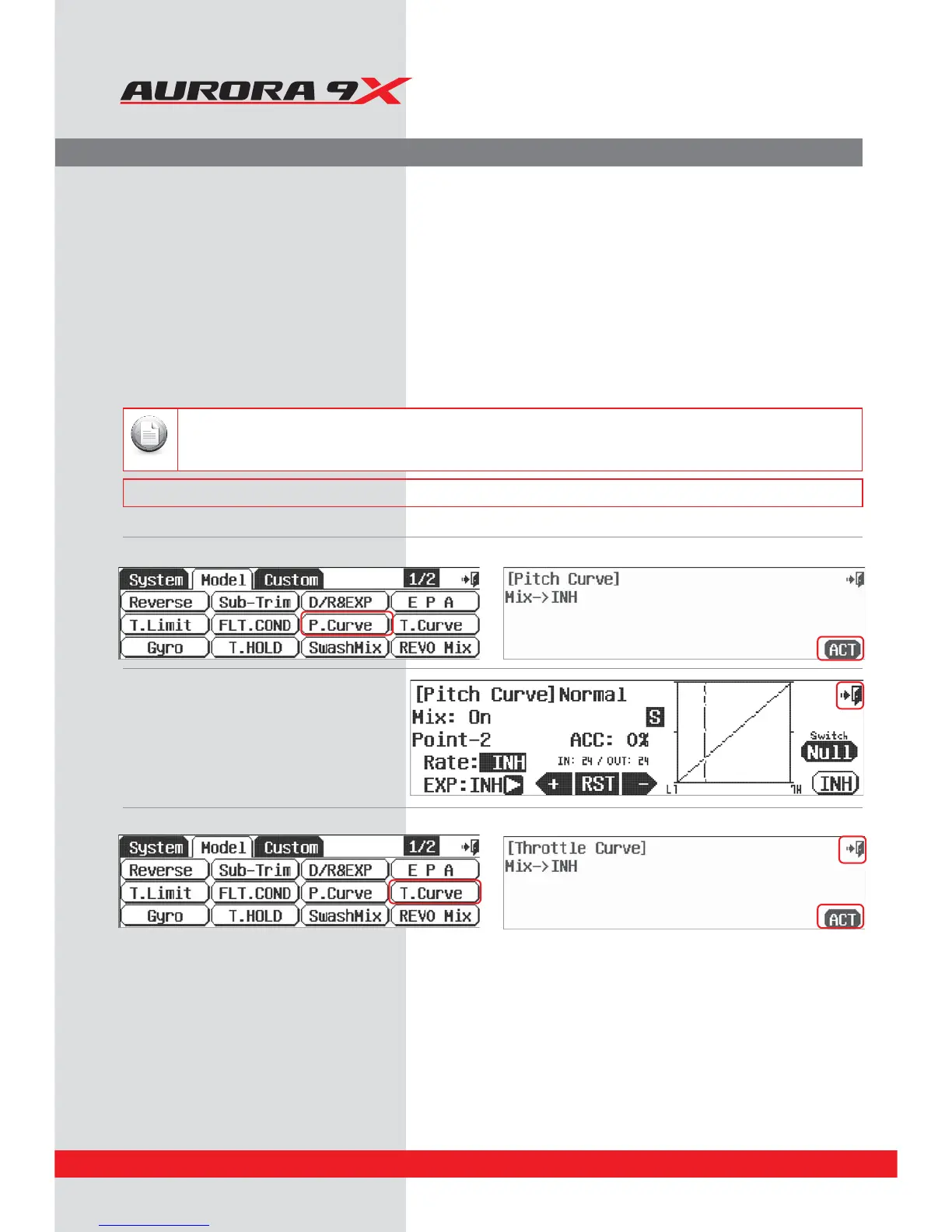
To activate both Pitch and Throttle curve menus:
a. Press P. C u r v e in the model menu. b. Press ACT to activate the Pitch Curve menu.
c. Press the Exit in the upper right corner of the
screen to return to the model menu.
d. Press T. Curve in the model menu. e. Press ACT to activate the throttle curve feature menu.
### This function can be inuenced by the ight condition feature ###
130



 To Next Page