9 CHANNEL 2.4GHz AIRCRAFT COMPUTER RADIO SYSTEM
Pitch and Throttle Curves (HELI)
Throttle and pitch adjust feature
Program the LT, CT and RT VR switches to work as in-ight adjustment controls for 5 dierent throttle and pitch curve adjustment
features. These adjustment menus are located in the Pitch and throttle switch set-up menus.
Throttle curve adjust options include;
1. Hover adjust
2. Hover with pitch adjust
Pitch curve adjust options include;
1. Hover adjust
2. High pitch adjust
3. Low pitch adjust
Note
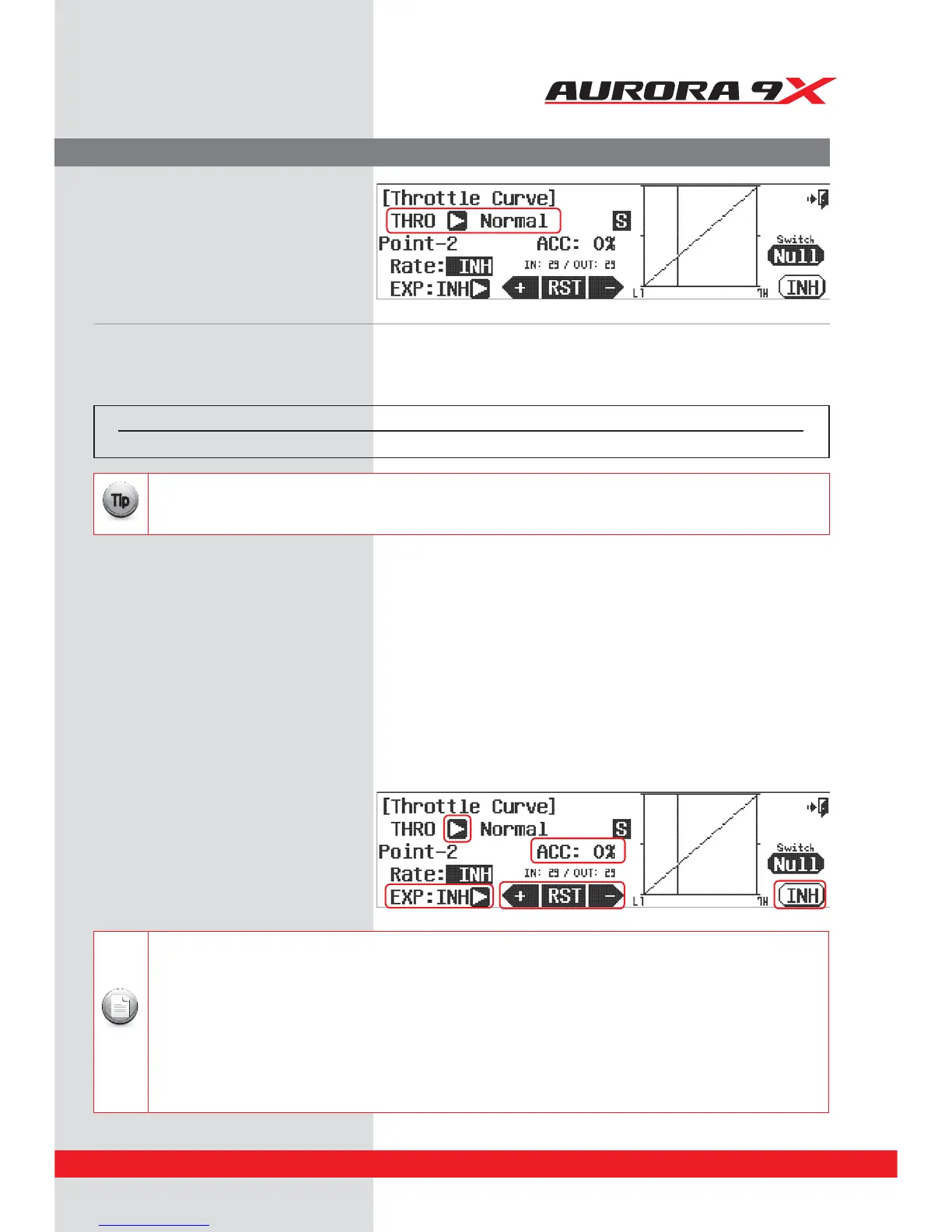
f. Note the THRO arrow NORMAL line on the menu.
Pressing the arrow will cycle you to the
Throttle Curve menu.
Switch Option and in ight Fine Trim Adjustment Switch Function.
g. To select a 2 or 3 position switch that will allow you to program multiple curve values, press NULL and follow the
switch activation process. This is also the menu to apply the hovering pitch and throttle controls to the VR switches.
h. Moving the throttle stick will change the location of the vertical line. This line represents the throttle stick position and lets you choose
which cure point you want to adjust. Press the +RST- icon set point using the +RST- icon to adjust.
i. INH (turn o), or ACT (turn on) a point by using the throttle to place the graph line through the point you wish to change, press RST.
j. Add an exponential curve from one point to another by pressing the Arrow next to the EXP: INH icon and
have it switch to EXP: ACT. This activates the expo option between it, the prior and the next point.
Use the +RST- icons to add a value creating a curve.
k. Change the activation speed with the ACC : 0% icon, or acceleration feature.
Again using the throttle to place the graph line through the point you wish to change,
use the +RST- icons to change the acceleration value.
l. Select the Exit icon to return to the model menu.
Switch type Function VR Adjust
2 or 3 position Multiple values Pitch and Throttle
You don’t have to set a switch to have multiple curves at this point. Many users will choose to use the ight conditions /
Idle-Ups to select between dierent curve values as the ight condition function will also inuence the gyro, governor,
dual and exponential rates plus many other critical mixes and functions.
{{
Tip
131



 To Next Page