9 CHANNEL 2.4GHz AIRCRAFT COMPUTER RADIO SYSTEM
Hitec 2.4GHz Optima and Minima Series Receiver
Optima and Minima Series Receiver Link (ID-Setting or Bind)
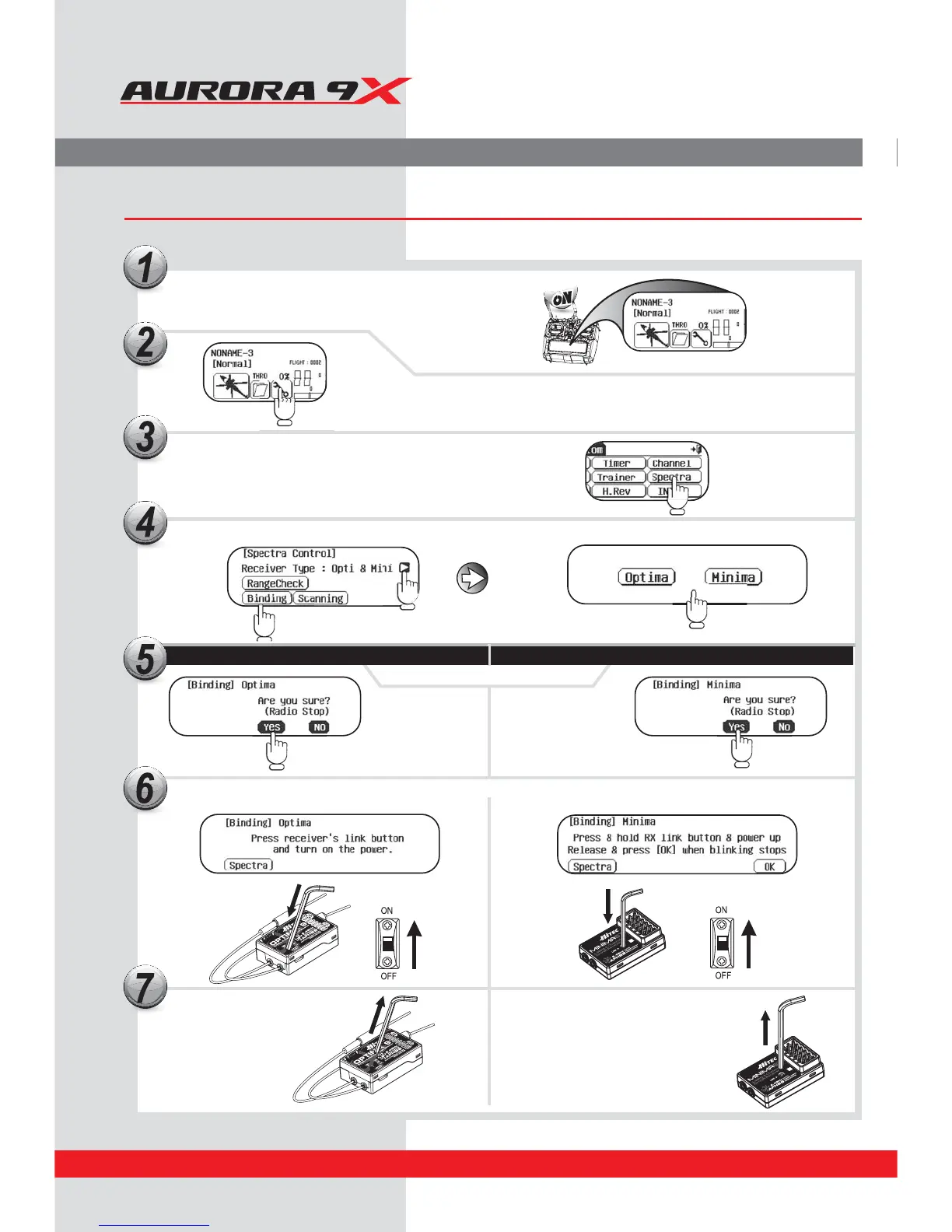
Turn On the transmitter, and touch the “Yes” icon
in Transmitter.
Touch the System menu.
Touch the “Spectra” icon.
Release the link button.
Both RED and BLUE LEDs will be blinking rapidly
to nd the transmitter signal.
Release the link button.
2.4GHz 6 Channel
Aircraft Receiver
Press and hold the link button on the Receiver and turn on the power.
Touch the “arrow” to select the type of receiver you wish to bind to, then select either Optima or Minima.
OPTIMA
MINIMA
Touch “Yes” For Binding
2.4GHz 6 Channel
Aircraft Receiver
20



 To Next Page