9 CHANNEL 2.4GHz AIRCRAFT COMPUTER RADIO SYSTEM
Hitec 2.4GHz System
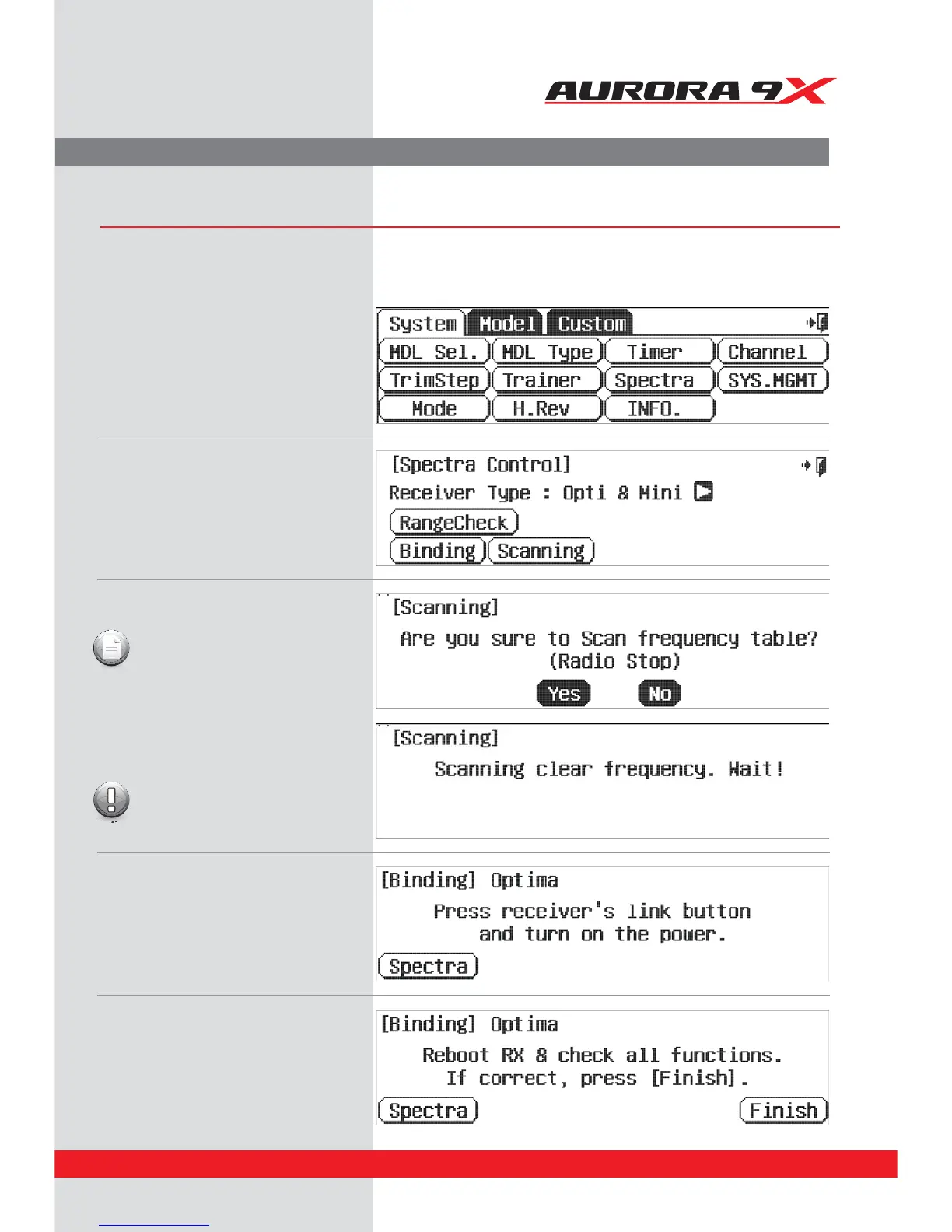
Scan Mode
In Scan Mode the transmitter and receiver will scan all available channels every time you turn it on. It will then choose the cleanest
frequencies to use. Scan Mode is preferable to use when ying in a crowded 2.4GHz environment.
a. From the System menu function choices,
select, Spectra.
b. Press the Scanning icon.
c. Press the “Yes” icon.
The radio will now scan for a clear frequency
table.
d. Once scanning is complete press the receiver’s
link button and turn on the power.
Note
The radio will stop transmitting
during the scanning operation.
While scanning is in progress you must
leave the transmitter alone. Do not push
any icons, buttons, switches or sticks.
Caution
e. If Scan Mode link is successful you will be
prompted to reboot the receiver.
f. Check to see that all functions are operating
correctly. If they do, press Finish. You now have
successfully bound your receiver in scan mode.
25



 To Next Page