9 CHANNEL 2.4GHz AIRCRAFT COMPUTER RADIO SYSTEM
Needle (HELI)
Carburetor Mixture Adjustment.
The Needle function is really two features: one is a manual needle adjustment independent of a mix. This is done by
moving the LS slider control. The goal is to lean or richen the fuel mixture in relation to the blade pitch values. The
second is a switched, automatic mix between a mixture control servo of a glow or gas heli motor, and the blade pitch.
### This function can be inuenced by the ight condition feature ###
There are two ways to activate this mix.
1. Use a slider. The default is the LS slider.
2. Direct mix to the pitch function activated with throttle stick movement.
a. Select Needle from the model menu
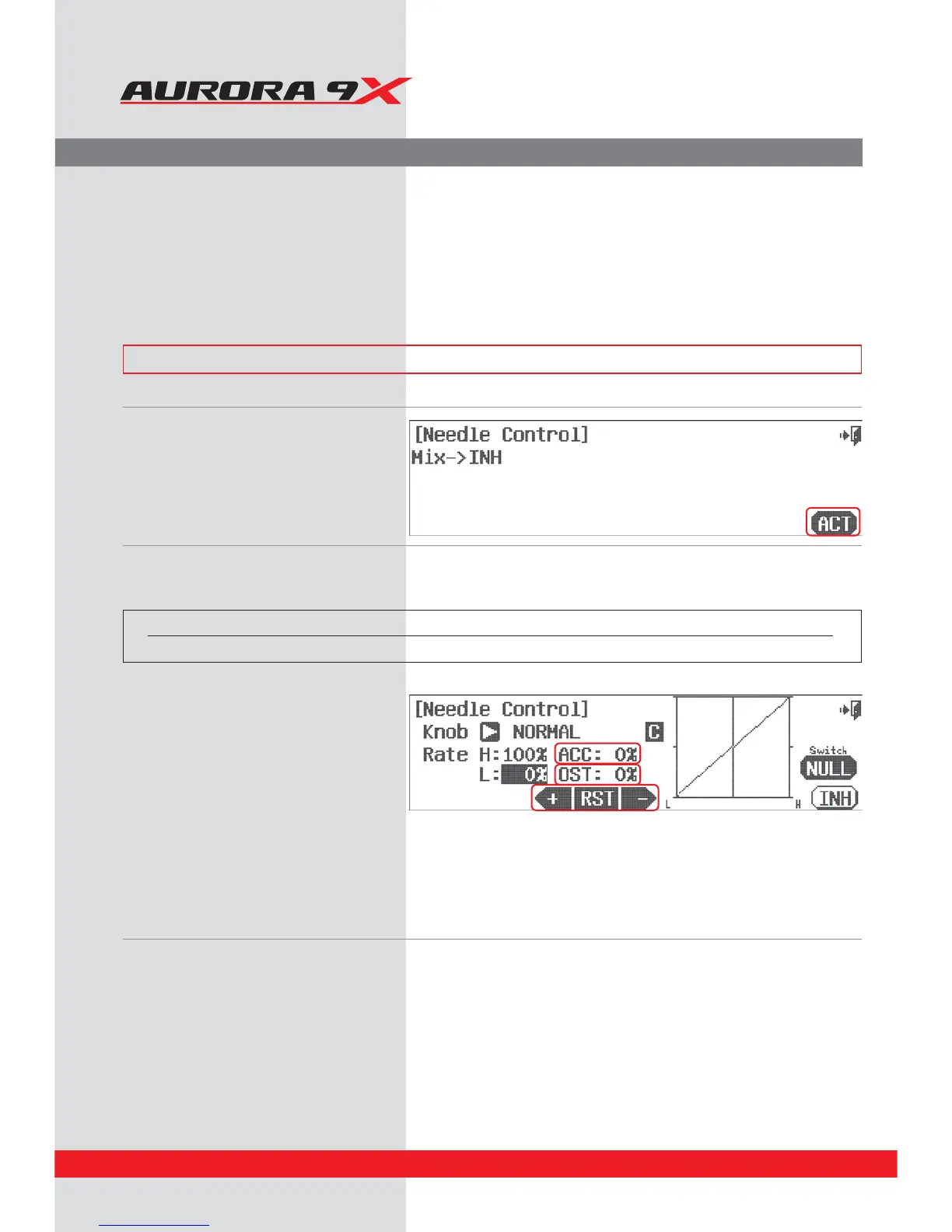
b. Press ACT.
Switch Option
c. To select a 2 or 3 position switch that will allow you to program multiple values and apply an in-ight adjustment switch,
press NULL and follow the switch activation process.
Direct needle control method
d. The rst feature noted is the KNOB control of the
needle mix. Move the LS slider and see the graph
line shift across the screen. Use it to highlight the
H or L rate value and use the +RST- icon to apply
a movement value.
e. Try the ACC feature to change the speed of the
mix. Press the ACC : 0% icon. Experiment with
positive and negative values watching the results
on your model.
f. Use the OST : 0% (oset) feature to manipulate
the curve even more.
Mix to pitch method
g. Here we program the rate values for high and low needle servo movement in relation to the blade pitch movement.
Move the throttle stick to highlight the H or L position and use the +RST- icon to set a value for the high and low position.
h. Try the ACC feature to change the speed of the mix. Press the ACC: 0% icon.
Experiment with positive and negative values watching the results on your model.
i. Use the OST : 0% (oset) feature to manipulate the curve even more.
j. Select the Exit icon to return to the model menu.
Switch type Function VR Adjustment
2 or 3 position Multiple values Fine tunning control choice
132


 To Next Page