9 CHANNEL 2.4GHz AIRCRAFT COMPUTER RADIO SYSTEM
RUD-THR
(HELI)
Tail Rotor to Throttle Mix.
This mix is between the rudder, or tail rotor input and the throttle. It is generally used to raise or lower the
throttle RPM slightly to compensate for tail rotor dynamics.
### This function can be inuenced by the ight condition feature ###
a. Select RUD-THRO from the model menu.
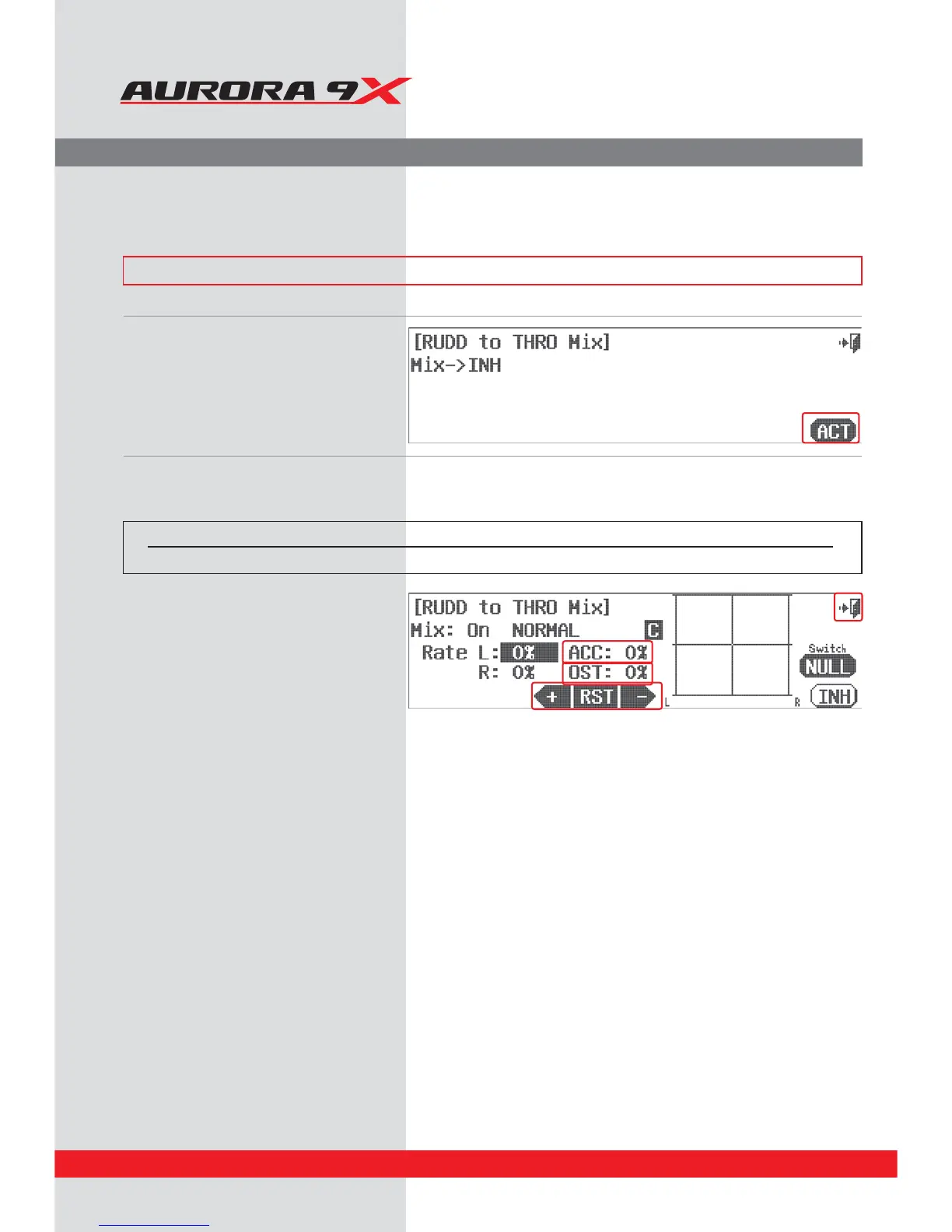
b. Press the ACT icon to enter the
rudder to throttle mix menu screen.
d. Move the rudder stick side to side to highlight
the rate value you want to adjust.
e. Use the +RST- icons to add a throttle value for
each side of the rudder movement input.
Note how the throttle input movement values
are shown on the graph.
f. Use the ACC feature to change the speed of the
mix. Press the ACC : 0% icon. Experiment with
positive and negative values watching the
results on your model.
g. Additional adjustment can be applied to the
mix using the Oset, or OST : 0% value.
h. Press the Exit icon to exit back to the model
menu.
Switch Option and In–Flight Fine Trim Adjustment Switch Function
c. To select a 2 or 3 position switch that will allow multiple mix values and to select an “in-ight” ADJUSTMENT switch,
press NULL and follow the switch activation process.
Switch type Function VR adjustment
2 or 3 position Multiple values Fine tuning control choice
134



 To Next Page