9 CHANNEL 2.4GHz AIRCRAFT COMPUTER RADIO SYSTEM
5PIFMQZPVHFUUIFNBYJNVNCFOFöUGSPNZPVS"VSPSB9XFXJMMHVJEFZPVUISPVHIBTJNQMFTFUVQPGBDPNNPODPMMFDUJWFQJUDI
$$1.IFMJ5IFPQFSBUJPOTTIPXOEVSJOHUIJTFYFSDJTFXJMMIFMQZPVMFBSONBOZPGUIFCBTJDQSPHSBNNJOHTUFQTSFRVJSFECZNPTUPG
UIF"VSPSB9hTGFBUVSFT
Channel assignments are:
"JMFSPOPSiSPMMwDZDMJD
&MFWBUPSPSiQJUDIwDZDMJD
5ISPUUMF
3VEEFSPSUBJMSPUPSQJUDI
(ZSPGVODUJPO
1JUDI$PMMFDUJWF
"GUFSJOTUBMMJOHUIFTFSWPTBOEBDDFTTPSJFTJOZPVSIFMJGPMMPXUIFTFTUFQTUPTFUJUVQ
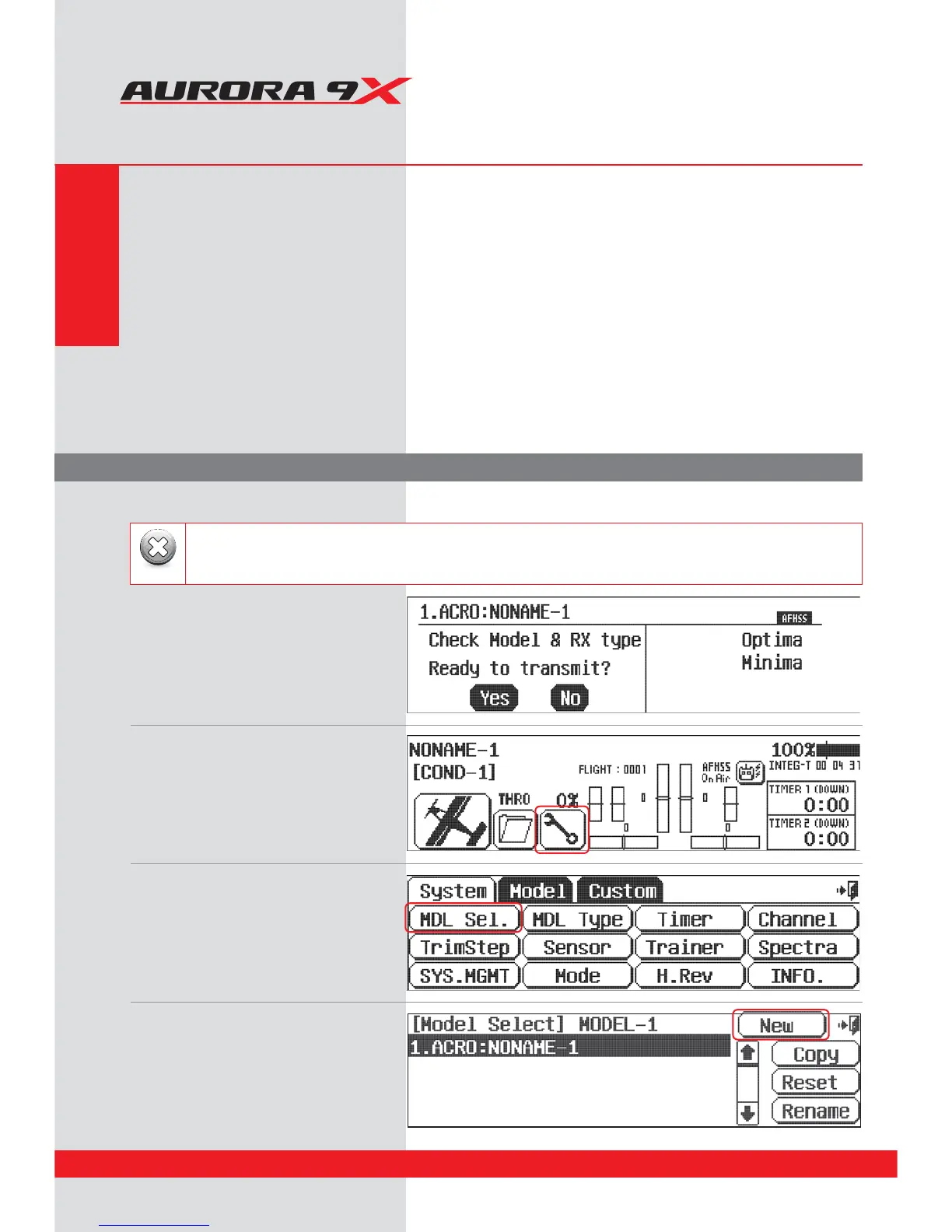
1. Turn on the transmitter; do not turn on the Heli.
2. The rst screen is the transmit option,
select No.
5. At the model selection screen press, New.
3. This is the home screen;
select the wrench icon for the System menu.
4. Note the System menu function choices,
select, MDL Sel .
For safety reasons during this set-up exercise on an electric powered heli please remove the blades and/or un-plug the
motor from the speed control.
Warning
System Programming Menu
Quick Start Guide to Setting Up a Simple Heli
Section Three
42



 To Next Page