9 CHANNEL 2.4GHz AIRCRAFT COMPUTER RADIO SYSTEM
System Programming Menu
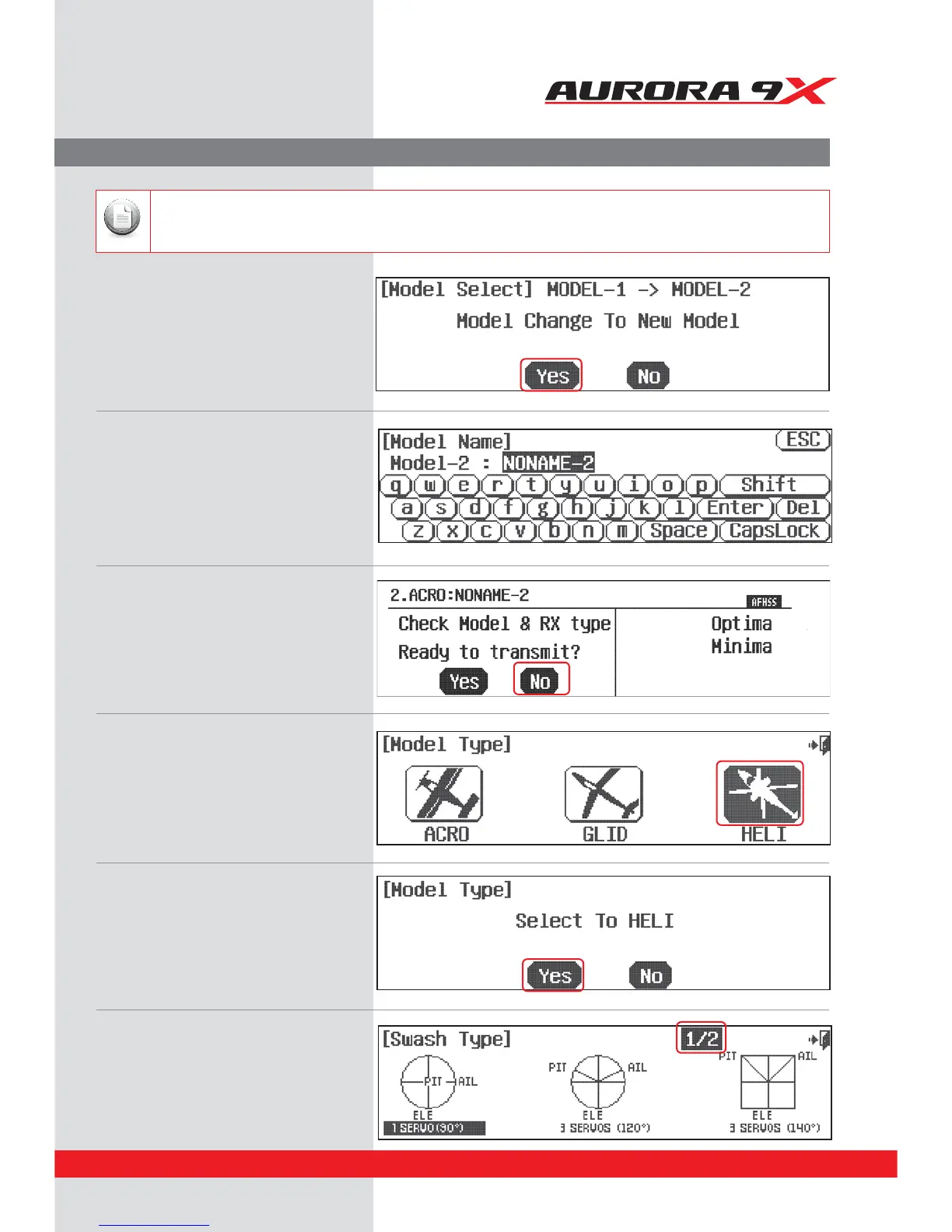
6. Select, Yes to conrm the selection of
a new model.
7. At the model naming menu,
name your new model using the keyboard,
8. Here at the transmit option screen,
press, No. We do not wish to transmit yet.
B1SFTT4IJGUUPTFFUIFPUIFSDIBSBDUFST
C8IFOEPOFQSFTT&OUFS
10. Select change to HELI, Yes at the model type
change conrmation screen.
11. Here is the screen that will tell the transmitter
what kind of swash type your heli uses.
9. Next you are prompted to the model type
screen where we select HELI
(the heli icon on the right).
We are programming a new model into the #2 model memory slot, not the model memory one slot. For the purpose of
this exercise it will ensure a fresh model memory with no existing programming.
Note
43



 To Next Page