9 CHANNEL 2.4GHz AIRCRAFT COMPUTER RADIO SYSTEM
B'PSPVSTBNQMFIFMJZPVNVTUTFMFDUXIBUTXBTIUZQFZPVSIFMJVTFT.PTUXJMM
TFMFDUPSEFHSFF$$1.TXBTIUZQF$POTVMUZPVSIFMJNBOVBMUPöOEPVU
XIBUTXBTIUZQFZPVSIFMJVTFT5IFOQSFTTUIF4&5JDPO
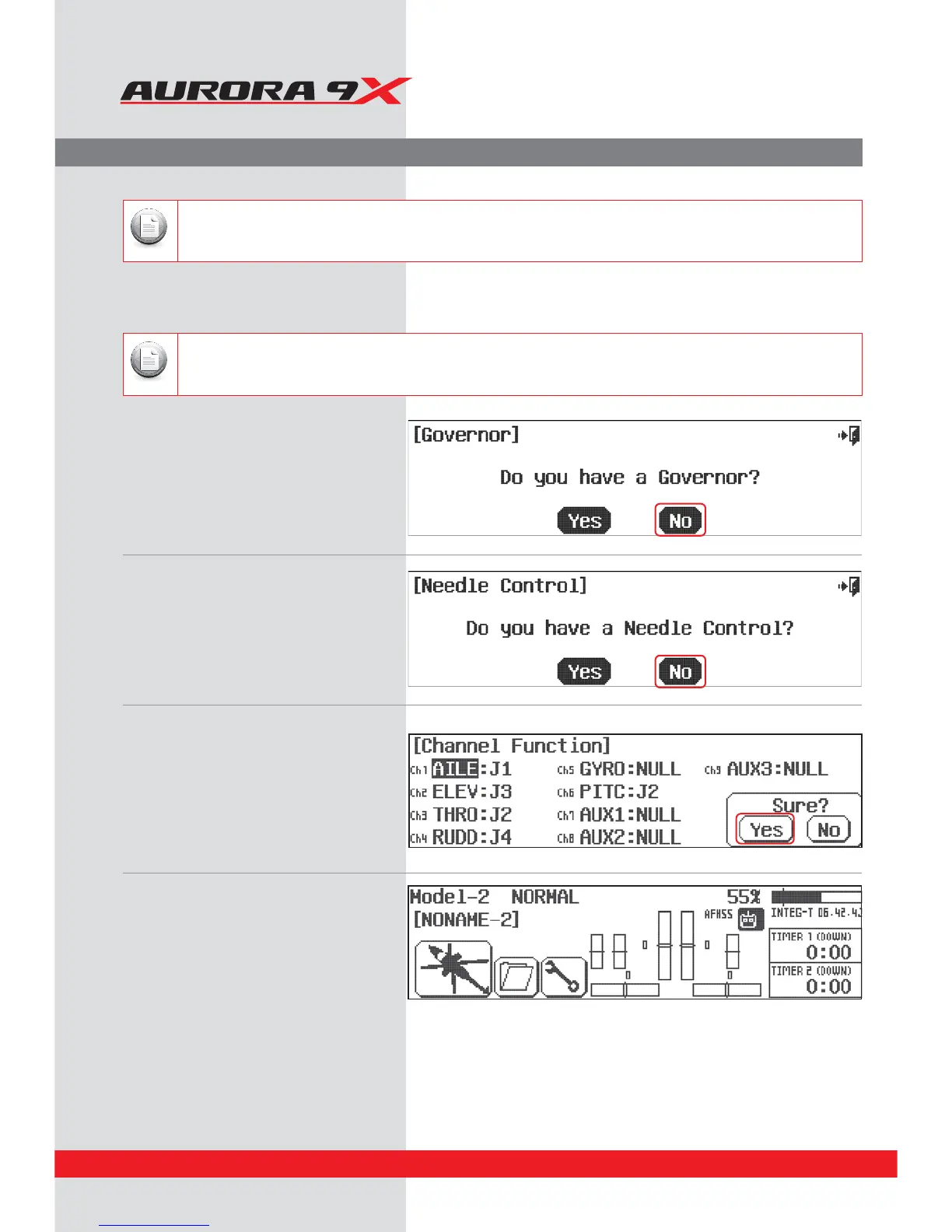
12. Governor? Press No.
13. Needle control? Press No.
15. At the Home page, turn o the transmitter
and prepare your model to be set up.
14. Ok here are the channel assignments,
the radio has selected for you.
They should be appropriate, select Yes.
Note
There is a1/2 icon in the upper right of the screen. This means there are two pages in this menu. Touch the1/2 icon
and note the second screen has even more swash type selections. Many function menus will have more than one
screen of options. Check for the 1/2 icon as you program your heli into the radio.
Note
Depending on what you select in this, and for the following choices of this menu, the radio will automatically
optimize the functions for your choices.
System Programming Menu
44



 To Next Page