9 CHANNEL 2.4GHz AIRCRAFT COMPUTER RADIO SYSTEM
Selecting a Switch
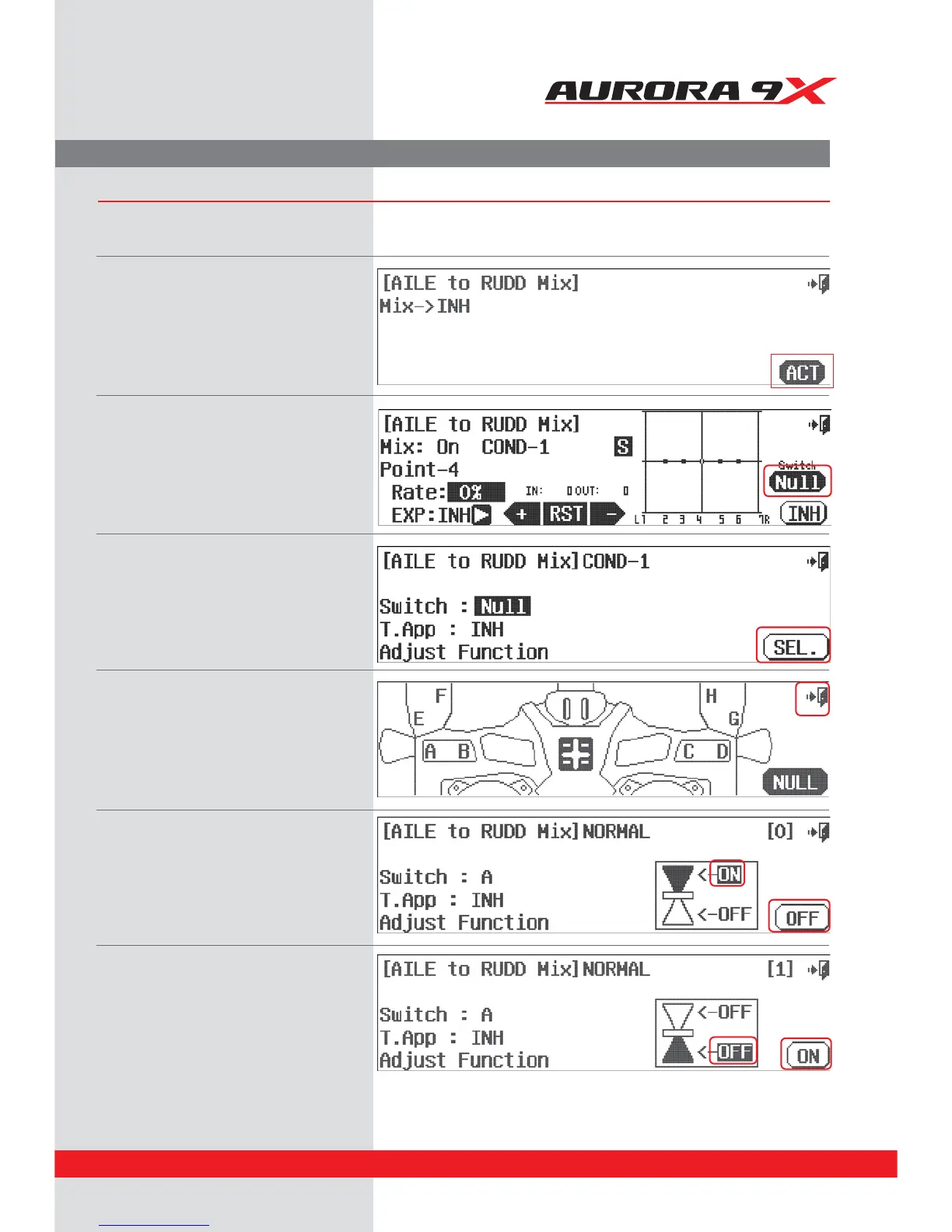
We will use the aileron to rudder mix to set up a two position switch on or o function.
Two position on and o
a. Select the "*-36% icon from the model menu.
b. Press ACT to access the mix menu screen.
c. Press the NULL icon.
d. Press SEL.
e. Let’s put our switch for the aileron to rudder
mix on switch A. Press the A icon, or simply
move switch A.
f. Press the Exit UPSFUVSOUPUIF"*-&UP36%%
mix switch screen.
g. Press the ON icon.
h. Press the OFF icon in the corner of the screen.
i. Select the lower OFF icon.
j. Press the ON icon.
k. Move switch A to see how the icons on the
screen react to this movement.
Note the switch position represented by the
[0] and [1] icons.
77



 To Next Page