9 CHANNEL 2.4GHz AIRCRAFT COMPUTER RADIO SYSTEM
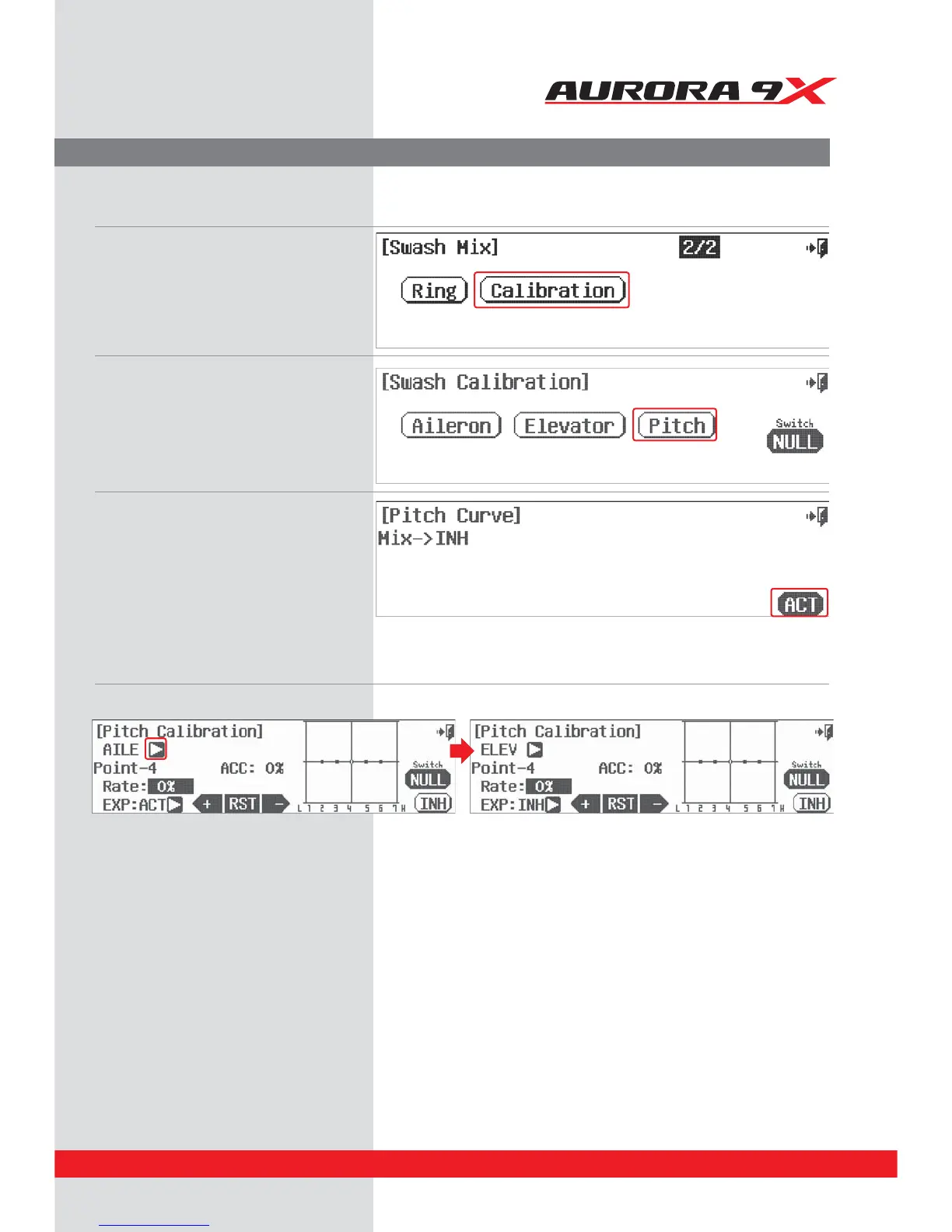
h. In this menu, we can modify the inputs of both the aileron and elevator in relation to the pitch function.
i. Select the AILE arrow to cycle to the ELEV, or elevator menu.
j. Move the elevator stick up and down to note the way it slides against the graph of the pitch line (the horizontal line in the middle with
the little dots). Move the elevator stick over a dot to change the rate value with the +RST- icon.
k. Inhibit (turn o ), or activate (turn on) a point by using the throttle to place the graph line through the point you wish to change,
press RST.
l. Add an exponential curve from one point to another by pressing the arrow next to the EXP: INH icon and have it switch to EXP: ACT.
This activates the expo option between it, the prior and the next point.
m. Use the +RST- icons to add a value creating a curve.
n. Change the activation speed with the ACC : 0% icon, or acceleration feature. Again using the throttle to place the graph line through
the point you wish to change, use the +RST- icons to change the acceleration value.
. Select the Calibration icon.
i. From this intermediate menu,
select the function to adjust.
For our example select Pitch.
j. Select ACT Pitch calibration menu.
Calibration menu
The use of a swash leveling tool is mandatory for the super ne adjustment provided in this menu.
137



 To Next Page