9 CHANNEL 2.4GHz AIRCRAFT COMPUTER RADIO SYSTEM
Trim Link Activation
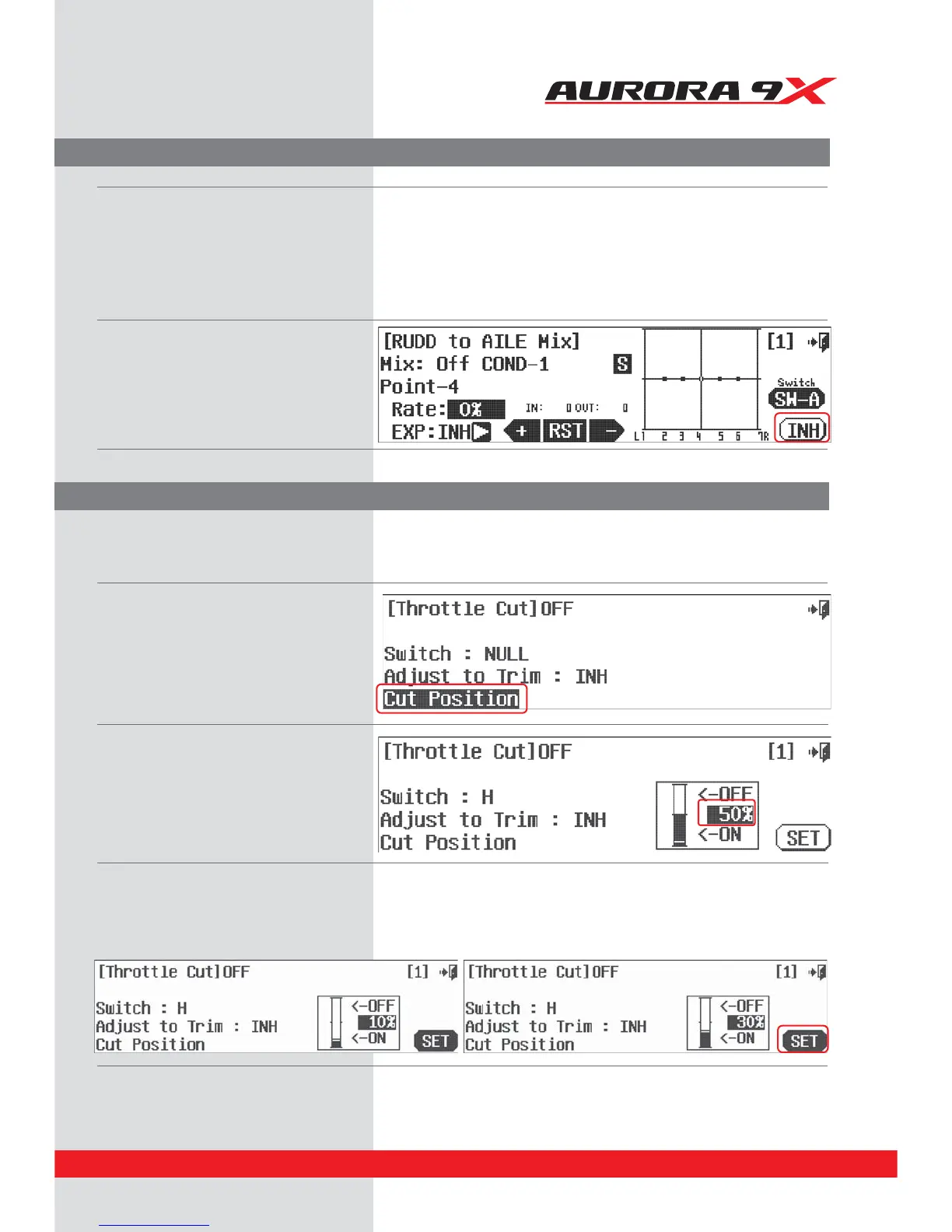
Cut Position set-up
T.APP
5IF5"11PSi5SJN"QQMZwJTBUSJNMJOLGFBUVSFBMMPXJOHUIFMJOLJOHPGUXPøJHIUDPOUSPMUSJNGVODUJPOT
primarily a feature of critical mixing functions.
Again we use the aileron to rudder mix as an example. The default is to have the trims separate.
To activate a trim link between aileron and rudder, so that adjusting the aileron trim will also adjust the rudder trim:
The throttle cut feature is now going to work only when the throttle position is at the lower 1/3rd of the throttle stick travel
stick, and then only when switch H is toggled.
c. Press the 50% icon on the graph.
d. Move the throttle stick to the position you want the throttle cut action to take eect. Note the throttle will drop to the rate position
ZPVQSFWJPVTMZTFMFDUFEXIFOUIFTXJUDI)JTUPHHMFE0/-:8)&/5)&5)3055-&45*$,104*5*0/*4#&-085)&$65104*5*0/ZPV
are about to set.
e. We suggest you move the throttle stick to the 30% position, then press SET.
a. At the rudder /aileron swith menu screen,
press the T.App :*/).
b. Press ACT, the trim link is turned on.
c. Reverse this process to inhibit,
or turn o the trim link.
b. Move the throttle stick up and down, note the
line on the bar graph as it moves.
Cut position is used to set an initiation point or a cut-o point for a specic function.
We will use the Throttle Cut feature in our example.
After selecting the recommended throttle cut switch H, do the following:
a. At the Throttle Cut switch menu screen, press
the Cut Position icon.
83



 To Next Page