9 CHANNEL 2.4GHz AIRCRAFT COMPUTER RADIO SYSTEM
Model Programming Menu
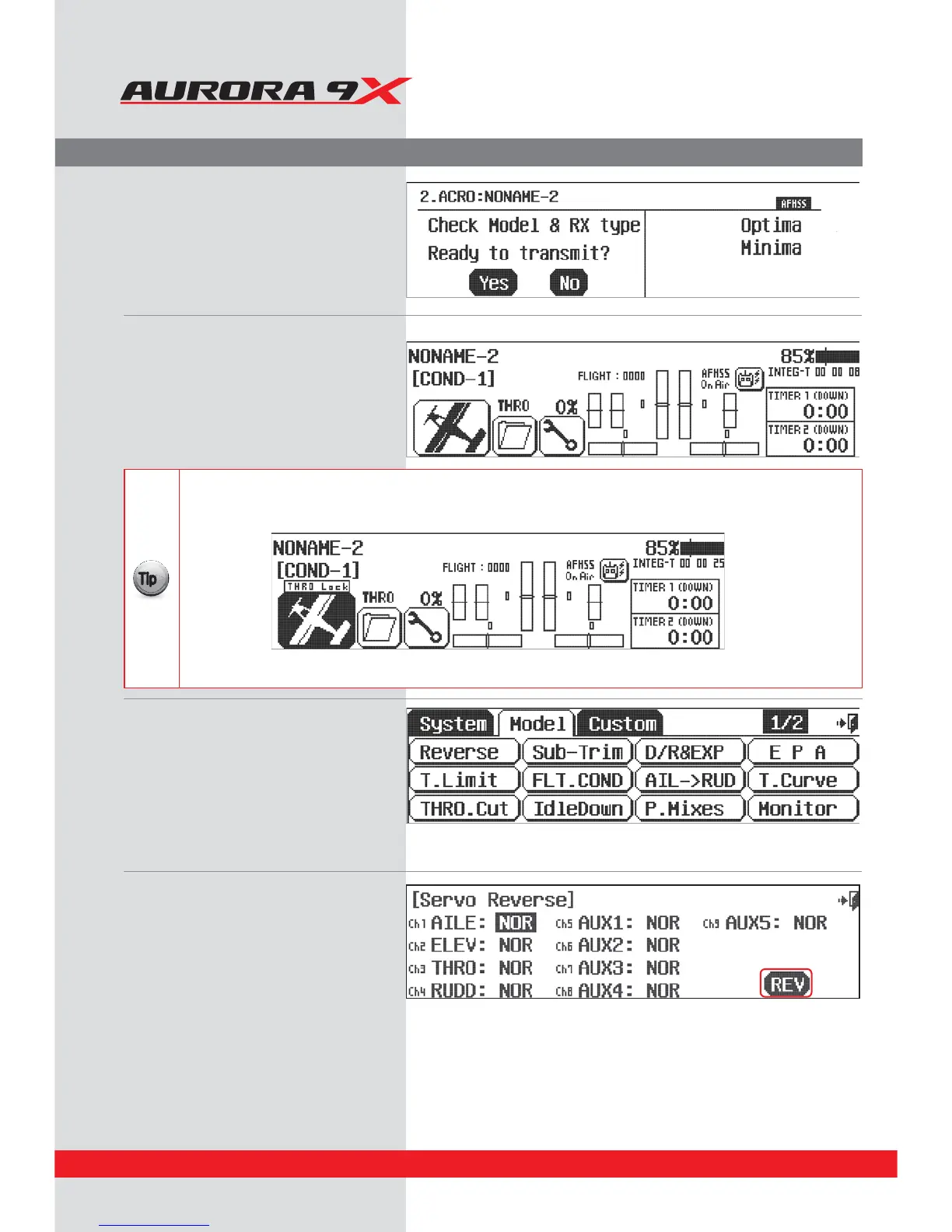
1. Turn on the transmitter,
select Ye s to transmit.
2. At the home page, let’s select some model
functions by pressing the plane icon
at the lower left of the screen
3. This is the main screen. If you select 1/2
ic
on, you will nd out all the setting menus.
The Aurora 9X supports a variety of settings.
4. Select Reverse from the model menu
/PXUVSOPOQPXFSUPZPVSNPEFM8JUIJOBNPNFOUZPVTIPVMEIBWFDPOUSPMPWFSZPVSNPEFMXJUIUIFUSBOTNJUUFS
B.PWFZPVSDPOUSPMTBSFBMMUIFTFSWPTHPJOHJOUIFDPSSFDUEJSFDUJPO
*GOPUTFMFDUUIFDIBOOFMUPSFWFSTFUIFOQSFTTUIF3&7JDPO
C1SFTT:FTXIFOBTLFEi4VSF w
D%PUIJTVOUJMBMMTFSWPUISPXEJSFDUJPOTBSFDPSSFDU
E#BDLVQUPUIFNPEFMNFOVCZTFMFDUJOHUIF&YJUJDPO
Throttle Lock
The Aurora 9X features a "throttle lock" function that can be activated when the transmitter is transmitting a signal.
We encourage you to apply the throttle lock as a safety precaution against "accidental throttle application".
{{
Tip
B5VSOUIFUISPUUMFMPDLPOBOEPòGSPNUIFIPNFQBHFCZQSFTTJOHUIF.PEFMJDPOGPSUXPTFDPOET
5ISPUUMFMPDLJTDPOöSNFEXIFOUIFi5)30-PDLwJDPOJTEJTQMBZFE
38



 To Next Page