9 CHANNEL 2.4GHz AIRCRAFT COMPUTER RADIO SYSTEM
Swash Mix (HELI)
Note
As this is a set-up feature, swash mix is one of the few functions that is NOT inuenced by ight conditions,
idle-up or hold conditions.
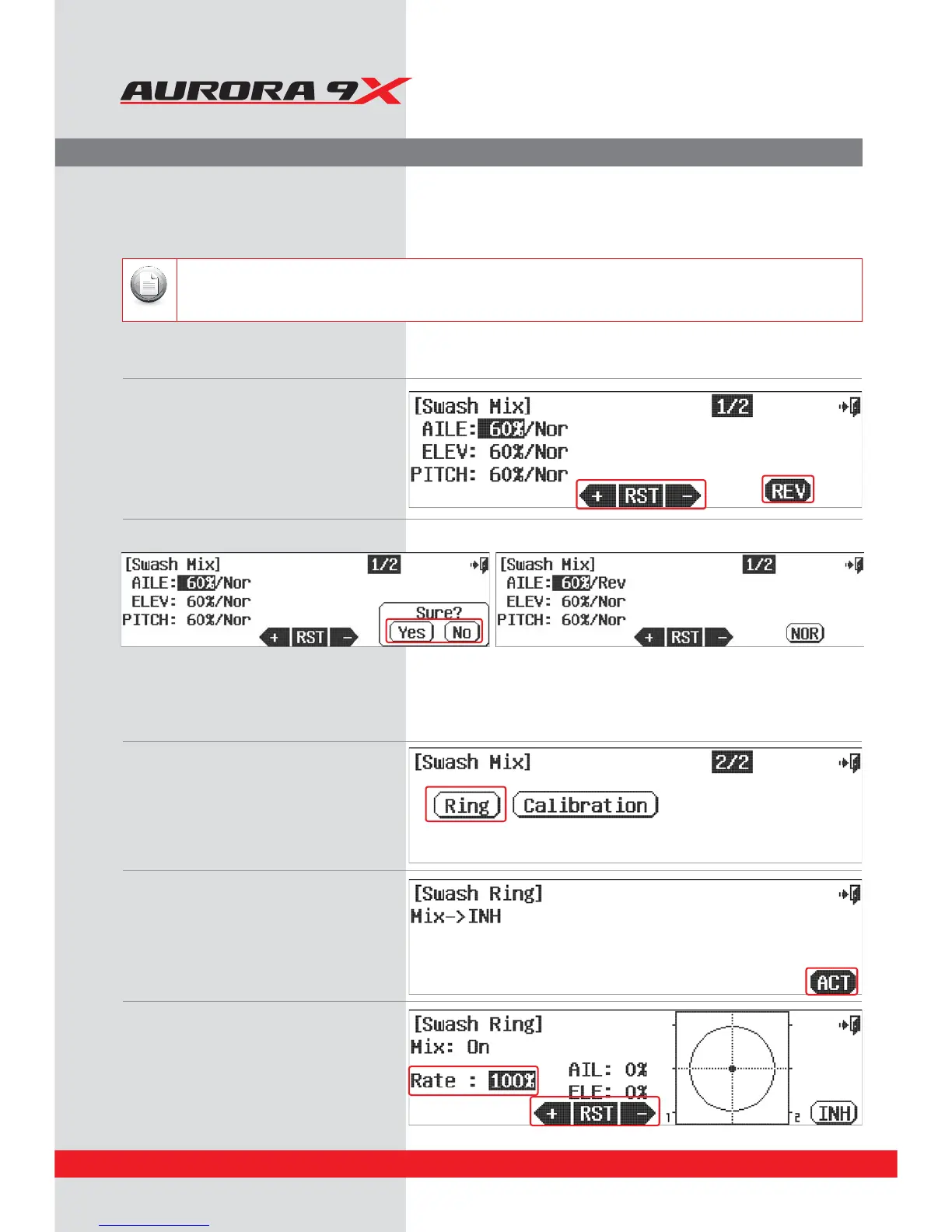
Swash Plate Adjustment Menu.
Use the swash mix feature to apply a ne adjustment to the swash plate travel. For the very best accuracy,
we recommend the use of a swash plate leveling set-up tool.
a. Select SwashMix from the model menu.
b. From this screen we can set a travel rate for
the individual collective servos using the
+RST- icon.
c. We can also reverse the direction of the
collective input wit the REV icon.
d. Are you sure? Press Yes, or No.
* For most users this degree of swash accuracy is appropriate. To further adjust the swash, consult the next menu, Ring and
Calibration.
UGSelect Ring from the Swash Mix 2/2
Our example will show a 120CCPM head format.
Swash Ring menu
The swash ring function is used in order to prevent interference from the swash plate in movement of the aileron and elevator to
master during extreme 3D ight.
f. Press the ACT icon to enter the
swash ring menu screen.
. Increase / Decrease the setting value using the
+ RST - icon.
g. Press the Exit to return to the swash mix menu.
136



 To Next Page