9 CHANNEL 2.4GHz AIRCRAFT COMPUTER RADIO SYSTEM
Hitec 2.4GHz System
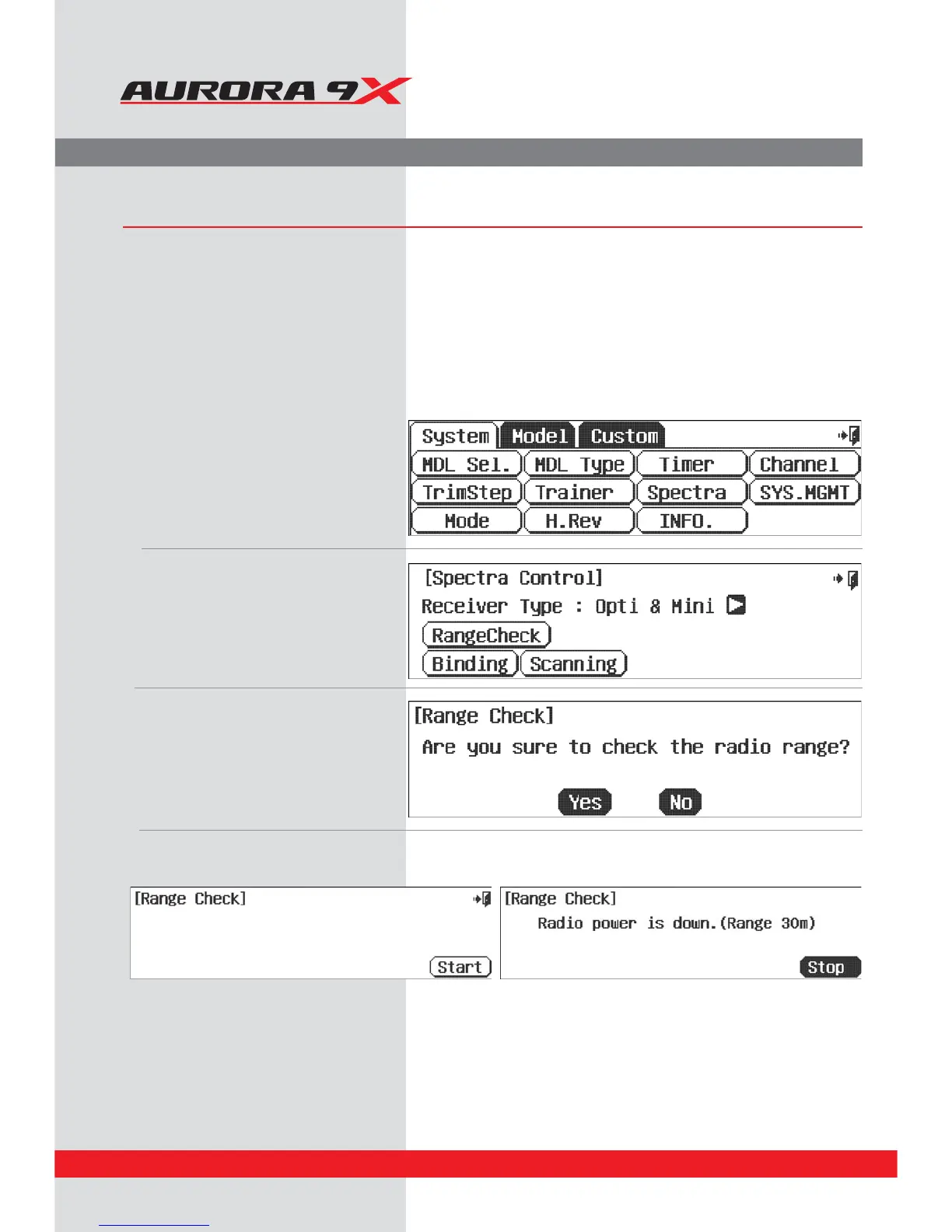
Range Check Function
It is critical that before each ight session you perform a range check that conrms the signal between the receiver and transmitter is
appropriate. Unlike the FM/PPM or PCM signal radios, 2.4GHz systems use a xed shorter, stubby transmitter antenna so the traditional
method of range checking your system by lowering the transmitter antenna will not work.
We instead use a power-down mode to reduce the transmitter signal strength. During this power-down mode, you should walk away
from the secured aircraft carrying the transmitter to a distance of approx. 30 meters, testing the eective range.
a. Note the system menu function choices,
select, Spectra.
b. Press the Range Check icon.
c. Press the “Yes” icon.
d. Press the Start icon and nish Stop.
24



 To Next Page