9 CHANNEL 2.4GHz AIRCRAFT COMPUTER RADIO SYSTEM
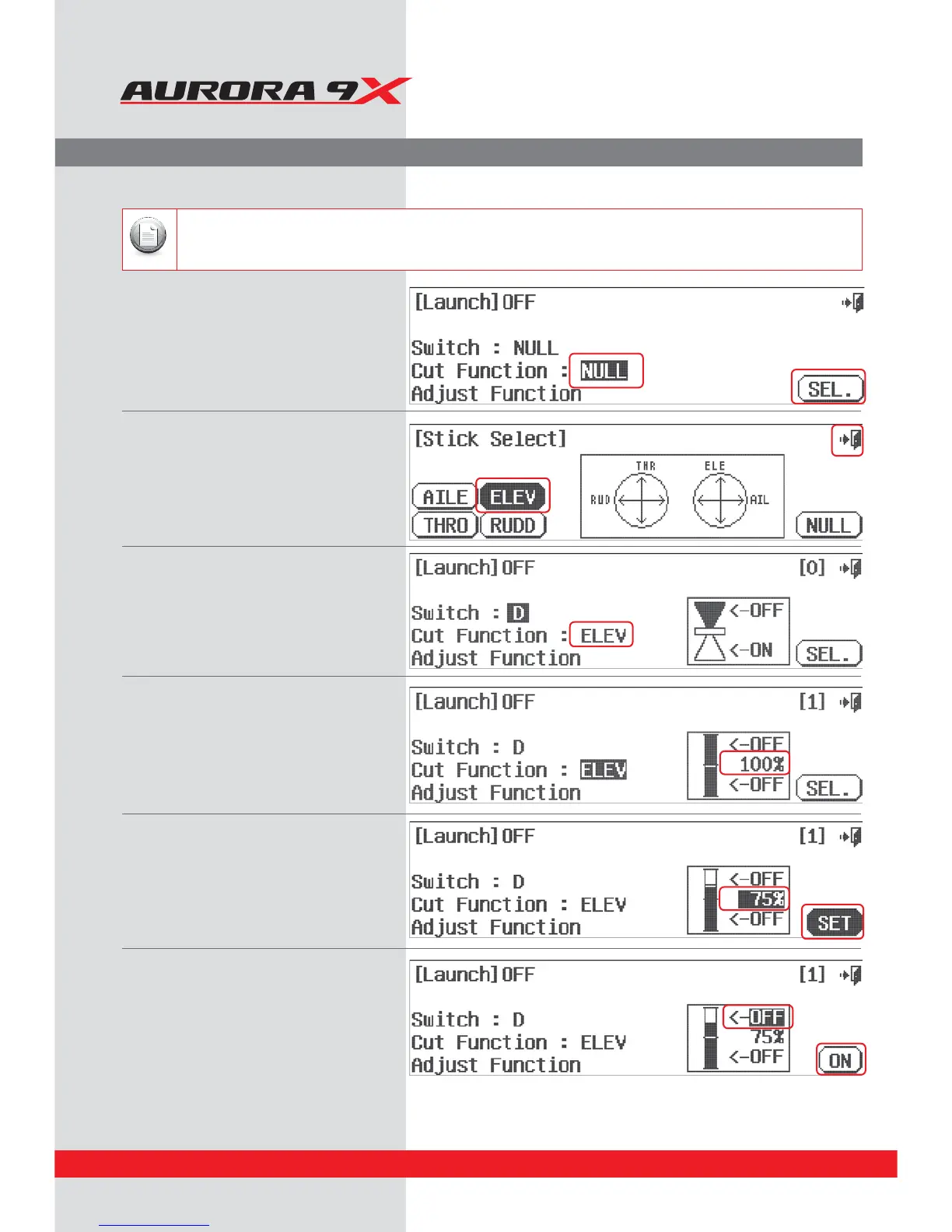
The launch mode features the option to have the cut control be applied to a stick movement.
The result is the ability to select a launch mode by turning it on with your switch. The aps, ailerons and elevator should move to
their pre-programmed launch position for a pedal launch or high start. At the apex of the launch, when the “round-out” process is
started with down elevator input, the launch mix is “cut” or de-activated when the down elevator is applied.
a. At the launch mode switch menu, press the
Cut Function : Null icon.
b. Press SEL.
c. For our example we will place the
Launch cut on the elevator. Press ELEV.
d. Select the Exit and return to the
Launch mode switch menu.
e. Press the Cut Function : ELEV icon.
f. Move the elevator stick up and down.
Note the movement displayed on the bar graph.
g. Press the 100% icon on the bar graph.
h. Move the elevator stick to the cut position.
For our example, move the elevator stick half
way up (away from you as in “down” elevator
input) hold it there and press the set icon.
We are looking for about a 75% value.
i. Press the top OFF icon.
j. Then press the On icon.
The launch function must have a switch assigned to it for the cut function to work.
Note
Launch Cut switch set-up
84



 To Next Page